

A sudden drop in Google Ads conversions can be a big concern, particularly when previous campaigns produced a good number of leads, calls, sales, or other valuable actions.
But a reduction in conversions doesn’t mean that your Google Ads campaigns are no longer working. There can be several reasons, such as changes to the website, landing page issues, etc.
Before adjusting bids or increasing budget,it is essential to identify where the decline is occurring. With the right Google Ads management, identifying the underlying causes can help you fix them. Also, check whether conversions actually drop or Google Ads just stopped tracking them correctly.
Explore common reasons for a sudden drop in Google Ads conversions and check how you can fix those issues.
Key Takeaways
- Check conversion tracking before making major campaign changes.
- Review recent Google Tag Manager, GA4, and website changes.
- Evaluate landing-page speed, mobile usability, and calls to action.
- Consider changes in search demand and user behavior.
- Make sure location targeting matches your actual service area.
- Diagnose the cause before making significant changes to your campaigns.
Reasons That May Be Causing Your Google Ads to Drop
A sudden decline in conversions from your Google Ads can happen for several reasons. Before making major changes to your campaign, review each possible cause to identify where the drop begins.
1. Google Ads Conversion Tracking or Tagging Changed
One of the first aspects to check is whether your conversion tracking is functioning properly. A campaign may still receive clicks without reporting conversions if a tracking tag or event has stopped recording conversions. A detailed Google Ads account audit can be significant here.
Changes in Google Tag Manager (GTM) can impact how Google Ads conversion tags operate. Similarly, changes to GA4 events, conversion settings, website code, form submissions, or thank-you pages can affect this.
How to Fix
1. Check conversion action status :
Go to Goals > Conversions > Summary in your Google Ads account.
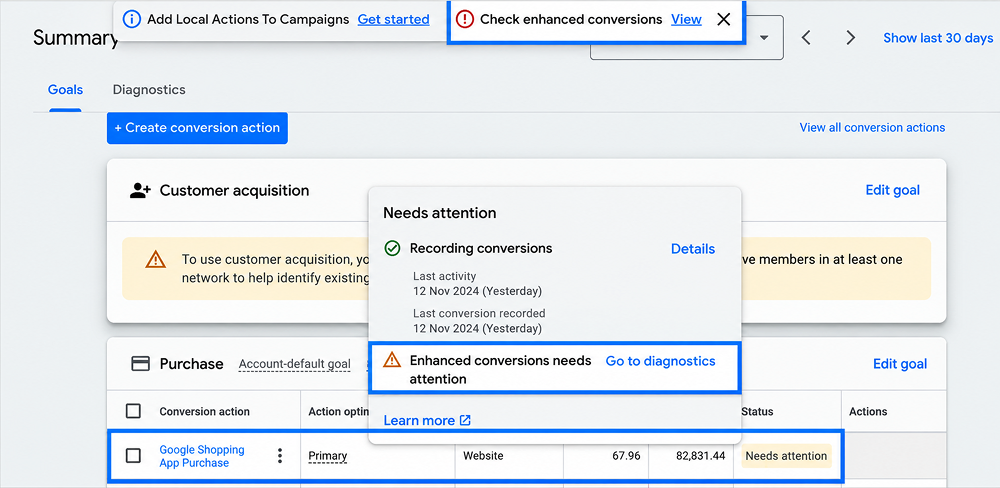
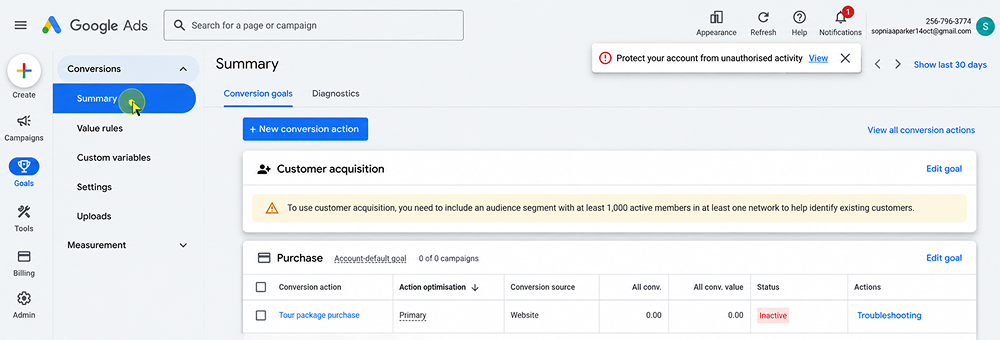
Look for conversion actions marked as Needs attention, Inactive, or Misconfigured.
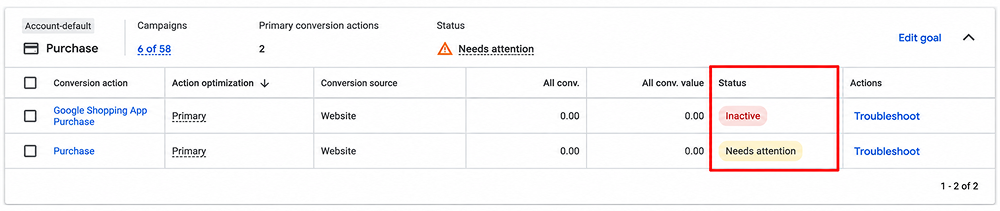
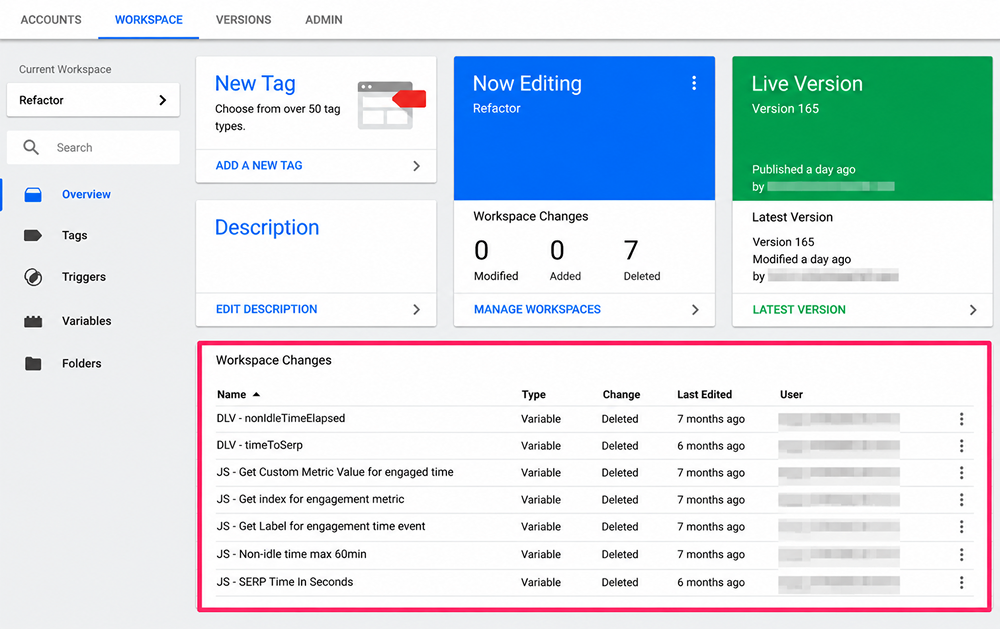
2. Check recent tracking changes.
Check whether you recently updated website code, Google Tag Manager container, Google tag, conversion action, or tracking settings.
Google Tag Manager → Workspace → Changes
3. Verify Google Tag or GTM Installation:
Make sure the Google tag or Google Tag Manager container is installed correctly across the relevant pages of your website.
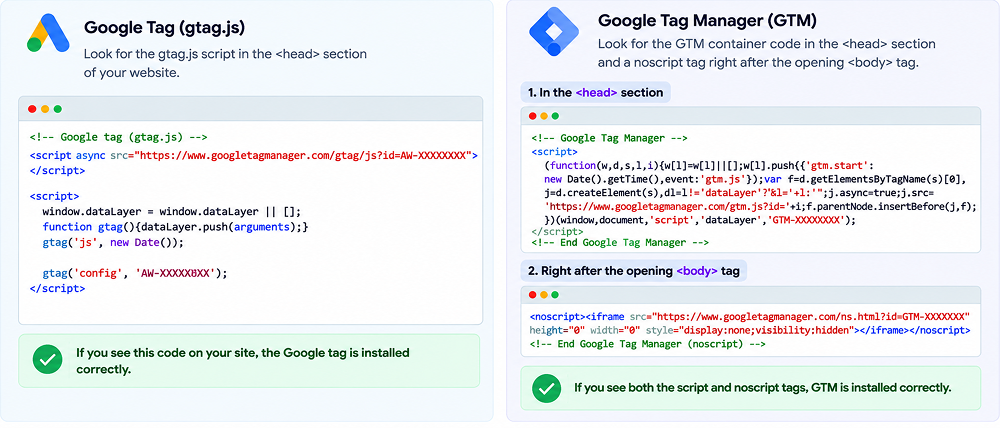
4. Check Conversion Linker:
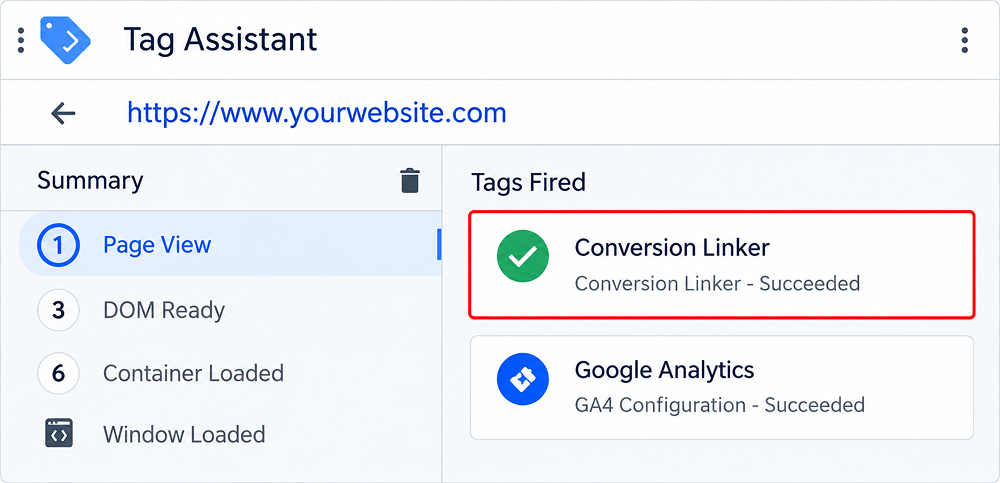
If you use Google Tag Manager, confirm that the Conversion Linker tag is installed and firing correctly. This helps Google Ads connect ad clicks with conversions.
Log in to Google Tag Manager > select the website container > click Tags> Conversion Linker.
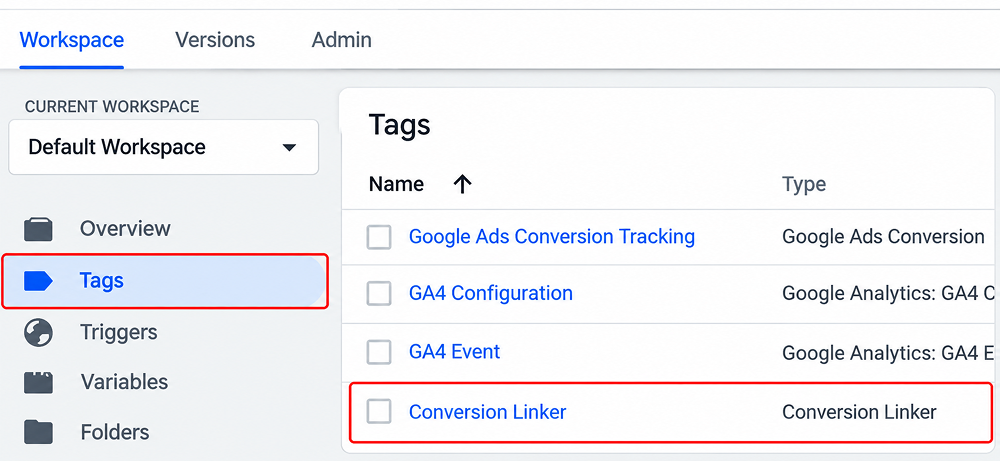
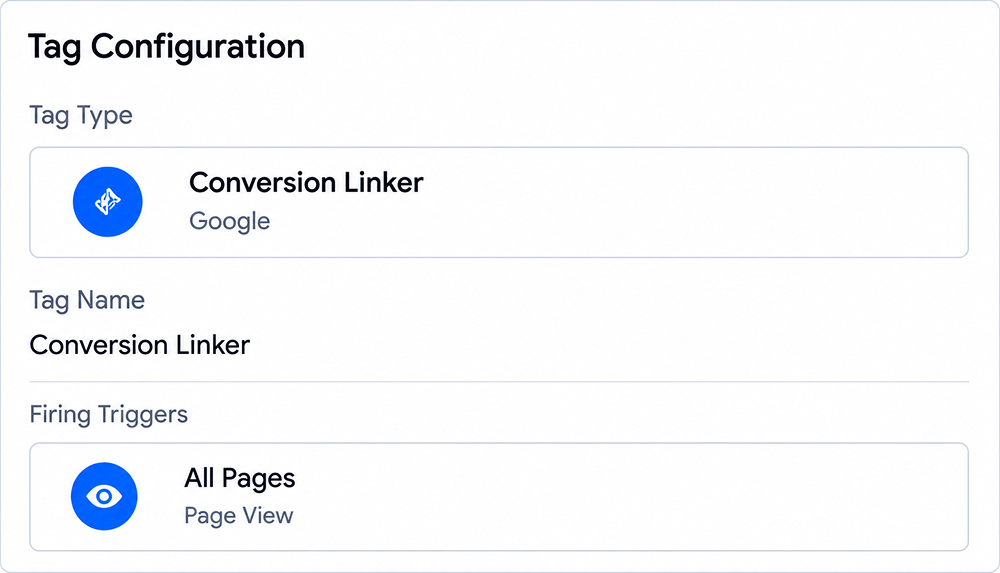
Click on the tag name (Conversion Linker)> then check all details.
The Conversion Linker tag should be set on All pages.
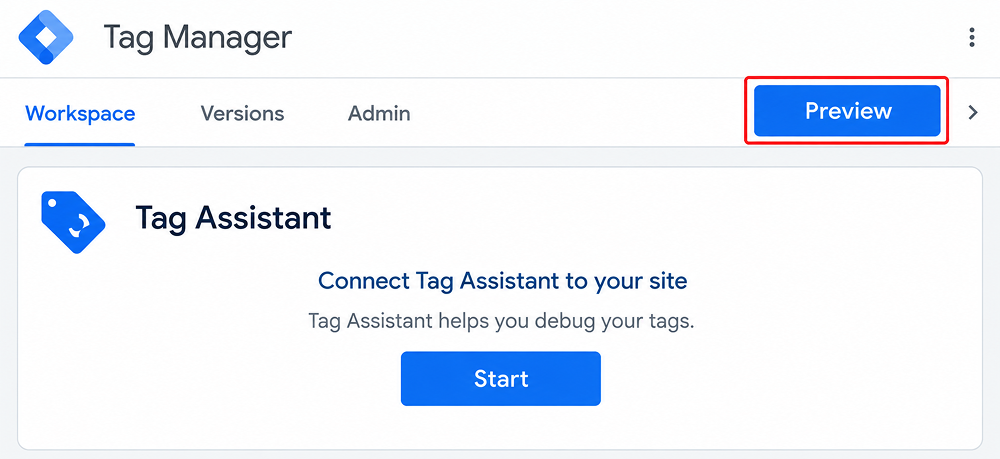
After this, click Preview in GTM and use Tag Assistant. With this, you can check if the tag is firing in real time.
Now check the Tag Assistant pane; you can see the conversion linker listed as firing.
5. Check Auto-Tagging and GCLID:
Go to your Google Ads account settings and confirm that auto-tagging is enabled. Check that GCLID (Google Click Identifier) parameters are being preserved when users move from your ads to your website.
2. Recent Website Changes
Recent changes made to your website can affect the performance of your Google Ads. Changes in navigation, forms, URLs, checkout, buttons, scripts, or content can complicate the steps of conversion.
How to Fix It
1. Check your website update history:
Check your CMS, developer, or deployment history to find changes made around the date conversions started declining. Look for updates to pages, plugins, themes, forms, scripts, or checkout functionality.
2. Test the complete landing page.
Visit your landing page > click on the Get Started button.
Fill in all required information.
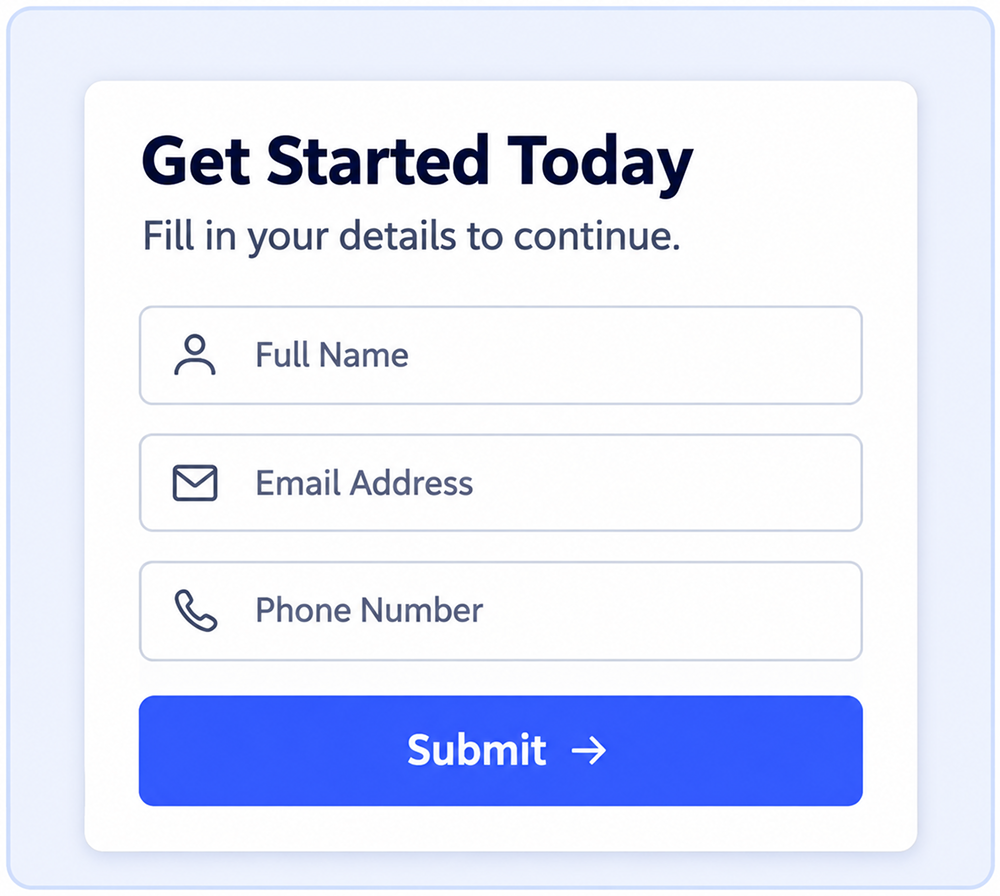
Make sure you receive a confirmation message after completing the form.
3. Check tracking after the website update:
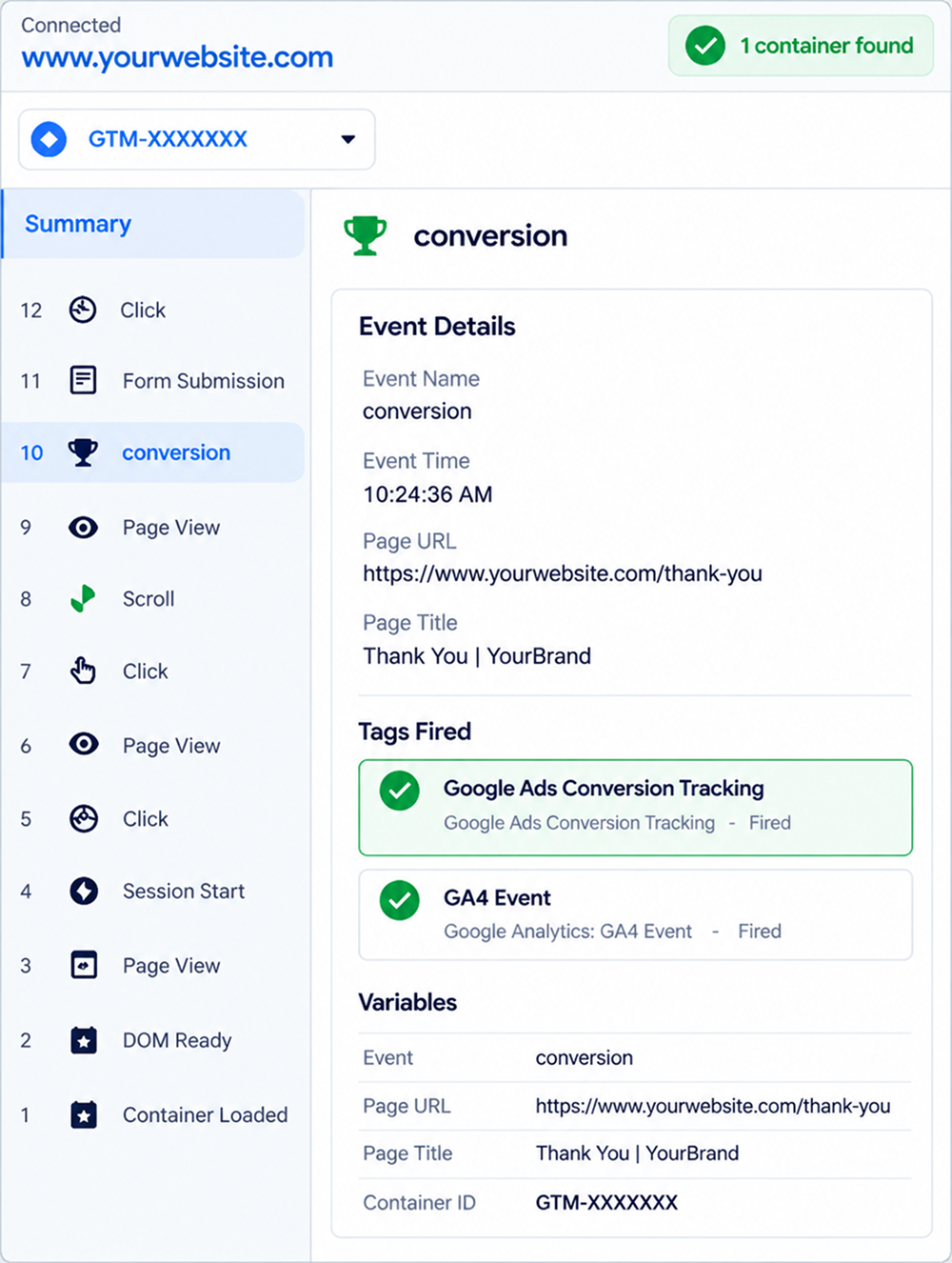
Use Google Tag Manager Preview or Tag Assistant to confirm that the relevant conversion tag fires when the user completes the desired action.
4. Check important URLs:
Confirm that landing pages, form pages, checkout pages, and thank-you pages are loading correctly and returning the expected status.
5. Test on mobile and desktop:
Check that your website should opens on different devices. Open the website on different devices and browsers to identify problems.
6. Compare before and after performance:
Compare conversion, bounce rate, and completed actions before and after the website change. If the decline started immediately after an update, investigate that change first.
3. Landing Page Performance Has Declined
If your landing page is not working properly, it may be slower, harder to use, or less relevant. Then clicks can never turn into conversions.
Slow speeds, poor mobile usability, a confusing interface, and poor communication or call to action may lead to potential customers leaving without completing the desired action.
How to Fix It
1. Check page loading speed:
Use tools such as Google PageSpeed Insights to identify slow-loading elements.
Check whether your content loads within the time limit. For a good user experience, a normal load time is 2.5 seconds or less.
You can also check how quickly the page responds to user interactions ( clicking a button or link). This should be less than 200 milliseconds.
Measure how much elements such as buttons, images, and text jump around as the page loads. Aim for a CLS score under 0.1.
2. Test the mobile experience:
Open the landing page on a smartphone and check whether text is readable, buttons are working, forms work properly, and important information is visible without excessive scrolling.
3. Review the CTA:
Make sure the primary call to action is clear and easy to find. Whether it is Request a Quote, Book a Consultation, or Buy Now, users should understand what happens when they click it.
4. Compare performance before and after changes:
Review conversion rate, engagement, and other relevant metrics before and after the landing-page update to determine whether the change affected performance. Landing page experience can also influence your Google Ads Quality Score.
4. Targeting Too Broad Keywords
Targeting broad keywords can allow your ads to reach a wide number of searches, but it does not mean that all of these searches have strong commercial intent. Because of this, your campaigns can gain clicks from individuals who are exploring, inquiring, or seeking irrelevant information. Your ad copy should also reflect the intent behind the keywords you target.
This is a situation where clicks increase, but conversions continue to decline.
How to Fix It
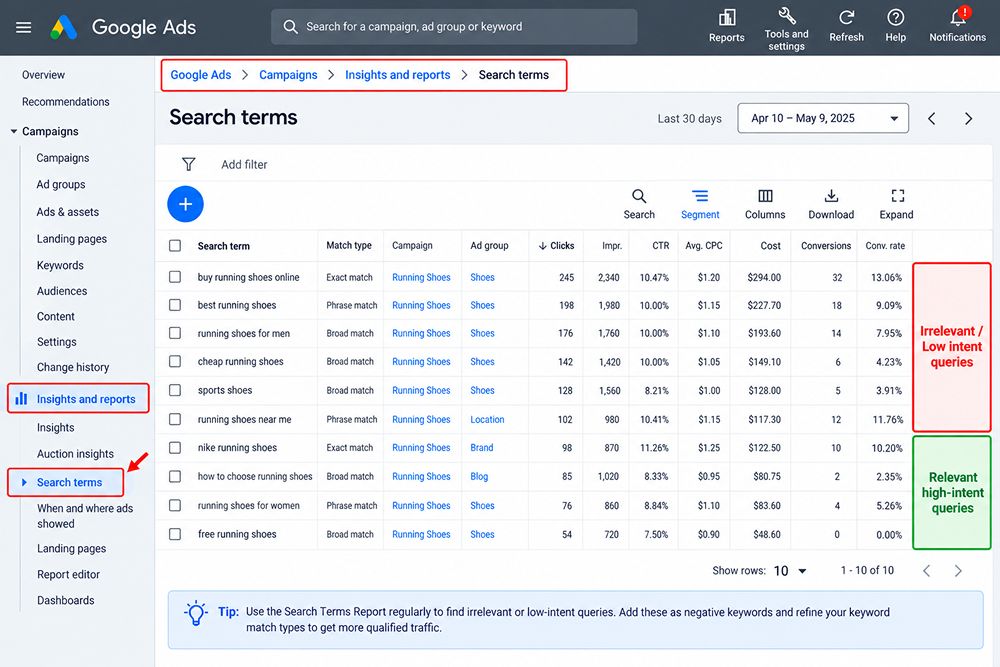
1. Check the Search Terms Report:
Click on Google Ads > Campaigns > Insights and reports > Search terms and identify the actual searches that triggered your ads. Look for irrelevant or low-intent queries.
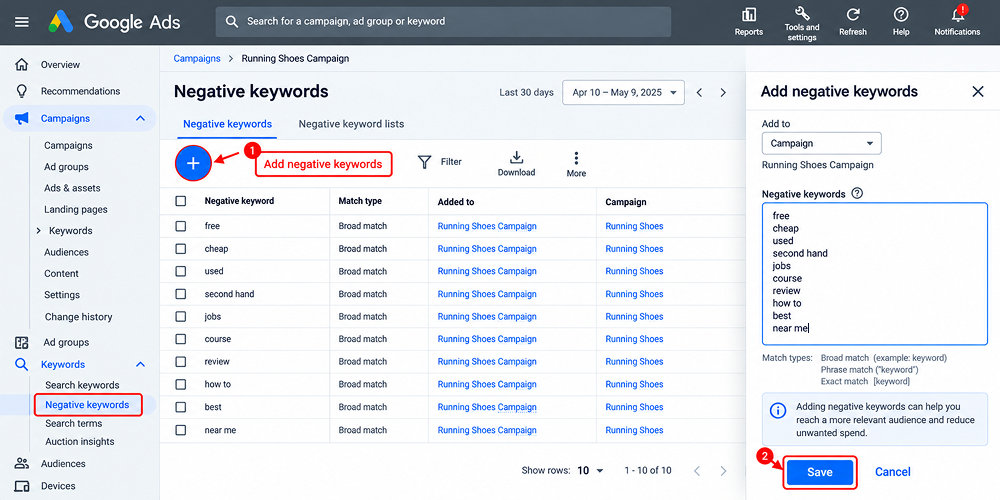
2. Add Negative Keywords:
You can fix this issue by adding irrelevant searches as negative keywords so your ads are less likely to appear for those queries.
3. Separate High- and Low-Intent Keywords:
Group keywords based on search intent so you can evaluate which terms are generating qualified leads or sales.
4. Check Keyword-Level Conversion Data:
Compare clicks, conversion rates, cost, and conversions for individual keywords. Do not judge a keyword only by its click volume.
5. Review Changes Regularly:
Continue checking the Search Terms Report after making adjustments. This helps identify new irrelevant queries and keeps your traffic aligned with your target audience.
5. Fluctuate in search demand
In some cases, conversions are negatively impacted, as fewer individuals search for your offerings. Search demand can change for many reasons, such as seasonality, holidays, changes in customer needs, or trends in various industries.
If overall search volume declines, your campaigns may receive fewer impressions and clicks, resulting in reduced conversions despite having the same conversion rates.
How to Fix It
1. Analyze The Search Volume Trends Over The Period:
Evaluate the performance metrics for your Google Ads for the current period vs. the previous periods by comparing impressions, clicks, and conversions.
2. Consider Seasonality:
Investigate if certain factors like holidays, climatic changes, major events, or seasonal purchases have any impact on the demand for your products. Plan your Google Ads campaign structure accordingly.
3. Check the search terms:
Analyze the search term report to check whether people are using different terms to find your offerings. Based on this, add new keywords.
4. Revise your campaign strategy:
In case demand changes, focus your budget on the most efficient keywords and campaigns instead of increasing your expenditure.
6. Location Targeting Is Too Broad
If your business operates in a specific location, using location-based targeting means your ads are shown to users who are not interested in your offerings. This can reduce conversion rates even when your campaigns continue to generate clicks.
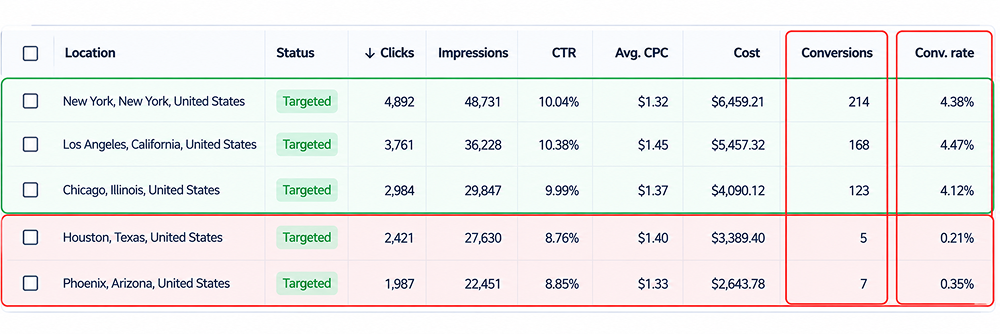
1. Check Conversions by Location
First, check the campaign’s performance by location and compare conversions, conversion rate, clicks, and cost. Identify locations that generate significant clicks or spend but produce few or no conversions.
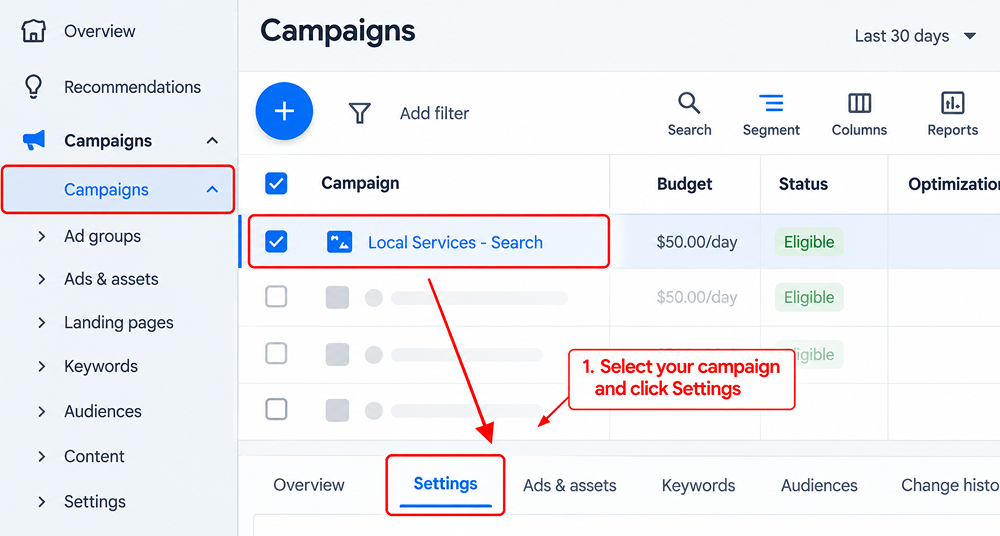
2. Check location settings
Open the relevant Google Ads campaign and click on Settings.
Now, check which countries, states, cities, or areas are currently targeted.
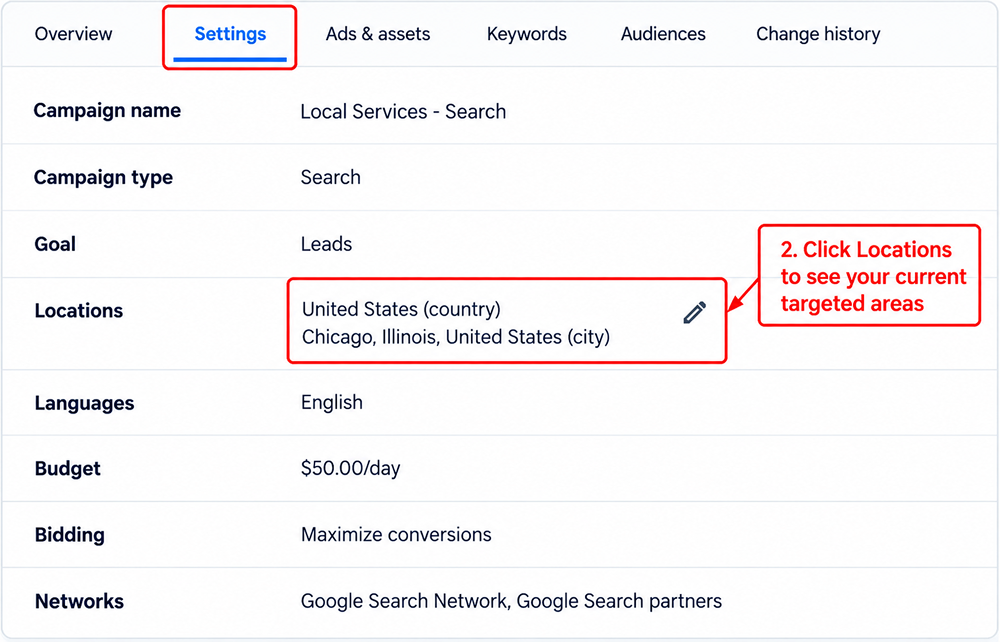
Remove locations that are outside your actual service area and target specific areas where your business can serve customers.
7. Irrelevant Traffic
Getting clicks and impressions but from irrelevant users who are not interested in your business offerings.
This can affect campaign performance, and you may find difficulty evaluating accurate traffic data and conversions.
How to Fix
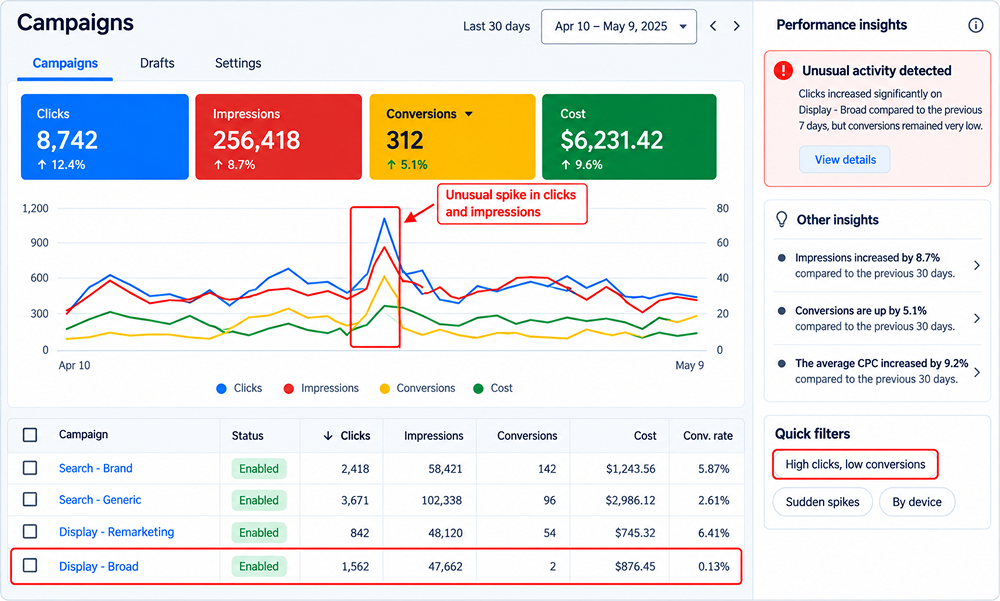
1. Check traffic pattern
Analyze clicks, impressions, conversions, and engagement indicators. Pay more attention to any extraordinary clicks or unexpected actions that differ from normal campaign behavior.
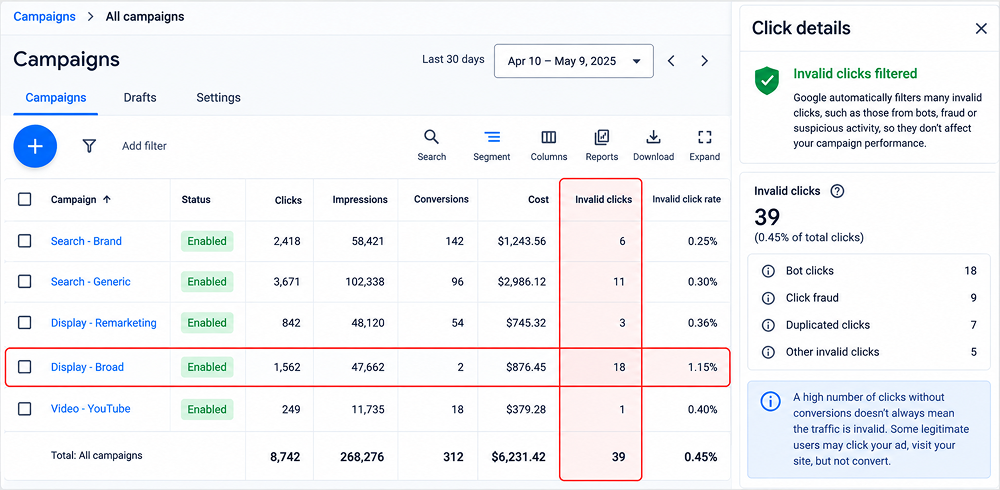
2. Check invalid clicks
Check Google Ads reports regarding invalid clicks or possible signs of bad quality traffic. Google automatically filters out much invalid traffic.
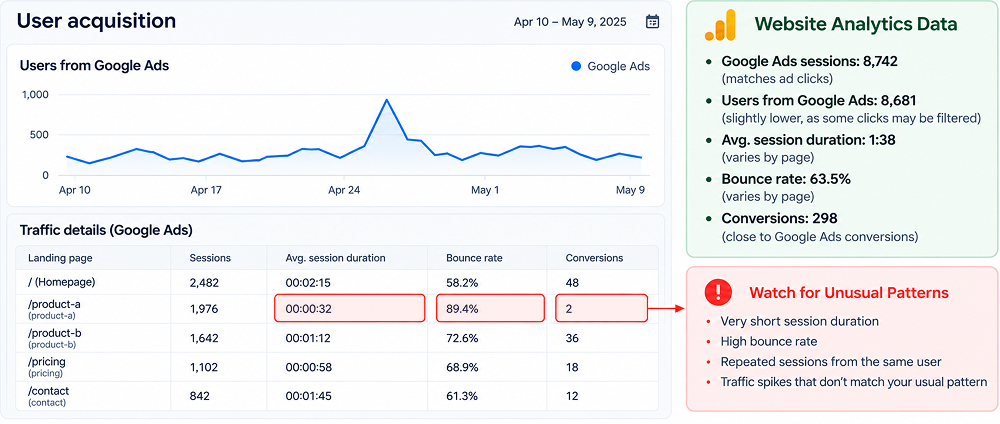
3. Compare Google Ads with website data.
Check analytics or server reports to ensure that the traffic from Google Ads is being properly sent to your site. Check unusually short visits, repeated sessions, or traffic patterns that appear inconsistent with your usual users.
8. AI-Powered Search Is Changing How People Discover Businesses
With the advancement of AI search, users increasingly ask conversational queries and get summarised answers without clicking blue links.
There is a higher possibility that consumers perform more research before clicking on advertisements,s which can change the path from initial discovery to conversion.
It doesn’t impact conversions,s but businesses should consider users’ search behaviour.
How to Fix It
1. Analyze changes in search behaviour.
Do not only check Google Ads performance, but also review organic traffic, search terms, and website engagement. Look for changes in how users search and evaluate your business before converting.
2. Understand Conversational Search Intent
Evaluate conversational queries users are searching for related to your business offerings. This can help you understand what information users may want before they are ready to convert.
3. Strengthen Your Website Content
Provide clear, useful information about your products or services, pricing, features, processes, and frequently asked questions. Helpful content can support users during the research stage.
4. Keep Business Information Consistent
Make sure important information such as services, business details, contact information, and product or service descriptions are accurate and similar across your website and relevant business profiles.
5. Continue Monitoring Conversions
AI-powered search does not automatically mean that your Google Ads conversions will decline. Treat changes in search behavior as a factor to monitor rather than assuming AI is the cause of a conversion drop.
For More Information, read out blog: How To Optimize Google Ads For AI Overviews
Conclusion
Your Google Ads conversions can drop due to many reasons such as recent website changes, landing-page performance, keyword relevance, search demand, location targeting, and traffic quality. The growth of AI-powered search also changes the way people search for your business.
Instead of immediately changing your budget or rebuilding campaigns, focus on a structured approach. Confirm that tracking works, analyze where the decline occurs, identify the cause, and then make targeted changes. Make decisions based on performance data.
Frequently Asked Questions
1. How much does it cost to run Google Ads?
There is no fixed cost for running ads. It depends on various factors such as keyword competition, industry, location, bidding strategy, and campaign goals.
Understanding expected Google Ads cost can help you understand whether changes in clicks, CPC, or conversions are affecting campaign performance.
2. How long does it take for a Google Ads conversion drop to recover?
The recovery time depends on the cause of decline. A Google Ads conversion drop typically takes 2 to 4 weeks to fully recover after you fix the campaign issue.
3. Can a change in Google Ads bidding strategy affect conversions?
Yes. Changing a bidding strategy can influence how Google prioritizes and bids for available traffic. After making a significant bidding change, monitor impressions, clicks, cost, conversion rate, and conversion volume to determine how campaign performance is responding.
4. Should I pause my Google Ads campaigns when conversions suddenly drop?
No, Pausing campaigns immediately can remove useful traffic and make it harder to understand what caused the decline.
5. What should I check first when Google Ads performance suddenly changes?
First, check Google Ads Change History to see if any recent setting, bid, budget, or conversion tracking modifications caused the performance shift.