
Quick Answer: PPC negative keywords prevent your ads from appearing for searches that are irrelevant to your business, helping reduce wasted ad spend. The safest approach is to review actual search queries, evaluate their intent, and add negative keywords using the narrowest match type needed to exclude unwanted traffic without blocking relevant searches.
Most Google Ads accounts waste nearly one-fourth of their budget on irrelevant clicks. These searches generally come from job seekers, customers looking for free solutions, or people searching for something you don’t offer. They just drain your budget without producing any results.
The fix isn’t more keywords or fancier automation; it’s negative keywords. Adding negative keywords is the fastest way to stop this waste, but it is important to use them carefully. If you add them too broadly, you risk blocking relevant searches. If you ignore them, you keep paying for irrelevant searches.
The key is to understand what to exclude, when to exclude, and how narrowly you can apply the exclusion. In this guide, you will learn a practical process for finding negative keywords, choosing the right match types, and reducing wasted PPC spend without affecting the high-intent traffic, protecting both your budget and results.
Key Takeaways
- Negative keywords can reduce wasted PPC spend by preventing ads from showing up for searches irrelevant to your offerings or services.
- The Search Term Report is often the best starting point for finding negative keywords because it shows the actual searches triggering your ads.
- Don't add every non-converting search as a negative. Consider intent, spend, CPA, conversion lag, and whether the search could still bring a valuable customer.
- Look for recurring patterns such as jobs, careers, free, DIY, templates, or irrelevant products and locations instead of treating every search as an isolated problem.
- Use the narrowest negative match type that solves the problem. Exact negatives provide more control, while phrase and broad negatives require greater caution.
- Apply negatives at the right level: shared lists for universal waste, campaign-level for intent that differs by campaign, and ad group-level only for very specific exclusions.
- Review your Search Terms report weekly. A simple 15–30 minute routine is enough to keep wasted spend under control.
- Avoid common mistakes like adding broad negatives too early, never revisiting old lists, or applying the same negatives to every campaign.
- Use negative keywords carefully. The goal is to remove wasted clicks cautiously, without blocking searches that could bring you good leads.

What Are Negative Keywords (and Why They Matter)
Negative keywords are the words or phrases you tell Google (or other ad platforms) not to show your ads for. While target keywords help you reach people searching for your products or services, negative keywords help you filter out searches that are unlikely to become customers. They help you spend your budget on keywords that have a real conversion potential.
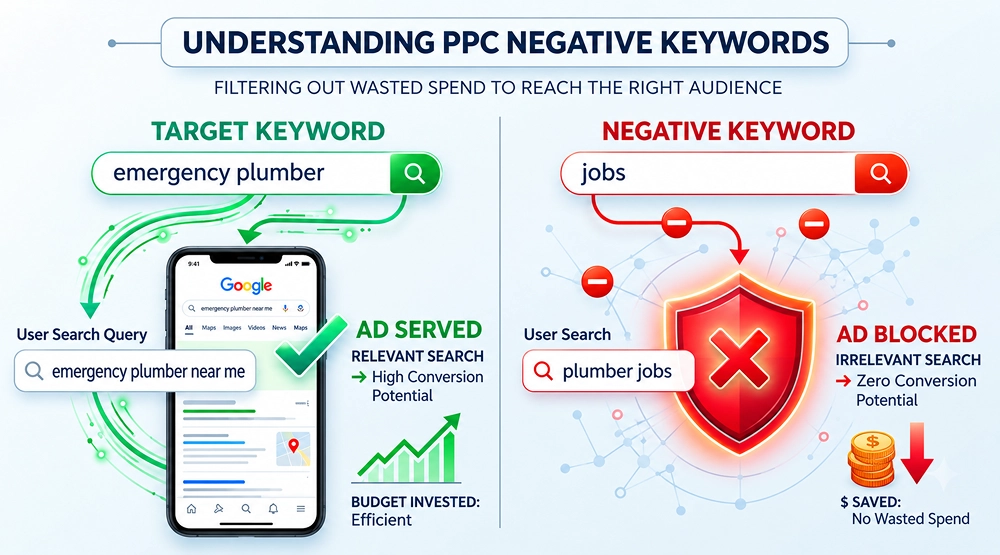
Without negative keywords, your ads can appear for searches that look related but have no real buying intent. For instance:
- Your target keyword is “emergency plumber”. So, you wish to appear in searches when someone is seeking emergency plumbing services.
- But a search for “plumber jobs” certainly has a completely different intent. The user is seeking employment.
- Hence, adding “jobs” as a negative keyword can help prevent your ad from appearing in irrelevant searches.
Here’s a simple way to understand the difference:
Keyword Type |
Purpose |
Example |
|---|---|---|
| Target keyword | Tells Google what searches you want to reach | emergency plumber |
| Negative keyword | Tells Google which searches you don't want | plumber jobs |
| Search query | The actual phrase a user searches | emergency plumber near me |
Why Are Negative Keywords Important?
Without negative keywords, your ads may attract clicks from users without any purchase intent. The clicks not only consume your budget but also lower the quality of your traffic, making it difficult for you to reach customers with genuine buying intent.
An effective PPC management strategy that includes a well-executed and managed negative keyword strategy can help you:
- Reduce wasted spend on irrelevant clicks
- Improve click-through rate (CTR) and Google Ads Quality Score
- Give Smart Bidding cleaner conversion data
- Lower cost-per-acquisition (CPA) and improve ROAS
- Free up budget for high-intent traffic
Negative keywords help you stop paying for the wrong traffic so you can invest more in the right traffic. The primary goal is to filter out or block wrong traffic and keep searches that have the potential for conversion. Hence, reviewing and understanding search intent before adding negative keywords is crucial.
Step-by-Step: Finding Negative Keywords Without Killing Good Traffic
Finding negative keywords is not about removing all the searches that never converted. It’s about reviewing the actual search queries that triggered your ads. The review process can help you find irrelevant terms with no potential to convert while protecting searches that could still become valuable customers.
Here’s a repeatable workflow you can use inside Google Ads to find negative keywords:
Step |
Action |
Where in Google Ads |
Filters / Settings |
Goal |
|---|---|---|---|---|
| 1 | Open Search Terms report | Campaigns → Insights and reports → Search terms | Last 7–30 days | See real queries triggering ads |
| 2 | Sort by cost or clicks | Same report | Sort: Cost (desc) or Clicks (desc) | Find biggest budget offenders first |
| 3 | Filter for waste | Same report | Clicks ≥ 3, Conversions = 0, Cost > $10 (or > 5× avg CPC) | Surface clear non-converting queries |
| 4 | Scan for intent mismatches | Same report | No filter; manual review | Catch high-CPA or wrong-intent queries with 1–2 conversions |
| 5 | Group patterns | Spreadsheet/doc | Group by “jobs”, “free”, “DIY”, etc. | Prepare shared lists and campaign-level negatives |
| 6 | Add negatives | Keywords → Negative keywords | Choose level: shared, campaign, ad group | Block waste at the right scale |
Pull the Right Data
- Start with the search term report for the last 7 to 30 days.
- Sort the report by cost or clicks so the most expensive or high-volume queries appear at the top.
- This shows you exactly what people are searching for when your ads appear and helps you make smarter negative keyword decisions.
Filter for Waste, Not Just Zero Conversions
Don’t simply look for queries with zero conversions and make them negative keywords. Rather, prioritize searches that combine signs like:
- Multiple clicks with no conversions
- Meaningful spend relative to your average CPC or target CPA
- High CPA compared with your campaign target
- Clearly irrelevant intent
- Searches for products, services, locations, or offers you don't provide
A practical starting filter can be:
- Clicks ≥ 3
- Conversions = 0
- Cost above a meaningful threshold (for example, more than $10 or more than 5× your average CPC)
Also look for queries with one or two conversions but very high cost per acquisition. If they consistently underperform your target CPA, they may still be wasting spend. The key is to use performance data to find possible keywords, then use search intent to make a final decision.
Look for Patterns, Not One-Offs
- Don’t treat every irrelevant query as an isolated case. Look for recurring words and themes such as “jobs,” “free,” “DIY,” “how to,” “template,” “course,” or “salary.”
- Group similar terms in a spreadsheet or doc by pattern (e.g., all “jobs” queries together, all “free” queries together).
- Use these groups to build shared negative lists and campaign-level negatives instead of adding ad-hoc terms one by one.
This approach is far more efficient than adding one-off negatives and reduces the chance of missing related variations. By following this process regularly, you can systematically remove wasted spend while keeping high-intent traffic intact, especially when this process is paired with strong PPC keyword research.
Which Search Queries Should You Add as Negative Keywords?
Even a well-structured ad campaign can leak budget if the ad shows up for the wrong searches. Some queries may contain your target keyword but still carry the wrong intent. Most wasted ad spend falls into the three clear categories below that you can add as negative keywords. Understanding the pattern of these queries can help you block the junk and maintain a good traffic flow.
Query Type |
Typical Triggers |
Example Queries |
Why It’s Waste for Most Offers |
|---|---|---|---|
| Wrong-intent | jobs, careers, education | “plumber jobs”, “SEO course”, “digital marketing salary” | User wants work or training, not your service/product |
| Wrong-offer | free, cheap, DIY, templates | “free CRM”, “cheap emergency plumber”, “SEO template download” | User wants something you don’t (or shouldn’t) provide |
| Wrong-product/service | competitor names, unrelated industries, wrong locations | “Salesforce alternative” (if you don’t support migrations), “plumber in Texas” (if you only serve California) | Your offer can’t satisfy their need |
Wrong-Intent Queries
- These are searches from people seeking jobs, education, or career information, instead of products and services you offer. The common triggers include jobs, careers, salary, resume, internship, course, and certification.
- For example, someone searching for “emergency plumber jobs” is mostly looking for employment instead of plumbing services.
Wrong-Offer Queries
- These users are generally searching for a different type of solution other than what you offer. Typical triggers include free, cheap, discount, template, DIY, tutorial, open source, and cracked.
- For example, users searching for “free CRM software” or “DIY website builder” are not looking to avail the paid service you offer.
Wrong-product/service queries
- These are searches from users outside your service area or for products/services you don’t offer.
- For instance, you serve only in California, but your ads are appearing even when someone is searching “plumber in Texas”. This is a pure waste of your budget, as Texas is outside your operational area.
Even searches that look relevant on the surface can fall into one of these categories. The key is to identify the underlying intent and block the patterns that consistently fail to convert.
How to Choose the Right Negative Match Type
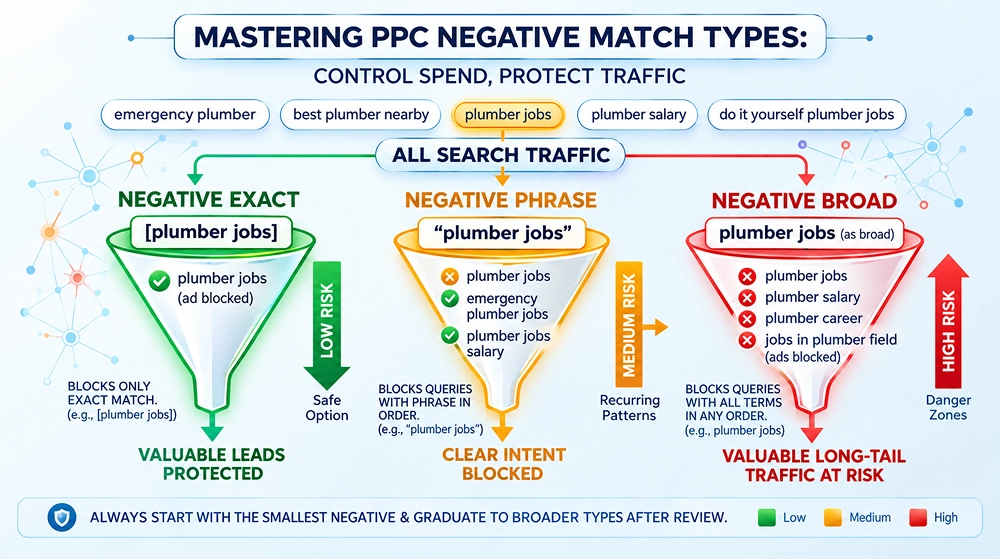
Choosing the right match type is as critical as identifying searches you wish to exclude. Picking the right negative match type is key to keeping your good traffic safe. If you choose the wrong one, you might accidentally block searches that could bring in valuable leads. The goal is to block waste while protecting relevant queries.
Match Type |
Syntax Example |
What It Blocks |
When to Use |
Risk of Over-Blocking |
|---|---|---|---|---|
| Exact negative | [plumber jobs] | Only the exact query “plumber jobs” | You’re 100% sure this query is a waste | Low |
| Phrase negative | "plumber jobs" | Queries containing “plumber jobs” (e.g., “emergency plumber jobs”) | Clear intent patterns like “[service] jobs”, “free [service]” | Medium |
| Broad negative | `plumber jobs` (as broad) | Queries related to both terms in any order | Very obvious, high-volume waste patterns | High |
Here’s a quick breakdown:
Exact negative
- These are the safest options, as they are for specific queries you’re sure are waste.
- You can use exact match when you are confident that the particular term doesn’t relate to your offerings at all.
- For example: Adding [plumber jobs] will only stop the exact search “plumber jobs.”
Phrase negative
- These cover multiple variations of your exact negative keywords.
- You can use phrase negative keywords for recurring patterns you have seen in your search term report.
- This is ideal for clear intent patterns such as “free [service]” or “[service] jobs.”
- For example: Adding "plumber jobs" will also block “emergency plumber jobs” and “plumber jobs near me.”
Broad negative
- They block searches that contain the words in any order. Because of this wider reach, they generally carry the highest risk of over-blocking valuable long-tail traffic.
- You should use broad negatives only for very obvious, high-volume waste categories once you have confirmed the pattern.
- For instance: Adding plumber jobs as a broad negative can block a wider range of related queries, some of which may still be relevant.
Always start with the smallest negative that solves the problem. Begin with exact match, move to phrase match when a clear pattern appears, and use broad match only when necessary and after careful review.
Where Should You Add Negative Keywords in Google Ads?
Once you have decided which query to block, the next step is to choose the right place to add it. Where you add negative keywords matters as much as which search term you choose. Adding a negative keyword in the wrong place may accidentally kill good traffic in other parts of the account.
The table below shows negative keyword levels at a glance:
Level |
Best For |
Example Use Case |
|---|---|---|
| Shared List | Universal waste (jobs, free, DIY) | Apply across multiple campaigns |
| Campaign Level | Intent is wrong for that campaign only | Exclude “free” from premium campaigns |
| Ad Group Level | Very specific exclusions | Exclude a term for only one product |
Shared Negative Lists
- You can use shared negative lists for universal themes that are almost never relevant across your account.
- Common examples include jobs, free, DIY, how to, competitors you don’t want to bid on, and locations outside your service area.
- It saves you from adding the same negative keywords individually to each campaign.
Campaign-Level Negatives
- You can add negatives at the campaign level when the intent is wrong for that specific campaign but may still be relevant elsewhere.
- For example, you might exclude “free” from a high-ticket or premium campaign while allowing it in a lower-priced or trial-focused campaign.
- This can give you more control without over-restricting the entire account.
They are usable, but they don’t test different customer motivations. Someone with severe tooth pain may want a same-day appointment, while someone considering cosmetic treatment may care more about experience, results, or financing.
That’s where a better prompt helps.
Ad Group-Level Negatives
- You can use ad group-level negatives for very specific exclusions tied to a single offer, product, or landing page.
- These should be used sparingly because managing too many ad-group negatives can become difficult as your account grows.
Choosing the right level helps you block irrelevant traffic efficiently while keeping your campaigns flexible and scalable.
How to Safely Add and Test Negative Keywords
Negative keywords can help you protect your budget, but if they are implemented too aggressively, you might risk losing valuable traffic. If you are worried about accidentally blocking good traffic, you can use a controlled testing setup instead of adding keywords directly to your main campaign. This lets you explore new traffic while protecting your main campaign.
Here’s a step-by-step testing workflow:
1. Create a dedicated test campaign
- Duplicate your best campaign into a small, separate campaign.
- You can name it something clear like “Query Expansion Test” so you know this is experimental.
2. Run broad match with strict controls
- Add broad match versions of your proven keywords into the test campaign.
- Keep CPC low and set a small daily budget.
3. Monitor search terms closely
- Check the search term report daily while the test is running.
- Look for clear waste patterns and add negatives in controlled batches.
- Choose ad group or campaign level depending on how specific the waste is.
4. Document every change
- Record what you added, where you applied it, and why. Keep a simple log of the negatives you add, the date, and the match type used.
- This helps your team track the impact on CPA, ROAS, conversion volume, and overall traffic quality.
- In case performance drops, you can quickly identify and reverse any overly aggressive exclusions.
This testing workflow gives you a safe way to discover new opportunities while minimizing the risk of blocking good traffic or draining budget on irrelevant searches
Common Mistakes That Block Good Traffic
Negative keywords are helpful, but they can also hurt performance when used carelessly. Even a well-designed negative keyword list can affect campaign performance if the exclusions are too broad, too specific, or applied without considering campaign intent. This is one of the common PPC budget mistakes many advertisers make.
Here are the most common mistakes and how to avoid them:
Mistake |
Why It’s Harmful |
Better Approach |
|---|---|---|
| Adding broad negatives too early | Blocks good long-tail traffic | Start with exact match |
| Using overly long negatives | Misses variations or over-blocks | Keep negatives short and focused |
| Never reviewing old negatives | May block newly relevant queries | Do quarterly audits |
| Same list for every campaign | Ignores different campaign intents | Use shared + campaign-specific lists |
Negative Keyword Maintenance: How Often Should You Review Your List?
Negative keywords are not a one-time task. Search behavior changes, new irrelevant queries appear, and your offers generally evolve over time. Without regular maintenance, old negatives may start blocking valuable traffic.
A simple weekly routine is usually enough to keep your lists clean and effective, and it plays a useful role in ongoing PPC budget planning. Here’s a practical 15–30 minute sprint you can follow:
Step |
Task |
Time Needed |
Notes |
|---|---|---|---|
| 1 | Open Search Terms report (last 7–14 days) | 2 min | Sort by Cost |
| 2 | Filter: Clicks ≥ 3 + Conversions = 0 | 3 min | Focus on high cost |
| 3 | Identify patterns (jobs, free, DIY, etc.) | 5–8 min | Group similar terms |
| 4 | Add negatives at the right level | 5 min | Prefer Exact → Phrase |
| 5 | Log changes | 2 min | Track impact later |
Frequently Asked Questions
1. What are negative keywords in Google Ads?
Negative keywords are words or phrases you add to a PPC campaign to prevent your ads from showing for searches that are irrelevant to your business. They can help reduce wasted ad spend and exclude irrelevant searches like “jobs,” “free,” or “DIY,” so you don’t have to pay for clicks that are not likely to convert.
2. How do I find negative keywords in Google Ads?
You can use the Search Terms report to review the actual queries that triggered your ads. Look for irrelevant intent, high-cost searches with no conversions, recurring patterns such as “jobs” or “free,” and searches for products, services, or locations you don’t offer.
3. Which negative keyword match type should I use?
Use the narrowest match type that solves the problem. Exact negatives are often useful for specific unwanted queries, and phrase negatives work well for recurring phrases. Broad negatives should generally be used more cautiously because they may risk over-blocking valuable long-tail keywords.
4. Can negative keywords improve PPC performance?
Yes. By removing irrelevant searches, negative keywords help reduce wasted clicks and improve the quality of traffic reaching your ads. They help you allocate more of your budget toward searches that are relevant to your products or services.
5. Should I add every search with zero conversions as a negative keyword?
No. A zero-conversion search doesn’t automatically mean an irrelevant query. If the query is closely related to your offer, it may simply need more data before you can make a decision. You should consider clicks, spend, conversion lag, CPA, and intent before excluding it.
6. How often should I review and add negative keywords?
For new or high-spend campaigns, you can review the Search Terms report weekly (or even daily at first). Once the account is more stable, a weekly 15–30 minute review is usually enough. However, do a deeper audit every quarter.
7. How many negative keywords should I add at once?
There isn’t a fixed number of negative keywords to be added at once. The key is to focus on high-impact exclusions and check out your search term report once before adding. A good practical approach can be adding 5 to 20 highly relevant negative keywords at a time. The goal is not to add so many of them; it is to remove wasted traffic without blocking searches that have the potential to convert.
Conclusion
Negative keywords are one of the most effective ways to reduce ad budget wastage, but they should be added carefully. When implemented correctly, they can lower wasted spend, improve CPA, and ROAS.
Start by reviewing your Search Terms report, identifying clear intent mismatches and recurring sources of waste, and applying negatives at the right level. If you apply them properly and review your list regularly, you are likely to cut wasted spend and maintain a consistent flow of valuable traffic. Prefer to have experts handle this for you? Learn more about our PPC services and how we help businesses reduce wasted ad spend.

Ami Singh is a highly skilled AdWords PPC Specialist, known for creating profitable Google Ads strategies that elevate brands. With deep expertise in Google Search, Display, Shopping, YouTube Ads, and advanced bidding techniques, Ami consistently converts data into performance-driven results.
With a sharp analytical mind and a strong understanding of online consumer behavior, Ami designs campaigns that maximize ROI, boost quality scores, and reduce acquisition costs. His approach blends technical expertise with strategic thinking—making him a go-to expert for businesses aiming to dominate Google Ads.
Ami doesn’t just adapt to the fast-changing PPC industry, but he also stays ahead of the curve by testing new features, adopting automation smartly, and refining what works. Clients trust him for his transparency, insights, and ability to scale campaigns sustainably.
Looking to take your Google AdWords performance to the next level? Connect with Ami Singh at Adwordsppcexpert and discover how he can help you get the maximum growth through powerful PPC strategies.