
Anyone who’s ever created a Google Ads account with multiple campaigns, hundreds of ad groups, and confusing names will understand how quickly it can get out of hand.
A lot of advertisers feel that the structure of a campaign is not that significant. They believe they can always optimize later. In fact, your campaign structure is the backbone of your entire Google Ads campaign strategy. A disorganized account is hard to optimize, will burn up budget, and will restrict growth.
A very structured account provides you more control, cleaner data, and a much smoother route to scaling.
No matter which type of ads you are running for a small local business or a larger SaaS company, a properly structured campaign will save you time and budget, and help you perform better.
Let’s dive into how Google Ads campaigns work, how to structure them for long-term growth, common pitfalls to avoid, and best practices of seasoned PPC professionals.
Key Takeaways
- Structure your account in the order: Account -> Campaign -> Ad Group -> Keywords -> Ads.
- Run campaigns for business objectives, products, places, or budget, but not lists of keywords.
- Group highly similar keywords in the same Ad Group to improve relevance and Quality Score.
- When possible, separate out branded, non-branded, competitor, and remarketing campaigns.
- Use clear naming conventions so it is easy to understand your account at a glance.
- Grow your account rather than start new campaigns each time you launch a campaign.
- Optimization, reporting, budgeting, and scaling are easier when the campaign structure is clean.
What is Google Ads Structure?
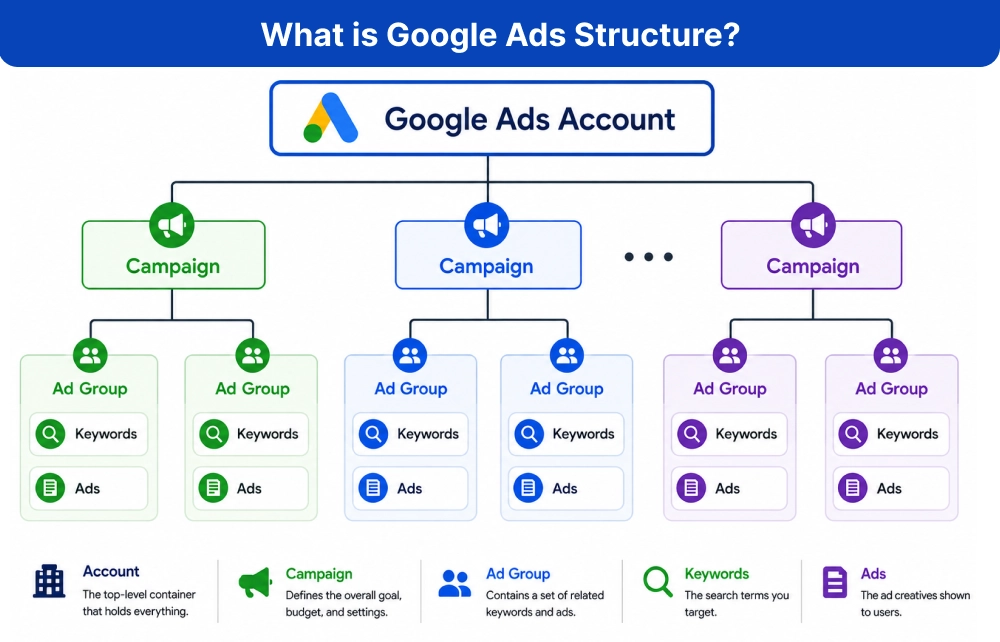
It refers to how your Google Ads account is organized. Think of it like you organize files on your computer. Instead of saving every file in one folder, you create folders and subfolders to keep everything easy to find. Google Ads works in the same way.
Your account has different levels, and each level controls different settings.
Each level has a specific purpose.
Level |
Purpose |
|---|---|
| Account | Manages overall billing, user access, and account settings |
| Campaign | Defines budget, targeting, bidding strategy, locations, and networks |
| Ad Group | Organizes related keywords and ads around a common theme |
| Keywords | Search terms you want your ads to target |
| Ads | The advertisements that users see in search results or across Google networks |
When these levels are organized properly, managing campaigns becomes much easier.
Why Campaign Structure Matters?
Your Google Ads campaign structure does much more than keep your account organized. It has a direct impact on how well your campaign performs and how easy they are to manage as your business grows.
When your campaigns are structured properly, you have better control over where your budget goes. For instance, you can invest more in your top sellers or best-performing services, without impacting the rest of your campaigns.
A well-structured design also enhances the relevance of ads. If keywords, ads, and landing pages are closely related, then the chances of the user finding what they are searching for are higher. This makes it a better experience and can often result in increased click-through rates and conversions.
Another significant advantage is improved Quality Score. Google will give credit to ads that match user search queries. The better the Quality Score, the lower your cost per click (CPC) will be and the higher your ad position will be, meaning you’ll achieve better results with the same budget.
Good campaign organization also makes reporting much simpler. Instead of sorting through a confusing mix of campaigns and ad groups, you can quickly identify what’s working, what’s performing and underperforming, and where your advertisement budget should be adjusted.
As your account grows, optimization becomes much easier too. Since all of this is done locally, you can try new ads, tweak your bidding strategies, pause underperforming campaigns, and introduce new products without disrupting your current setup.
Most importantly, a scalable campaign structure saves time in the long run. No matter how many campaigns you’re running now or will run in a year, a structured account is easy to understand, optimize, and grow.
When all products are in the same campaign, it’s hard to manage budgets, write relevant ads, and know which category is performing best.
Instead, segment different campaigns for different product categories. You can set different budgets, write more specific ad copy, direct traffic to the most appropriate landing page, and get metrics for each category separately. This makes your campaigns more optimizable and better suited for future growth.
Understanding the Google Ads Hierarchy
Before you create campaigns, it’s important to understand what each level controls.
Account Level
The account is the highest level. It includes:
- Billing information
- User permissions
- Overall conversion tracking
- LinkedIn Google Analytics account
Most advertisers only have one account unless they manage multiple businesses.
Campaign Level
This is where the biggest decisions are made. Campaign-level settings include:
- Daily budget
- Geographical targeting
- Language bidding strategy
- Networks
- Device adjustments (where applicable)
Each campaign should have a clear purpose, for instance: brand campaign, search campaign, display campaign, shopping campaign, and remarketing campaign.
Ad Group Level
Ad groups organize similar keywords together. Each ad group should focus on one theme. For example:
Campaign – Running Shoes
Ad Groups: Men’s Running Shoes, Women’s Running Shoes, Trail Running Shoes.
Each ad group contains relevant keywords and ads matching that specific topic. This improves relevance between search intent, ad copy, and landing page.
Keywords
Keywords trigger your ads. Instead of mixing unrelated keywords, group similar searches.
For example: Ad Group – Men’s Running Shoes
Keywords:
- Men’s running shoes
- Buy Men’s running shoes
- Lightweight men’s running shoes
- Best running shoes for men
All these words share the same search intent.
Ads
Every ad should closely match the keywords inside its ad group. For example, someone searching for:
“Waterproof trail running shoes”, expects to see an ad mentioning waterproof trail running shoes – not generic footwear. The closer the match, the better the user experience.
How to Structure Google Ads Campaign for Scale?
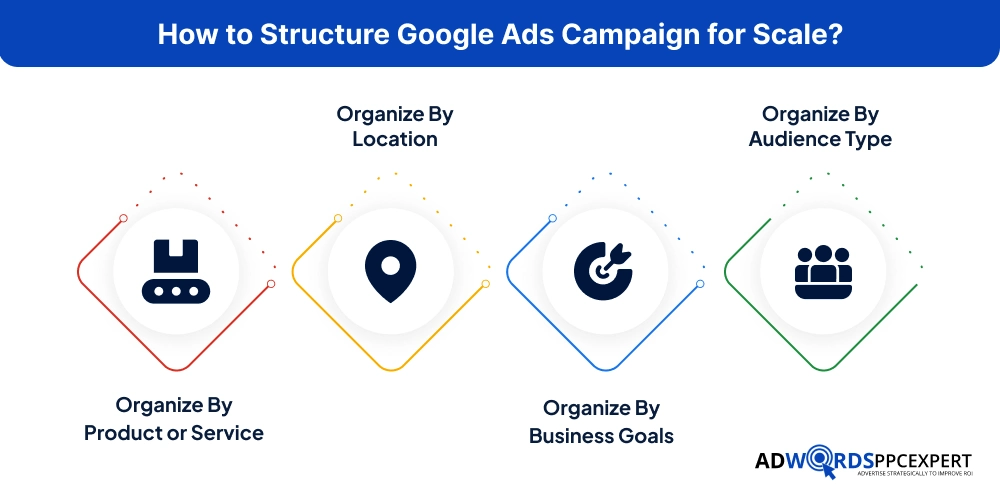
Many beginners create campaigns based on whatever comes to their mind first. On the other hand, experienced advertisers organize campaigns according to their business strategy.
Here are the most effective ways they often use:
Organize By Product or Service
This is the most common structure.
Example:
Campaign 1:
SEO Services
Campaign 2:
Google Ads Management
Campaign 3:
Social Media Marketing
Each service gets its own budget and optimization strategy.
Best For:
- Agencies
- SaaS Companies
- Service Businesses.
Organize By Location
Useful for businesses serving multiple cities or countries. Each location may have different:
- Budgets
- Compensation
- CPC
- Search demand
Organize By Business Goals
Different goals such as lead generation, online sales, app installs, brand awareness, etc., often need different campaigns. Each objective uses different bidding strategies and performance metrics.
Organize By Audience Type
Sometimes audiences perform very differently. Examples:
- New customers
- Returning customers
- Remarketing visitors
- Customer Match Lists
Separating these audiences allows for more personalized messaging and budget allocation.
Best Practices For Building a Scalable Google Ads Structure SA?
Consider Other Decision Factors
A good structure isn’t just about organization. It’s about making future optimization easier. Here are the practices experienced PPC agencies or managers follow:
Keep Ad Groups Tightly Themed
Each ad group should be targeted to one topic or a set of closely related keywords. If you’re selling running shoes, for instance, don’t use the keywords for formal shoes or hiking boots in the same ad group. If the keywords have similar user intent, you can create more targeted ads and connect your users with more targeted landing pages. This enhances the user experience and can result in better Quality Score and conversion.
Use Clear and Consistent Naming Conventions
With a clear naming system, it becomes much easier to manage your Google Ads account, particularly as it expands. Use campaign names that tell what the campaign is about, like Search | Men’s Shoes | India, rather than using general names like “Campaign 1” or “New Campaign”. A consistent name makes it easy to recognize campaigns, streamlines reporting, and keeps the account from getting confused when there is more than one person managing it.
Separate Branded and Non-Branded Campaigns
Branded users are already familiar with your brand, and non-branded users are still learning about their options. Separate campaigns make it easier to control budgets and independently measure the performance of each campaign. It also provides you with a better understanding of your brand’s traffic versus new customer acquisition.
Match Ads With Right Landing Pages
Your ad should always lead visitors to the page that best matches their search. For instance, if a user clicks on an ad for office chairs, they should be brought to the office chairs category page, not the home page. A relevant landing page not only provides a better user experience, but can yield higher conversion rates and make your ads more useful to Google.
Build Your Account With Future Growth in Mind
As you design your campaign plan, consider more than just your existing products or services. Allow space for additional categories, locations, or campaigns without having to re-organize the account later. A scalable structure helps you save time, maintain a structured report, and scale your advertising efforts without hassle as your business grows.
Common Google Ad Structure Mistakes To Avoid
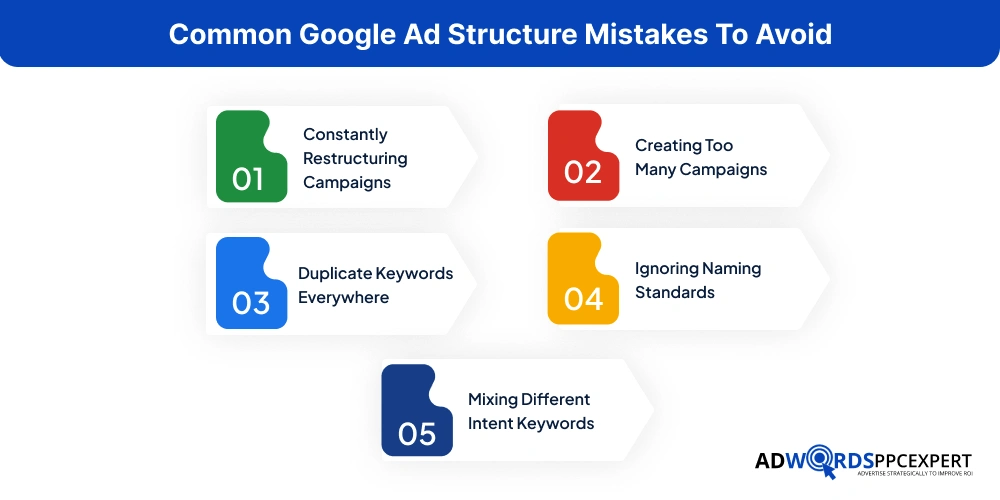
Even experienced marketers make mistakes, some of which are:
Constantly Restructuring Campaigns
A campaign requires sufficient information prior to major changes. Restructuring resets learning, makes it hard to report, and makes it hard to know if it has improved performance. Instead of rebuilding your account every week, optimize bids, ads, keywords, and landing pages within a stable structure whenever possible.
Creating Too Many Campaigns
It can be tempting to make a campaign for each product, keyword, and small variation, but this can make your account hard to manage. It also distributes your budget over too many campaigns, which reduces the amount of data you can collect and slows down the optimization process. Only develop new campaigns when there’s a clear business purpose.
Duplicate Keywords Everywhere
The same keyword shouldn’t compete against itself in multiple campaigns unless there’s a clear strategic reason. Internal competition can increase costs and make performance harder to measure.
Ignoring Naming Standards
Names such as “Campaign 1”, “Final Campaign” or “New Campaign Updated” may be convenient for the first few campaigns, but as your account evolves, they can cause confusion. Rather, follow a consistent naming convention which clearly explains the campaign’s objective, e.g. Search | Running Shoes | India or Brand | US | Leads. Using clear names helps with the identification of campaigns, analysis of reports, team collaboration, and efficient account management over time.
Mixing Different Intent Keywords
People searching “CRM software”, “CRM Pricing”, and “CRM Free Trial”, are at different stages of their buying journey. Grouping them often reduces relevance.
Campaign Structure Checklist Before You Launch
Before publishing your campaign, ask yourself:
- Is each campaign focused on one objective?
- Is there a budget for each individual campaign?
- Do ad groups have a single keyword theme?
- Are ads relevant to the keywords?
- Are each of the ads driving to the best matching landing page?
- Do 'brand' and 'non-brand' campaigns exist?
- Will I be able to add additional products, services, or locations later easily?
- Will someone else be able to understand this account in 6 months time?
If you answer “yes” to most of these questions, your account is likely built for long-term success.
Final Thoughts
Building a good Google Ads campaign structure isn’t simply about staying organized; it’s establishing a framework that will help your account perform better now and grow more easily in the future.
Grouping campaigns, limiting ad groups to specific themes, consistently naming all campaigns, and matching ads to the correct landing page will create an easier-to-manage, optimize, and scale account.
From a campaign that’s just getting started to one that’s running hundreds of thousands of ads per month, the same rule applies: A clean structure will lead to better insights, smarter decisions, and better results.
Do not look for instant solutions; put the time in to create the right foundation now. You’ll thank yourselves in the future for your optimization efforts, and your advertising budget will thank you too.

Ami Singh is a highly skilled AdWords PPC Specialist, known for creating profitable Google Ads strategies that elevate brands. With deep expertise in Google Search, Display, Shopping, YouTube Ads, and advanced bidding techniques, Ami consistently converts data into performance-driven results.
With a sharp analytical mind and a strong understanding of online consumer behavior, Ami designs campaigns that maximize ROI, boost quality scores, and reduce acquisition costs. His approach blends technical expertise with strategic thinking—making him a go-to expert for businesses aiming to dominate Google Ads.
Ami doesn’t just adapt to the fast-changing PPC industry, but he also stays ahead of the curve by testing new features, adopting automation smartly, and refining what works. Clients trust him for his transparency, insights, and ability to scale campaigns sustainably.
Looking to take your Google AdWords performance to the next level? Connect with Ami Singh at Softtrix and discover how he can help you get the maximum growth through powerful PPC strategies.