

Running PPC campaigns across multiple cities is simple. However, things get complicated when time zones enter the equation. A campaign that works well in New York may perform differently in London, Los Angeles, or Dubai because users are active at different hours depending on their time zones. This not only affects how the ads show up (visibility) but also budget pacing, accuracy of the reports, conversion timing, and how performance is interpreted across locations.
Marketers often use a single universal schedule without adjusting it according to time zones, resulting in inefficiencies. Such ads may run during low-intent hours in one city while missing peak demand in another. This results in wasted ad spend and uneven lead quality.
Moreover, Google Ads uses the account’s time zones for scheduling and reporting, while its bidding systems may still consider the local time and real-time signals of users.
These contradictions are essential to be realized for advertisers if they want to align campaigns with actual customer activity rather than internal assumptions. Doing this can lead to more accurate targeting and improved performance across all cities and time zones.
Why Do Time Zones Matter in Multi-City PPC Campaigns?
The main challenge with multi-location PPC is that the same clock time does not represent the same customer situations everywhere.
For example, suppose a company targets:
- Chicago
- New York
- Denver
- Los Angeles
Now, if they schedule a campaign from 9 AM to 6 PM using a single account time zone, those hours may correspond to different local times for users in each city. A schedule that represents normal business hours in one location could mean early morning, lunch, or evening in another.
So why does this matter? Because search behavior and conversion opportunities often change throughout the day. A user searching for an emergency plumber at 8 AM may have very different intent from another user looking for a bathroom renovation at 11 PM. Similarly, a B2B customer may search during working hours, while a consumer may be more active after work.
As you already know, Google Ads ad schedules are based on the time zones of the account, not automatically on each target city’s local clock. Google, in particular, recommends marketers consider the difference between the account time zone and the time of the people being targeted when creating schedules.
This creates an important distinction:
Account time ≠ customer local time.
This means a multi-city PPC strategy needs to account for both.
A simple example
Imagine an advertiser’s Google Ads account is set to Eastern Time and the campaign runs from 9 AM to 6 PM. At 9 AM Eastern:
- New York: 9 AM
- Chicago: 8 AM
- Denver: 7 AM
- Los Angeles: 6 AM
The campaign technically starts at 9 AM according to the account schedule, but customers in Los Angeles are seeing ads from 6 AM local time.
If the business receives most leads from Los Angeles between 9 AM and 5 PM Pacific Time, a basic 9 AM – 6 PM account schedule will not align with that behavior.
This is what a multi-location PPC campaign should be planned around: local customer hours first and account hours second.
How Google Ads Time Zones Work?
Before you begin changing campaign schedules thoughtlessly, you should understand how Google Ads handles time.
When you create a Google Ads account, you select an account time zone. This setting affects reporting, statistics, campaign scheduling, and other account-level functions. Google states that the time zone of a serving account cannot normally be changed after creation. So, if you need a different account time zone, you may be required to create a new account.
This makes the original account setup important for businesses that expect to expand internationally.
The account time zone also determines how your data is displayed. For example, when you look at performance by hour, the reported hours follow that account’s time zone, meaning they aren’t automatically converted to match the target city’s local time.
However, this does not mean Google Ads overlooks the user’s local time when deciding which ads and bids may perform well.
The Smart Bidding System of Google can use contextual signals, which include location and time of day. Google specifically states that Smart Bidding can optimize bids according to a person’s local time of day and day of the week.
That means advertisers should not assume that creating aggressive hourly bid adjustments manually is always necessary.
Instead, they can practice a better approach of distinguishing between:
- When the campaign is eligible to serve
- How Google bids within those eligible periods
- When customers are actually likely to convert.
This difference becomes particularly important when campaigns use automated bidding.
How Time Zones Can Affect PPC Ad Performance?
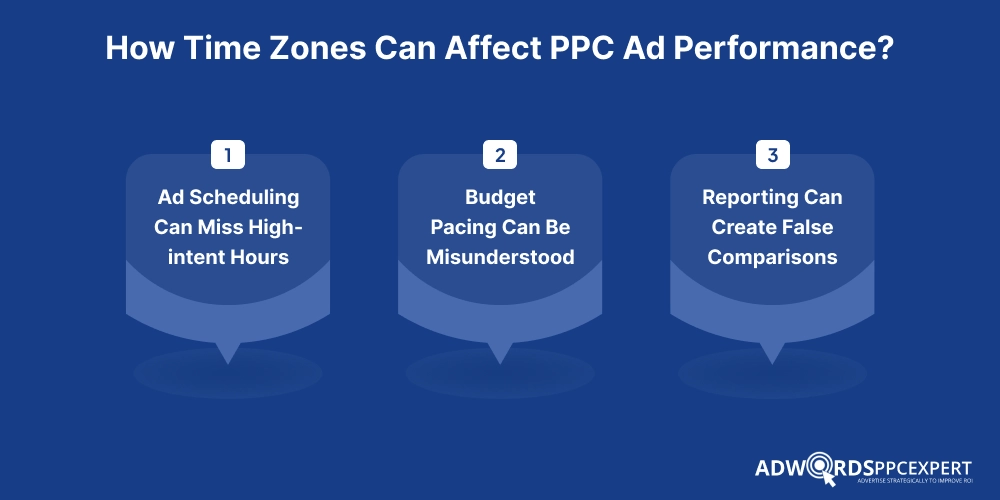
Multicity campaigns with time zone differentiation can affect several aspects of campaign performance, including:
Ad Scheduling Can Miss High-intent Hours
The most obvious impact is scheduling. Suppose a home-service company targets Dallas, Chicago, and Los Angeles. Its campaign is scheduled from 8 AM to 6 PM based on the account’s time zone.
If the account uses Central Time, the schedule becomes:
- Dallas: 8 AM - 6 PM
- Chicago: 8 AM - 6 PM
- Los Angeles: 6 AM - 4 PM Pacific
The Los Angeles campaign is therefore not covering the same local customer hours.
This can be particularly problematic for businesses where demand is focused around specific periods, such as restaurants, medical practices, real estate, legal services, home services, and local retail.
Google Ads allows advertisers to create schedules by day and hour, and campaigns can have multiple daily schedule periods.
The solution is to calculate the required local customer hours and convert them into the account’s time zone before entering the schedule.
Budget Pacing Can Be Misunderstood
Time zones also create confusion about how the daily budget is performing. A campaign’s daily activity is interpreted through the account’s time framework. If an advertiser manages campaigns that target several regions, spending may appear unusually focused around certain hours simply because the reporting clock is based on one account time zone.
This can lead to incorrect conclusions such as:
“The campaign performs poorly in the morning.”
The actual situation may be:
“The campaign performs poorly during the account’s morning hours, but those hours represent different local times across the target cities.”
For this reason, advertisers should analyze hourly performance alongside location.
Instead of looking only at:
Hours -> Clicks -> Conversions
Advertisers should ideally evaluate:
City + Local Hours -> Clicks -> Conversion Rate -> CPA/ROAS
This provides a more meaningful view of customer behavior.
Reporting Can Create False Comparisons
Google Ads reports statistics according to the account’s selected time zone. Let’s say there are two cities:
- City A is three hours ahead of City B.
- Both generate a conversion around 9 AM local time.
Those conversions can appear under different account hours depending on the account’s time zone. If a marketer evaluates performance only by the account’s hourly report, the customer behavior may appear more fragmented than it actually is.
A better reporting framework converts performance into a common local-time view. For example:
City |
Local High-Performance Period |
Account-Time Equivalent |
|---|---|---|
| New York | 9 AM – 1 PM | 9 AM – 1 PM ET |
| Chicago | 9 AM – 1 PM | 8 AM – 12 PM ET |
| Denver | 9 AM – 1 PM | 7 AM – 11 AM ET |
| Los Angeles | 9 AM – 1 PM | 6 AM – 10 AM ET |
This lets the marketers compare similar customer periods rather than comparing identical clock times.
The Role of Daylight Saving Time
Time-zone planning becomes more complicated when target markets observe Daylight Saving Time (DST). The United States, for example, changes clocks seasonally, while some countries and regions do not. This means the difference between two locations can change during the year.
For example, the time difference between a U.S. city and a non-DSR location may be different in January than in July.
Google Ads automatically adjusts campaign schedules and statistics when the selected account time zone observes daylight saving changes. However, advertisers still need to consider the relationship between the account time zone and each target market. This plays an important role when creating annual schedules.
A schedule that was converted manually in January should not simply be assumed to remain correct throughout the year if the target location changes its clocks differently.
Budget Pacing Can Be Misunderstood
Maintain a time-zone mapping document that contains:
- Target city
- Local time zone
- DST status
- UTC offset during standard time
- UTC offset during daylight time
- Account time-zone equivalent
- Campaign schedule
- Business operating hours
Advertisers should review this mapping before major seasonal campaigns and whenever they add a new city.
Should Every City Have a Different PPC Schedule?
Not necessarily.
Creating a separate schedule for every city can become difficult to manage, especially when a brand serves hundreds of locations.
The better approach is to group cities according to similar customer behavior and time zones.
For example, a U.S. campaign could initially be structured around Eastern Time, Central Time, Mountain Time, Pacific Time. If performance data shows that New York and Miami have similar demand patterns, they may use the same scheduling framework. If Los Angeles has a different conversion pattern, it can be treated separately.
Therefore, the decision should be based on data, not simply geography. Advertisers should examine:
- Conversions by hour
- Conversion rate by hour
- CPA by hour
- Conversion value by hour
- ROAS by hour
- Search volume by hour
- Lead quality by hour
- Business availability by hour
A city that receives fewer conversions but generates significantly higher-value customers may deserve more coverage than a city producing a larger number of low-value leads.
How Smart Bidding Affects the Strategy?

Time-of-the-day optimization becomes more nuanced when using Smart Bidding. Google Smart Bidding uses auction-time optimization and considers multiple signals, including location, device, browser, operating system, and time of day.
Therefore, advertisers should avoid assuming that manually restricting campaigns to only the historically best hours will always improve performance.
For example, if a campaign uses Maximize Conversions or Target CPA, Google’s system can adjust bids according to the likelihood that a particular auction will produce a conversion.
A better approach is usually:
Use ad scheduling to control true business constraints, while allowing automated bidding to optimize within the available traffic.
Business constraints may include:
- The sales team does not answer calls overnight
- A store is closed after 9 PM
- Leads submitted after a certain hour are not followed up until the next day.
- A promotion is only valid during specific local hours.
- The business does not want to pay for traffic outside its service hours.
For campaigns without such restrictions, completely turning off lower-volume hours simply because they have historically produced fewer conversions may remove useful opportunities.
Time Zones and Conversion Data: Do Not Optimize Too Quickly
Another mistake is making hourly decisions using incomplete conversion data. A click at 10 PM may not produce a conversion immediately. The customer may return the next morning or several days later.
Google Ads provides conversion-lag reporting because conversions can occur after the original ad interaction. Recent performance can therefore appear weaker until additional conversions are recorded.
Google also notes that conversion reporting can take time to update and recommends accounting for reporting latency when evaluating performance. This matters even more for multi-city campaigns because customers in different markets may have different buying cycles.
For example:
- A restaurant booking may convert within minutes.
- An emergency service lead may convert within an hour.
- A B2B software lead may take days or weeks.
- A real estate inquiry may require several interactions before becoming a qualified lead.
Therefore, do not pause a city or time period solely because its recent CPA looks high. First, check whether the conversion window is mature enough to support the decision.
A Practical Framework For Multi-City PPC Time-Zone Management
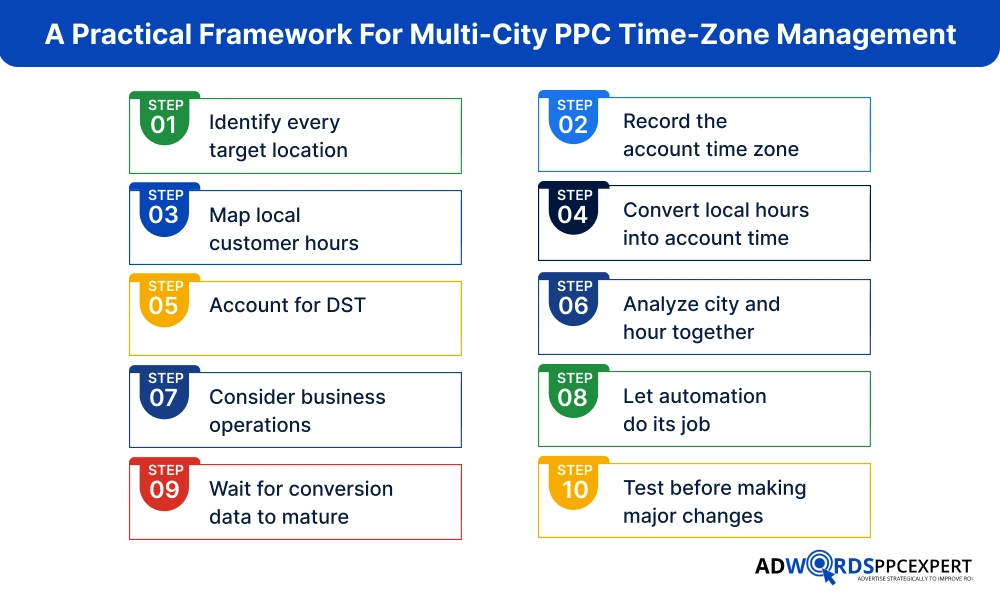
A reliable workflow can make time-zone management much easier. Here are all the steps:
Step 1: Identify every target location
Create a list of cities, regions, or countries targeted by each campaign. Do not rely only on country-level targeting when campaign decisions are actually being made at the city level.
Step 2: Record the account time zone
Check the Google Ads account time zone before creating schedules. This becomes the reference point for campaign scheduling and reporting.
Step 3: Map local customer hours
Determine when customers are most likely to search, contact the business, purchase, or complete another valuable action in each city.
Step 4: Convert local hours into account time
Create a simple conversion table so that the intended local schedule is entered correctly in Google Ads.
Step 5: Account for DST
Check whether the account and target locations observe daylight saving changes differently.
Step 6: Analyze city and hour together
Do not evaluate hourly performance separately from geography. Use a combined view such as:
Location -> Local Hour -> Device -> Campaign -> Conversion Rate -> CPA/ROAS
Step 7: Consider business operations
If leads require human follow-up, align campaign coverage with the hours when someone can respond. This is especially important for lead-generation campaigns. A cheap lead received at 2 AM may be less valuable than a slightly more expensive lead that receives an immediate response.
Step 8: Let automation do its job
If you are using Smart Bidding, avoid excessive manual restrictions without evidence. Google’s system already uses time and location as bidding signals.
Step 9: Wait for conversion data to mature
Account for conversion lag before judging a particular hour, city, or schedule.
Step 10: Test before making major changes
Instead of changing every city at once, test schedule changes on selected campaigns or locations and compare results after enough conversion data has accumulated.
Common Time-Zone PPC Mistakes to Avoid
Several mistakes repeatedly create problems in multi-city campaigns:
- Using the agency’s working hours as the ad schedule: Your team’s 9 AM - 6 PM schedule may have nothing to do with the customer’s buying behavior.
- Assuming Google Ads schedules automatically follow each user’s local time - Campaign schedules are based on the account time zone.
- Comparing cities using raw hourly reports - The same reported hour may represent different local customer times.
- Ignoring daylight saving changes - Time differences can change between markets during the year.
- Turning off low-volume hours too quickly - A low-volume period can still produce valuable conversions.
- Ignoring lead response time - For lead-generation campaigns, conversion value depends partly on what happens after the click.
- Changing account structure just to solve a scheduling problem - Separate accounts or campaigns should be created for strategic reasons, not simply because cities are in different time zones.
- Over-managing Smart Bidding - Automated bidding already considers time and location signals, so manual restrictions should have a clear business or performance rationale.
The Final Words
Time zones are not simply a scheduling issue in multi-city PPC campaigns. They affect ad timing, budget use, performance tracking, and conversions. Advertisers should focus on local customer behavior instead of only account time settings.
Google Ads uses the account time zone for scheduling and reporting. So, campaigns must be adjusted for each city’s active hours. Use location targeting, Smart Bidding, and conversion lag data for better decisions. Also, consider daylight saving time changes across regions. This helps avoid wrong assumptions about performance.
A simple, local-focused setup works better than complex schedules. It keeps PPC campaigns easier to manage and more effective and aligned with real customer demand always.

Ami Singh is a highly skilled AdWords PPC Specialist, known for creating profitable Google Ads strategies that elevate brands. With deep expertise in Google Search, Display, Shopping, YouTube Ads, and advanced bidding techniques, Ami consistently converts data into performance-driven results.
With a sharp analytical mind and a strong understanding of online consumer behavior, Ami designs campaigns that maximize ROI, boost quality scores, and reduce acquisition costs. His approach blends technical expertise with strategic thinking—making him a go-to expert for businesses aiming to dominate Google Ads.
Ami doesn’t just adapt to the fast-changing PPC industry, but he also stays ahead of the curve by testing new features, adopting automation smartly, and refining what works. Clients trust him for his transparency, insights, and ability to scale campaigns sustainably.
Looking to take your Google AdWords performance to the next level? Connect with Ami Singh at Softtrix and discover how he can help you get the maximum growth through powerful PPC strategies.