
Every click on your PPC ads costs money. But without proper conversion tracking, you’re making decisions based on assumptions instead of data.
Let’s say your business spends $20,000 every month on Google Ads.
Your dashboard shows 367 conversions.
At first glance, that sounds like a successful campaign.
But after talking with your sales team, you discover that only 29 of those were actual customers.
Now the real picture starts to emerge.
Your conversion data wasn’t telling the whole story.
Your campaigns weren’t generating quality leads. They were simply generating numbers.
This happens far more often than most advertisers realize.
Now, let’s get back to reality.
You might think a campaign is performing well because it’s bringing in clicks. In reality, those visitors never become paying customers.
This is where businesses quietly lose thousands of dollars.
PPC conversion tracking shows you exactly what happens after someone clicks your ad. Did they submit a contact form? Call your business? Book a demo? Download your guide?
Instead of guessing which campaigns are working, you know exactly which keywords, ads, and audiences are driving real business results.
In 2026, as AI continues to reshape digital advertising, accurate conversion tracking has become more important than ever. Google’s AI-powered bidding, Performance Max campaigns, Enhanced Conversions, and data-driven attribution all rely on reliable conversion data to make smarter optimization decisions.
In this guide, we’ll walk you through the complete PPC conversion tracking setup so you can measure what matters and make every advertising dollar count.
What is PPC conversion tracking?
Generally, PPC conversion tracking involves setting up analytics and advertising platforms, such as Google Ads and Google Analytics, to monitor what users do after clicking your ad. It tracks valuable actions like completing a purchase, submitting a contact form, booking an appointment, downloading a resource, or making a phone call. This data helps you understand which campaigns, keywords, and ads are driving meaningful business results, not just clicks.
Why Conversion Tracking Matters in the USA more than Ever in 2026
Back when digital advertising wasn’t as advanced as it is today, advertisers mainly relied on clicks, impressions, and CTR to measure campaign performance. While those metrics showed activity, they rarely revealed whether the campaign was actually generating business.
Not anymore.
Today, privacy regulations, browser restrictions, and Google’s growing reliance on machine learning have changed how campaign performance is measured. The focus has shifted toward first-party data, Enhanced Conversions, and modeled conversions. Google now recommends robust sitewide tagging and Enhanced Conversions because they improve measurement accuracy and help its bidding algorithms make better optimization decisions.
In short, accurate conversion tracking helps you:
- Train Smart Bidding with reliable data.
- Reduce wasted ad spend.
- Measure your true return on investment (ROI).
- Improve lead quality instead of simply increasing lead volume.
- Identify which keywords actually generate revenue.
- Connect online advertising with offline sales.
Think of conversion tracking as the GPS for your advertising budget. Without it, you’re making decisions with limited visibility. With it, every optimization is backed by real customer data instead of assumptions.
How to Configure PPC Conversion Tracking for U.S. Businesses
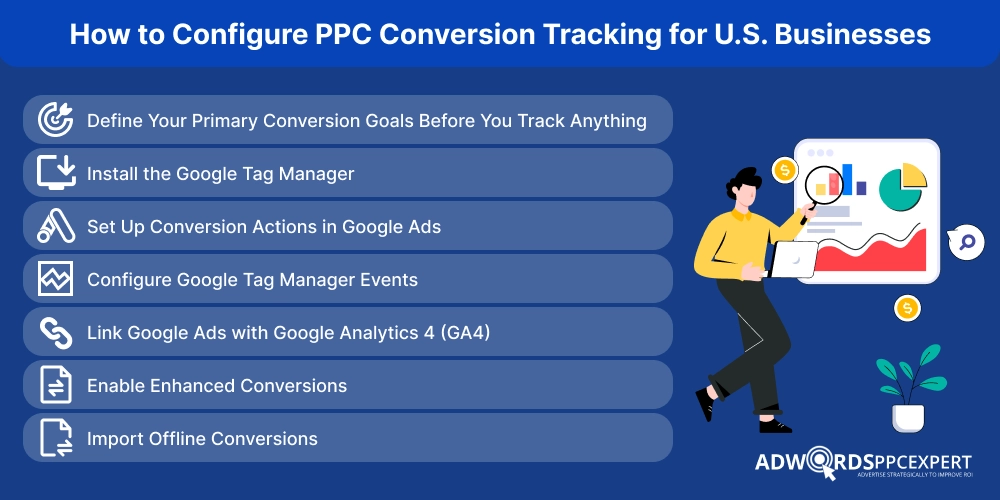
Whether you’re just getting started or already managing PPC campaigns, this step-by-step guide will help you set up conversion tracking the right way. We’ll walk you through the complete process so you can track the actions that actually matter to your business.
Step 1: Define Your Primary Conversion Goals Before You Track Anything
Setting up tracking before defining your primary conversion goal is one of the biggest mistakes advertisers make. Once that happens, they start tracking everything.
Every button click, PDF download, newsletter sign-up, page view, and video play suddenly becomes a “conversion.” The dashboard looks impressive because the numbers keep going up, but in reality, the business is just burning through its ad budget.
That’s why not every action deserves to be treated as a conversion.
Before you even open Google Ads or Google Tag Manager, ask yourself one simple question:
What action directly contributes to revenue?
The answer depends on your business model. An ecommerce store usually cares about completed purchases, while a law firm is far more interested in consultation bookings.
Business Type |
Primary Conversion to Track |
|---|---|
| Ecommerce Store | Completed Purchase |
| Law Firm | Consultation Booking |
| Dentist | Appointment Request |
| Roofing Company | Phone Call |
| SaaS Company | Demo Request |
Everything else becomes a supporting metric.
For example, when a customer adds an item to the cart that indicates buying intent, this doesn’t generate revenue until the purchase is completed.
Likewise, downloading a brochure or subscribing to a newsletter indicates interest, but those actions shouldn’t carry the same weight as someone requesting a quote.
Thus, knowing the difference between the terms is definitely a plus point. As Google’s automated bidding doesn’t understand your business. It only learns from the conversion signals you provide.
If you tell Google that every newsletter signup is as valuable as a $5,000 sales inquiry, it will optimize your budget accordingly, even if those newsletter subscribers never become customers.
The better you define your primary conversion, the smarter Google’s optimization becomes.
Step 2: Install the Google Tag Manager
Once you’ve identified what you want to measure, the next step is giving Google a way to collect that information.
This is where the Google Tag comes in.
Before you can track conversions, you need a way to manage all your tracking codes. Instead of asking a developer to add new code each time to track a form submission, phone call, or purchase, GTM lets you manage it all. You can track your order from one place. Along with this, it also makes updating and testing tags much easier as your campaigns grow.
How to Set Up Google Tag Manager
1. Create a GTM account and container.
Sign in to Google Tag Manager using your Google account, create a new account, and then create a container for your website.
2. Install the GTM container code.
Google will provide two code snippets. Add the first <script> code inside your website’s <head> section and the second <noscript> code immediately after the opening <body> tag on every page.
3. Create a Conversion Linker tag.
In GTM, click Tags → New, select Conversion Linker as the tag type, keep the default settings, and set the trigger to All Pages.
4. Publish the container.
Click Submit and Publish to make your changes live. Without publishing, none of your tags will work on your website.
The Conversion Linker is a small but important part of your setup. It helps Google Ads store information about ad clicks, making it easier to attribute conversions to the correct campaign, keyword, or ad. This gives you more accurate reporting and helps Smart Bidding make better optimization decisions.
Step 3: Set Up Conversion Actions in Google Ads
Now that Google Tag Manager is installed, it’s time to tell Google Ads what success looks like for your business. This is done by creating conversion actions. Every time a visitor completes one of these actions, Google Ads records it as a conversion and uses that data to optimize your campaigns.
The key is to track actions that have real business value. For example, an ecommerce store should prioritize purchases, while a B2B company may focus on demo requests or contact form submissions. Tracking too many low-value actions, such as newsletter signups or page views, can send mixed signals to Google’s bidding algorithm.
How to Set Up Conversion Actions
- Open your Google Ads account and go to Goals → Conversions → Summary.
- Click "Create Conversion Action" and select the conversion source, such as Website, App, Phone Calls, or Import for offline conversions.
- Choose the action you want to track. For example, you can track purchases, contact form submissions, appointment bookings, phone calls, or demo requests.
- Configure the conversion settings. Give the conversion a name, assign a value (if applicable), choose how many conversions to count, and set the conversion window based on your business needs.
- Save the conversion action and connect it to the appropriate Google Tag or Google Tag Manager tag so Google Ads can start collecting data.
Step 4:Configure Google Tag Manager Events
To measure conversion accurately, it’s crucial to configure event tags that signals the google ads after taking the action. Ensure that the event you create matches the conversion action. So, there is no confusion left.
For example, if you are tracing contact form submissions, the event should fire only after the form has been successfully submitted.
Process of configuring conversion events in GTM
1. Open your GTM workspace and click Tags → New.
2. Choose the appropriate tag type. For Google Ads conversions, select Google Ads Conversion Tracking and enter the Conversion ID and Conversion Label from your Google Ads account.
3. Create a trigger that determines when the tag should fire. Depending on your website, this could be:
- Form Submission
- Thank You page visit
- Button Click
- Phone Number Click
- Purchase Confirmation page
4. Attach the trigger to the tag, then save your changes.
5. Use Preview mode to test the event. Complete the action on your website and confirm that the tag fires correctly before publishing the container.
Step 5: Link Google Ads with Google Analytics 4 (GA4)
Google Ads tells you which campaigns generated conversions, but Google Analytics 4 (GA4) explains how users reached those conversions. It shows the complete customer journey—from the first page they visited to the final action they completed. Connecting the two platforms gives you a clearer picture of what’s working and where users are dropping off.
Once linked, you can also import important GA4 events into Google Ads, helping Smart Bidding optimize campaigns with more complete conversion data.
How to Link Google Ads with GA4
1. Open Google Analytics 4 and go to Admin.
2. Under the Product Links section, click Google Ads Links.
3. Click Link, then select the Google Ads account you want to connect.
4. Turn on Personalized Advertising and complete the linking process.
5. To import GA4 events into Google Ads, open Google Ads, go to Goals → Conversions, click New Conversion Action, choose Import, and select the GA4 events you want to use as conversions.
Not every GA4 event should become a Google Ads conversion. Focus on actions that indicate genuine business value, such as purchases, qualified lead submissions, appointment bookings, or demo requests. Importing too many low-value events can confuse Google’s bidding system and make campaign optimization less effective. A clean conversion setup always produces more reliable data and better optimization over time.
Step 6: Enable Enhanced Conversions
As privacy regulations tighten and third-party cookies become less reliable, standard conversion tracking can miss valuable conversion data. Enhanced Conversions help fill those gaps by using first-party customer data, such as an email address or phone number collected during a conversion. Before being sent to Google, this information is securely hashed, allowing Google to improve conversion measurement while protecting user privacy.
For businesses that rely on lead generation or online sales, enabling Enhanced Conversions can provide more accurate reporting and give Google’s Smart Bidding better data to optimize campaigns.
How to Set Up Enhanced Conversions
1. Open Google Ads and go to Goals → Conversions.
2. Select the conversion action you want to enhance.
3. Under Enhanced Conversions, click Turn On.
4. Choose your implementation method:
- Google Tag Manager (Recommended) if you're already using GTM.
- Google Tag if the Google Tag is installed directly on your website.
5. Map the required first-party customer data, such as email address, phone number, or name and address, and save your changes.
6. Test your setup using Google Tag Assistant or GTM’s Preview Mode to confirm that Enhanced Conversion data is being sent correctly.
Step 7: Import Offline Conversions
Not every customer converts online. In many industries, the real sale happens days or even weeks after someone clicks an ad. A potential customer might submit a contact form, speak with your sales team, and only then sign a contract. If you only track the form submission, Google Ads assumes every lead has the same value—which isn’t always true.
Offline conversion tracking closes this gap by sending your CRM or sales data back to Google Ads. This allows Google to learn which leads actually became paying customers and optimize future campaigns for higher-quality prospects instead of simply generating more leads.
How to Import Offline Conversions
1. Capture the Google Click ID (GCLID) or another supported identifier when a user submits a lead form.
2. Store the GCLID in your CRM along with the lead’s details.
3. Once the lead becomes a qualified customer or completes a sale, export the conversion data from your CRM.
4. In Google Ads, go to Goals → Conversions and select Import.
5. Upload the offline conversion file or connect your CRM using a supported integration to automatically send conversion data.
6. Review the imported conversions to ensure they match the correct campaigns and conversion actions.
What are the Common Conversion Tracking Mistakes?
Even experienced advertisers run into these problems:
- Counting duplicate purchases
- Tracking page views as conversions
- Forgetting phone-call tracking
- Optimizing for every micro-conversion
- Broken thank-you page tracking
- Missing Enhanced Conversions
- Testing only after campaigns go live
- Never auditing tracking after website redesigns
These mistakes rarely cause obvious errors.
They quietly distort reporting month after month.
How to Test Your Tracking?
Never assume your setup works because the tag is installed.
Test it.
Complete your own form.
Make a test purchase.
Click the tracked phone number.
Verify that:
- Google Tag fires
- GA4 records the event
- Google Ads receives the conversion
- No duplicate events appear
Five minutes of testing can prevent months of inaccurate reporting.
What are the Signs Your Tracking Is Broken?
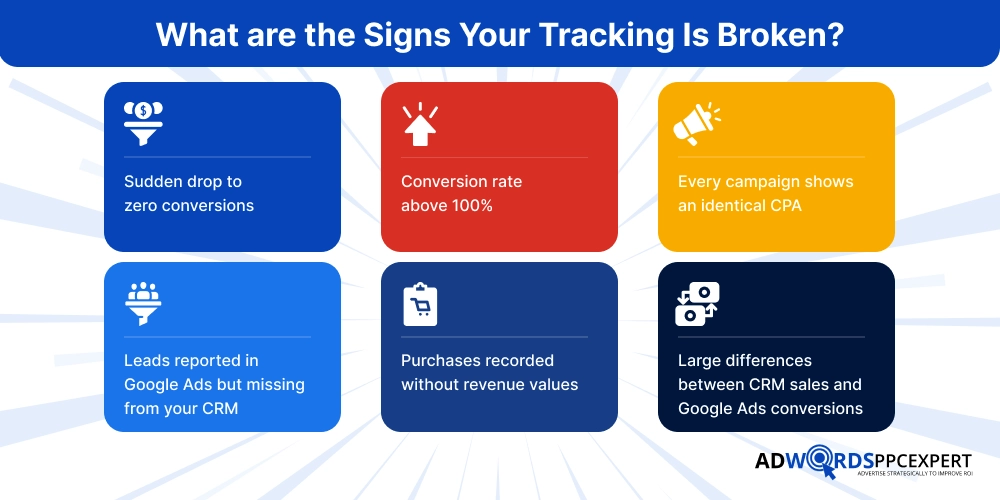
Watch for warning signs like:
- Sudden drop to zero conversions
- Conversion rate above 100%
- Every campaign shows an identical CPA
- Leads reported in Google Ads but missing from your CRM
- Purchases recorded without revenue values
- Large differences between CRM sales and Google Ads conversions
If any of these appear, your first task isn’t changing bids.
It’s fixing the measurement.
Final Thoughts!
The biggest advantage of professional PPC services in 2026 isn’t a clever headline or a larger budget.
It’s better data.
Google’s automation can only optimize what it can measure. When conversion tracking reflects real business outcomes- qualified leads, purchases, booked appointments, and closed deals, the platform has a much stronger foundation for improving performance. When it measures the wrong actions, every optimization decision becomes less reliable.
Before you increase your budget, make sure your measurement deserves it.
Because accurate conversion tracking doesn’t just tell you what happened yesterday.
It shapes how your campaigns perform tomorrow.

Ami Singh is a highly skilled AdWords PPC Specialist, known for creating profitable Google Ads strategies that elevate brands. With deep expertise in Google Search, Display, Shopping, YouTube Ads, and advanced bidding techniques, Ami consistently converts data into performance-driven results.
With a sharp analytical mind and a strong understanding of online consumer behavior, Ami designs campaigns that maximize ROI, boost quality scores, and reduce acquisition costs. His approach blends technical expertise with strategic thinking—making him a go-to expert for businesses aiming to dominate Google Ads.
Ami doesn’t just adapt to the fast-changing PPC industry, but he also stays ahead of the curve by testing new features, adopting automation smartly, and refining what works. Clients trust him for his transparency, insights, and ability to scale campaigns sustainably.
Looking to take your Google AdWords performance to the next level? Connect with Ami Singh at Softtrix and discover how he can help you get the maximum growth through powerful PPC strategies.
In 2026, digital advertising has become faster, smarter, and more competitive than ever. Google Ads auctions no longer require advertisers to constantly monitor past performance and manually adjust their bids. With Google processing millions of searches every day, every search triggers a fresh, unique auction with its own context and competition.
This is where Smart Bidding comes in. It is Google’s AI-powered bidding system that automatically sets bids in real time using machine learning to predict which clicks are likely to convert. Instead of relying on manual bid adjustment or one static bid for the day, it analysis hundred of signals in milliseconds and makes a smarter bidding decision on your behalf.
Understanding how Smart Bidding works can help you make better campaign decisions, improve your campaigns’ performance, and make the most out of your Google Ads budget. In this article, we will break down what Smart Bidding is, how it works, discuss different bidding strategies, and best practices to help you get the maximum out of your campaigns.
In 2026, digital advertising has become faster, smarter, and more competitive than ever. Google Ads auctions no longer require advertisers to constantly monitor past performance and manually adjust their bids. With Google processing millions of searches every day, every search triggers a fresh, unique auction with its own context and competition.
This is where Smart Bidding comes in. It is Google’s AI-powered bidding system that automatically sets bids in real time using machine learning to predict which clicks are likely to convert. Instead of relying on manual bid adjustment or one static bid for the day, it analysis hundred of signals in milliseconds and makes a smarter bidding decision on your behalf.
Understanding how Smart Bidding works can help you make better campaign decisions, improve your campaigns’ performance, and make the most out of your Google Ads budget. In this article, we will break down what Smart Bidding is, how it works, discuss different bidding strategies, and best practices to help you get the maximum out of your campaigns.