As we know, users’ demand, search behaviour, and buying patterns change with seasons. As a result, Google Ads campaign performance does not always increase or remain constant throughout the year. Users’ behaviour can affect important aspects like impressions, clicks, cost-per-click (CPC), conversion rates, and return on ad spend (ROAS).
Through this blog, we will try to understand how seasonal demand influences these metrics and how advertisers make major decisions about campaign budgets and bidding strategies. Not only this, but also check seasonal trends and how businesses can prepare their campaigns for peak periods.
Key Takeaways
- Expected seasonal demand causes sudden changes in search volume, impressions, and clicks for specific products and services.
- CPC may rise during peak seasons.
- Seasonal offers or discounts and stronger user buying intent can improve conversion rates, but results vary by industry and audience.
- Making adjustments in budgets, offers, and campaign settings based on demand can maintain performance during off and peak seasons.
- Analyzing previous performance and targeting seasonal keywords can help capture relevant demand.
- Tracking important aspects such as CPC, CPA, and ROAS helps determine whether seasonal spending is generating expected results.
What Is Seasonality in Google Ads, and How Does It Affect Google Ads Campaign Performance?
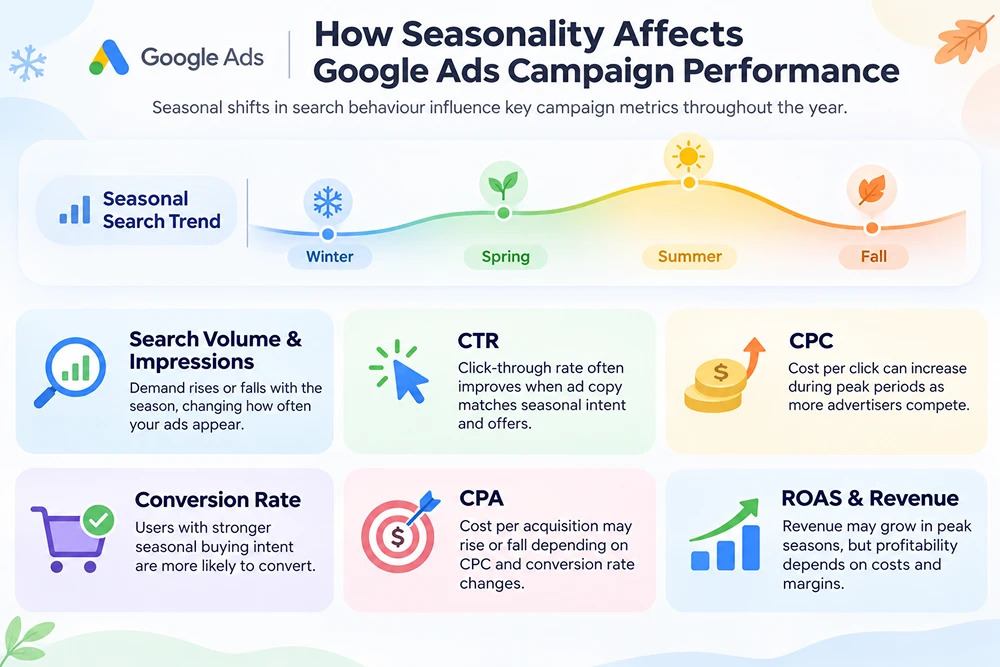
During different seasons, we notice some changes in users’ queries and buying behaviour over time.
- For example, in the summer season, users search for outdoor activities, summer fashion, food and drinks, summer jobs, etc.
- In winter, their searches may shift toward winter fashion and winter travel destinations, etc.
- Similarly, during the festive season, users search accordingly. This is a continuous process throughout the year.

These expected changes in search behavior influence the demand for different products and services.
Google Ads campaigns depend on real user queries, and these demand changes directly affect campaign performance. Advertisers may experience fluctuations in search volume, impressions, clicks, advertising costs, and conversions.
This pattern is known as seasonality in Google Ads.
Now we will look in depth at how seasonality affects Google Ads campaign performance. Here I have explained the major campaign metrics that get affected:
1. Shift in Search Volume and Impressions
Seasonal changes directly affect search volume for products or services.
When demand rises for a particular product or service, your ad can receive more impressions because more users enter relevant searches, or vice versa.
How?
- Obviously, a travel agency may receive more impressions for the ad “Goa holiday packages” during December and New Year because many people plan vacations.
- And during the monsoon season, the same campaign may receive fewer impressions because travel-related searches drop.
2. Click-Through Rate (CTR)
It is a digital metric that measures how many people click a specific link or ad after seeing it.
This can improve during peak seasons when ad copy matches urgent seasonal intent.
In our daily life, we frequently use food delivery apps like DoorDash, Uber Eats, and similarly Amazon and Walmart for shopping online. When these platforms offer any seasonal sale or discounts through their ads, customers may click on them and place an order immediately.
With this, these platforms may receive more clicks than a generic ad.
However, CTR can also drop if competitors use stronger offers or more relevant seasonal messaging.
3. Cost-Per-Click (CPC)
Cost per click is an advertising model where advertisers pay a fee each time a user clicks on their ad. During peak demand, CPC eventually increases because more advertisers aggressively compete for limited ad placements.
When more businesses bid on the same keywords, the auction becomes more expensive.
Why?
Obviously, in September, users are not interested in buying “Christmas gift hampers”; therefore, CPC may be lower, but in December (peak season), it rises sharply as multiple brands increase their ad budgets.
Higher CPC is good if conversions and revenue also increase. But it can reduce profitability if costs rise faster than sales.
4. Conversion Rate
Conversion rate measures percentage of users who completed an action (like make purchase or filling a form) after clicking a specific ad.
During peak seasons, conversion rate can improve if users have strong purchase intent.
For example, if users are searching for “buy Christmas gifts online”, searches like this show stronger purchase intent than someone simply searching for “gift ideas”.
Similarly, during festive peaks, e-commerce stores see higher conversion rates because users are actively looking for offers and sales.
But during off-seasons, conversion rates may drop because users only click on your ads to explore products but are not ready to buy. In this case, your ad may only generate clicks. To understand this in detail, check our blog on clicks but no leads.
Not only users’ intent; there are other factors to consider why conversion rates drop. To understand these reasons in detail, read our blog on why is your conversion rate dropping?
5. Cost Per Acquisition (CPA)
CPA is defined as the cost necessary to achieve one conversion. During peak seasons, CPA can rise or drop depending on how CPC and conversion rate change together.
6. ROAS and Revenue
Return on Ad Spend is a metric that measures the revenue a business earns on every ad spend.
During peak periods, revenue can be increased, but it mainly depends on CPC, product margin, target audiences, etc.
For example, an online store may generate high revenue during Black Friday, but if it offers deep discounts and pays high CPCs, its actual profit may be lower than expected. Therefore, advertisers should track ROAS along with profit margin and average order value.
Important Seasonal Trends That Affect Google Ads
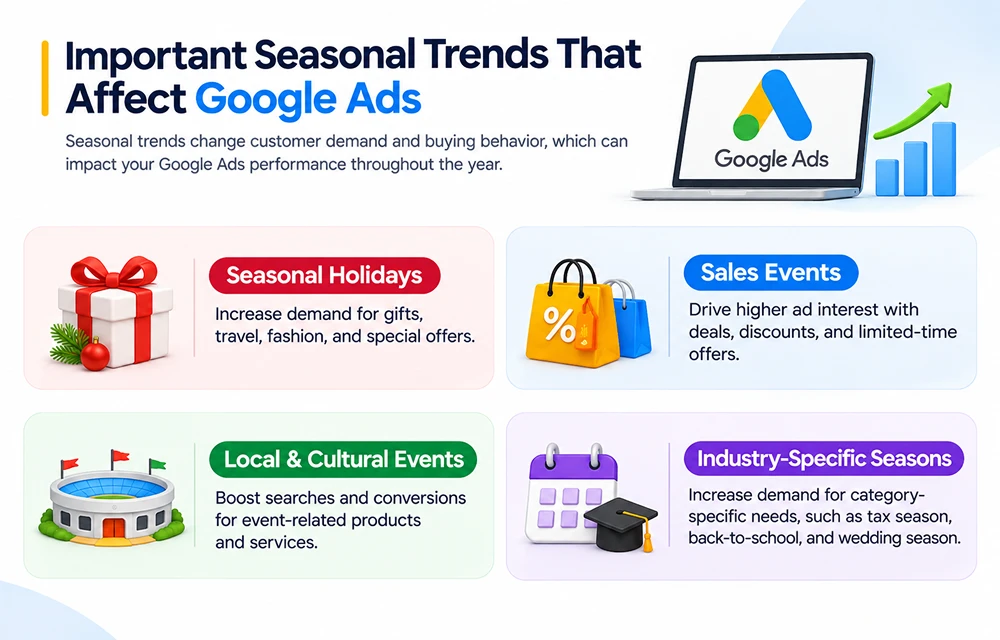
Understanding seasonal trends helps advertisers identify the right time to promote their products or services and adjust their Google Ads campaigns according to customer needs.
Seasonal Holidays
It Includes: Christmas, New Year, Thanksgiving, Black Friday, Cyber Monday, Valentine’s Day, and Halloween, etc.
Customer Buying Behaviour: During these seasons, customers actively search for gifts, decorations, food, travel, clothing, electronics, and special offers.
Effects:
- Increase in search volume and impressions for seasonal and gift-related queries.
- CTR may improve when ads highlight holiday offers, discounts, or gift ideas.
- CPC rises because many advertisers compete for the same audience.
- Because of stronger purchase intent, conversion rate can rise.
Sales Events
It Includes: Amazon Prime Day, Labor Day sales, Memorial Day sales, Fourth of July sales, and end-of-season clearance events.
Target Customer: These events attract deal-seeking shoppers who compare prices, discounts, shipping options, and return policies.
Effects:
- Keywords including words like “sale,” “deal,” “discount,” “coupon,” and “offer” receive higher search volume.
- During these days, CTR can rise when ads clearly mention discounts, limited-time offers, or free shipping.
- During these days, retailers compete aggressively, so CPC can increase sharply.
- When users find attractive offers and a smooth checkout experience, conversion rates may rise.
Local and Cultural Events
It Includes: Super Bowl, World Series, MLB season, NFL season, college sports events, music festivals, state fairs, elections, and regional holidays.
Customer Buying Motive: During these events, customer demand may rise for tickets, food delivery, merchandise, hospitality, transportation, and event-related services.
Effects:
- Local search demand can rise sharply before and during major events.
- Restaurants, hotels, bars, delivery services, and ticket sellers may see more conversions.
- Campaign timing matters because interest may peak only for a few days or weeks.
Industry-Specific Seasons
It Includes: Tax season, Back-to-school season, Wedding season, and financial year-end.
Effects:
- Search volume may increase for Industry-specific keywords during relevant periods.
- Ad copy should highlight deadlines, availability, consultations, financing, or seasonal offers.
- B2B campaigns may see longer decision cycles, so remarketing and lead nurturing become important.
How You Can Prepare Google Ads Campaigns for Seasonal Peaks
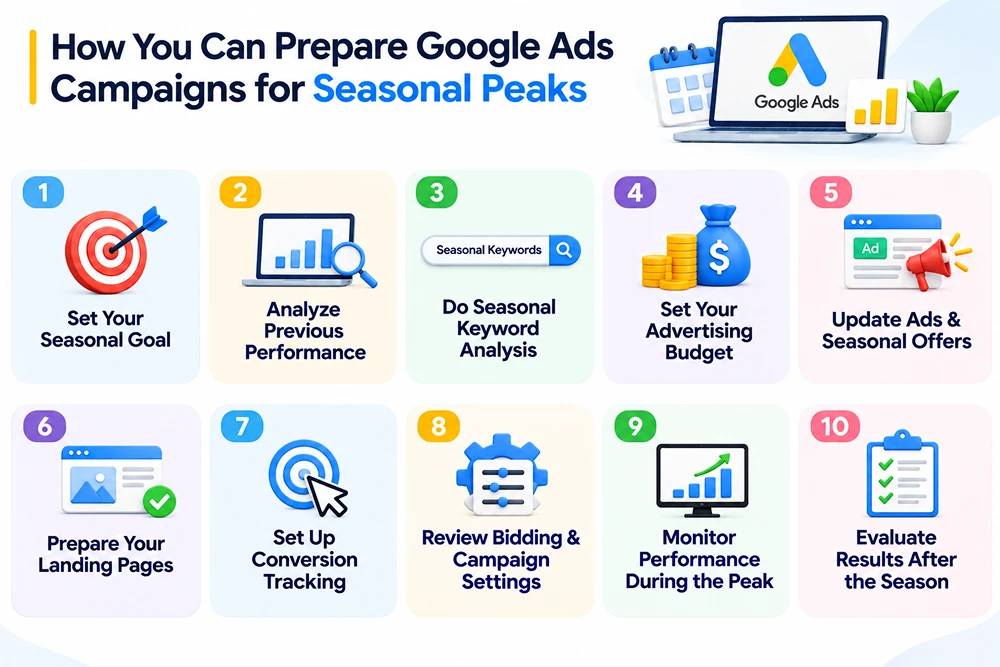
Here, I have outlined a plan to prepare your Google Ads campaigns during different seasons:
1. Set Your Seasonal Goal
There are multiple seasons, holidays, and events throughout the year, but not every event will be relevant to your business. Start by identifying 3 to 4 seasonal events that align with your business offerings and your target audience’s buying intent.
After this, set measurable objectives such as revenue, CPC, ROAS, app installs, store visits, or new customers.
2. Analyze Previous Campaign Performance
After setting a seasonal goal, review the previous year’s seasonal performance. In this, check important aspects such as:
- Using Google Ads, review last year’s seasonal campaign, including targeted keywords, location, audience, and product.
- With the help of Google Trends, check when demand for products started rising, peaked, and declined. After this, compare this with your previous Google Ads and Google Analytics 4 (GA4) data.
- Also check which targeted keywords, ads, audiences, and products give the best conversions and ROAS.
3. Seasonal Keyword Analysis
With the help of Google Keyword Planner, choose relevant keywords based on search volume and competition level. Focus on terms based on customers’ intent.
- For Christmas fest, target keywords like “Christmas gift hampers” or “Christmas gift basket offers”.
- Add relevant keywords to your campaigns and review your existing search terms to identify useful queries and irrelevant traffic.
4. Set Your Seasonal Advertising Budget
In peak seasons, demand and competition both rise together. Decide the expected amount advertisers can spend and allocate more budget to campaigns with a strong history of generating profitable sales.
For this, use Google Ads Performance Planner, a free forecasting tool, to compare budget and performance.
5. Update Your Ads and Seasonal Offers
- Based on customers’ requirements, make changes to ad headlines and descriptions.
- Highlight offers, discounts, sales, delivery options, etc., to make your ads more attractive.
- Before launching your campaign, review ads, seasonal promotions like discounts, or offers. Submit your ads for approval well before the seasonal peak.
6. Prepare Your Landing Pages
Landing pages are those specific pages on which users land after clicking your Google ad. They should provide accurate information to users about your products or services.
- In peak seasons, ensure your landing pages match your ads, highlight relevant seasonal products, offers, and information.
- Also check all technical aspects such as loading speed, mobile experience, and the purchasing process.
7. Conversion Tracking
Before increasing your budget, make sure Google Ads records important actions correctly, such as purchases, form submissions, and phone calls.
Check your conversion actions and test the tracking setup. If you use GA4, verify that important events and purchase data are being collected correctly. To know more about how you can do it, read our detailed blog on conversion tracking.
8. Review Bidding and Campaign Settings
Check your bidding strategy, location targeting, ad schedule, budget limits, and campaign status. Choose settings based on your business goal, such as maximizing purchases or achieving a target ROAS.
Google’s automated bidding already accounts for many normal seasonal patterns. Do not automatically apply a seasonality adjustment; it is intended for specific, short-term events when you expect a significant conversion-rate change.
9. Monitor Performance During the Peak
Once your campaign is running, review performance regularly. Compare results with your goals and previous seasonal periods.
Monitor impressions, CPC, conversions, CPA, and ROAS. Make changes based on the data rather than assuming that higher traffic means better results.
10. Evaluate Results After the Season
When seasonal demand declines, compare actual performance against your goals and previous periods. Identify which keywords, ads, products, and offers generated the best results.
Reduce budgets as demand declines, pause expired offers, and use the findings to prepare for the next seasonal event.
Common Seasonal Google Ads Mistakes to Avoid
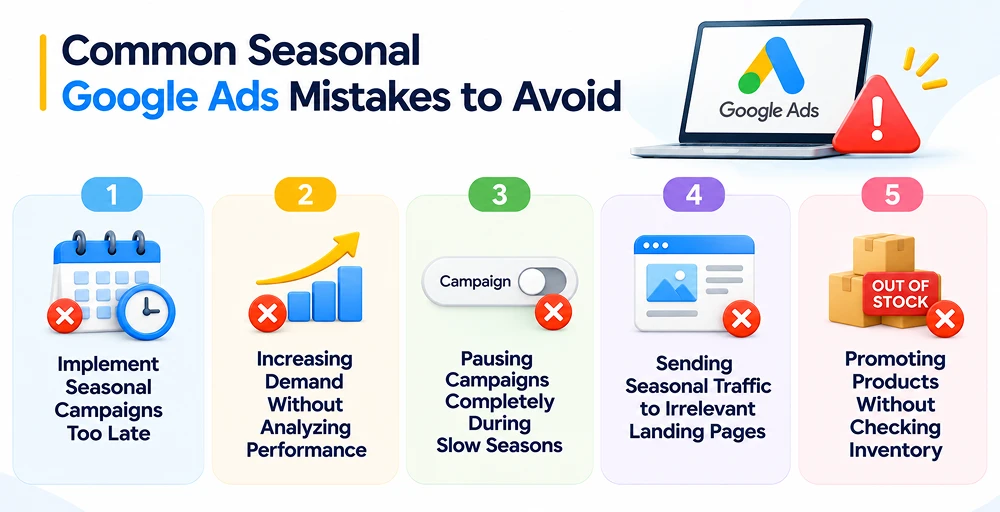
Here are some ways to avoid these mistakes and prepare your Google Ads campaigns before seasonal demand increases.
Implementing Seasonal Campaigns Too Late
Users generally start shopping a month or 2 to 3 weeks before any specific event, holiday, or day.
If advertisers launch ads just before a day, they may miss customer searches and have limited time to test ads, review keywords, and optimize Google ad campaign settings before competition increases.
How to avoid: Start preparing your campaign at least 2 to 4 weeks before the upcoming event. Use previous data and Google Trends to see when demand may rise, then prepare your keywords, ads, and landing pages in advance.
Increasing Demand Without Analyzing Performance
In peak seasons, competition can raise CPC. As a result, advertising becomes more expensive. A higher budget may generate clicks, but it does not guarantee conversions or revenue.
How to avoid: Advertisers should focus on analyzing campaign performance before and during the season. For this, check important aspects like CPC, conversions, cost per acquisition (CPA), and return on ad spend (ROAS) to understand whether additional spending is delivering valuable results.
Pausing Campaigns Completely During Slow Seasons
During off seasons, campaign performance may slow down; this leads businesses to pause their ads. However, some customers may still be looking for products during off seasons. If businesses stop all their campaigns, they may miss these customers.
How to avoid: Adjust campaign budgets based on changes in demand and performance. Reduce spending on campaigns with lower returns while continuing to run those that generate profitable sales or qualified leads.
Sending Seasonal Traffic to Irrelevant Landing Pages
In peak season, users search for more specific products, services, or offers.
If after clicking on your ad, users land on the wrong page, they may leave without exploring further or making a purchase.
How to avoid it: Ensure your landing pages align with your ad messaging and seasonal keywords. Keep product details, prices, promotional offers, and availability up to date, and make it easy for visitors to complete the desired action.
Promoting Products Without Checking Inventory
Seasonal ads generally run for a short time period. If advertised products are out of stock and delivery slots are full, then in this case the business cannot handle additional orders. Also, the campaign may generate costs without achieving expected results.
How to avoid it: Check product availability, stock levels, delivery schedules, and service capacity before launching seasonal promotions. Keep ads and landing pages updated when products become unavailable or offers expire to ensure customers receive accurate information.
Frequently Asked Questions
1. How far in advance should I plan seasonal Google Ads campaigns?
Advertisers should start planning for seasonal Google Ads campaigns at least 3 to 6 months in advance and launch them 4 to 6 weeks before peak season.
2. Does seasonality affect all Google Ads campaign types equally?
No, the effect depends on campaign type, industry, audience, and business goal. Search campaigns may respond directly to changes in query volume, while Display and YouTube campaigns may be influenced by audience activity and seasonal content.
3. Can seasonality affect Google Ads Quality Score?
Yes, seasonality can indirectly affect quality score. Changes in expected click-through rate, ad relevance, and landing page experience can influence its components.
4. Should I use Google’s seasonality adjustments for every seasonal event?
No, there is no need to use Google’s seasonality adjustments for every seasonal event.
When to consider?
- Major, unexpected spikes
- Short timeframes
- Excluding past data quirks
5. Can seasonal trends help businesses discover new advertising opportunities?
Yes. Analyzing emerging search trends can reveal growing customer interests, new keyword opportunities, and seasonal product demand that businesses can incorporate into their advertising plans.
Conclusion
Seasonal demand creates new business opportunities, but it also brings challenges like rising advertising costs, customer intent, and fluctuating conversion rates.
During peak season, businesses that only focus on increasing their budgets may miss the opportunity to improve campaign efficiency and profitability.
It is very important to understand when customers are searching and buying. Check previous data to make decisions. Not only that, but regularly monitoring performance during and after each seasonal event also helps identify what worked and where improvements are needed.