Quick Answer: Impression Share (IS) in Google Ads is the percentage of eligible ad impressions your campaign actually receives. It helps you understand how often your ads appear compared to how often they could have appeared. Low Impression Share can show how many opportunities you miss because of budget limitations or poor Ad Rank. By checking Impression Share (IS), you can identify the problem and take the right action.
Your Google Ads campaign might be getting high click-through rates (CTR), conversions, and bringing quality traffic to your website. But are you reaching everyone who could potentially become your customer?
Not necessarily.
Marketers and business owners often run their ads successfully while missing a large portion of their potential audience. That’s where Impression Share becomes important.
Clicks, CTR, and conversions are metrics that tell you how well your ads perform when they appear. Impression Share (IS) tells you how often they get that opportunity. Marketers who focus on and understand IS are able to identify missed opportunities, manage their advertising budget more effectively, and make better bidding decisions.
Let’s get into the details by exploring:
- What Impression Share Means
- How Google Calculates It
- Which Metrics Should You Monitor
- How To Improve IS Without Increasing Your Ad Costs
What Is Impression Share (IS) in Google Ads?

IS is the percentage of impressions your ads receive compared to the estimated number of impressions they were eligible to receive.
In simple terms, it tells you how often your Google ads appeared when they had a chance to show.
Suppose your business runs Google Ads targeting people searching for digital marketing services and your ads are eligible to appear in 1,000 relevant search auctions during a particular period, but they appear only 600 times. Then, your Impression Share is 60%.
The remaining 40% comprises potential impressions that your campaigns have missed.
However, there’s an important thing to consider: not every search is automatically counted as an eligible impression. Google calculates eligibility using several factors, such as:
- Targeting Settings: It considers your selected keywords, locations, devices, languages, and audience settings to determine which auctions your ads can enter.
- Ad Approval Setup: Your ads must comply with Google’s ad policies and should be eligible to serve.
- Bids and Ad Rank: Whether your ads are worth appearing is influenced by your bids and overall Ad Rank.
- Ad Quality: Factors such as expected CTR, ad relevance, and landing page experience contribute to ad quality and Ad Rank.
You can consider IS as a pie representing all the advertising opportunities your campaign can reasonably compete for. Impression Share will tell you how much of that pie you actually captured.
Impression Share Formula
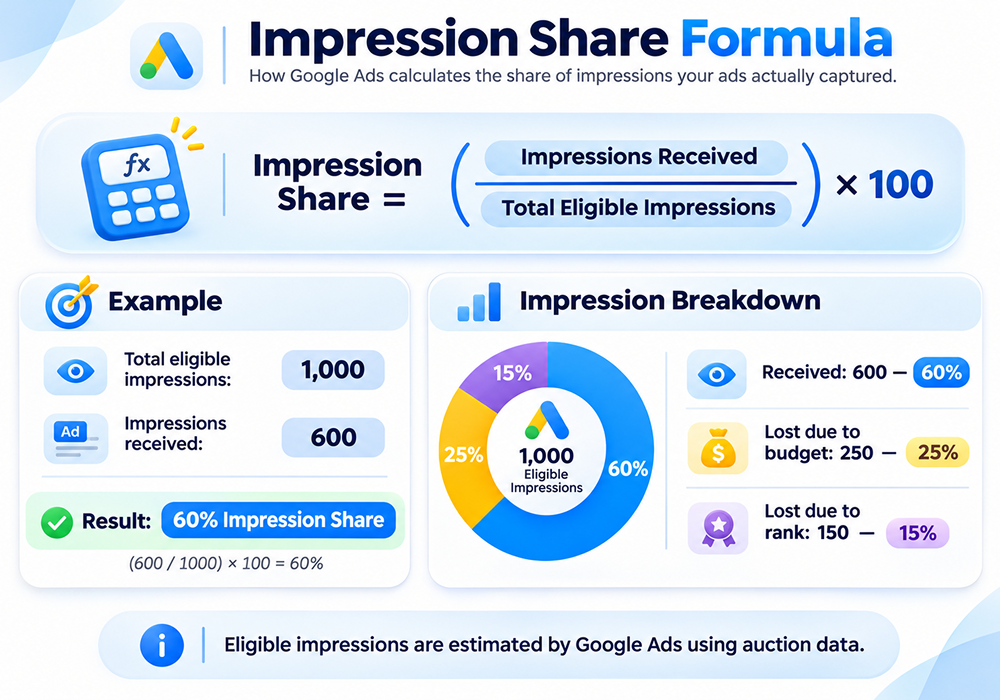
Google Ads calculates IS using a simple formula:
Impression Share = (Impressions Received ÷ Total Eligible Impressions) × 100
Let’s take an example to understand. Suppose your Google Ads campaign has the following numbers:
- Total eligible impressions: 1,000
- Impressions received: 600
When you apply the formula (600 ÷ 1,000) × 100, you get 60% Impression Share, meaning your ads appeared in 60% of the estimated opportunities where they could have shown.
Now, let’s look at why the remaining 40% of impressions were missed.
Impression Breakdown | Number | Percentage |
|---|---|---|
| Impressions received | 600 | 60% |
| Lost due to budget | 250 | 25% |
| Lost due to rank | 150 | 15% |
| Total eligible impressions | 1,000 | 100% |
This example shows that the ads missed out on 25% of potential impressions because of low budget, while another 15% were lost because of Ad Rank.
A key thing to remember: Google calculates the total number of eligible impressions using its auction data. Marketers cannot see the complete denominator directly.
Types of Impression Share Metrics in Google Ads

There are several IS metrics that Google Ads provides. Each one answers a slightly different question about the campaign’s visibility.
Here are the most useful ones:
Metric | What It Measures | When to Use |
|---|---|---|
| Search Impression Share | Percentage of eligible search impressions received. | To measure overall search campaign visibility. |
| Search Lost IS (Budget) | Estimated percentage of impressions missed because of insufficient budget. | To identify budget limitations. |
| Search Lost IS (Rank) | Estimated percentage of impressions missed because of poor Ad Rank. | To identify bidding or ad-quality issues. |
| Search Absolute Top IS | Eligible impressions received in the very first ad position. | To measure first-position visibility. |
| Search Exact Match IS | Impression Share for searches matching your keywords exactly or through close variants. | To evaluate visibility for more closely matched searches. |
| Display IS | Percentage of eligible Display Network impressions received. | To measure visibility across Display placements. |
Display and Shopping campaigns might have some differences in how impression opportunities are calculated, so avoid comparing their metrics directly with Search campaigns.
Search Top IS vs. Search Absolute Top IS
Marketers often get confused between these two metrics, but they measure different placements. Search Top IS tells you how often your ads appeared among the ads above organic search results compared with the eligible top-of-page opportunities. Whereas Search Absolute Top IS measures how often your ads occupied the very first ad position among those opportunities.
For example, your ad might appear above organic results without being the first ad. That impression contributes to Top IS, but not necessarily Absolute Top IS.
Both metrics are especially useful when brand visibility is important. Google also allows advertisers to use Target Impression Share bidding to focus on top-of-page or absolute-top placements.
Why Does Impression Share Matter in Google Ads?
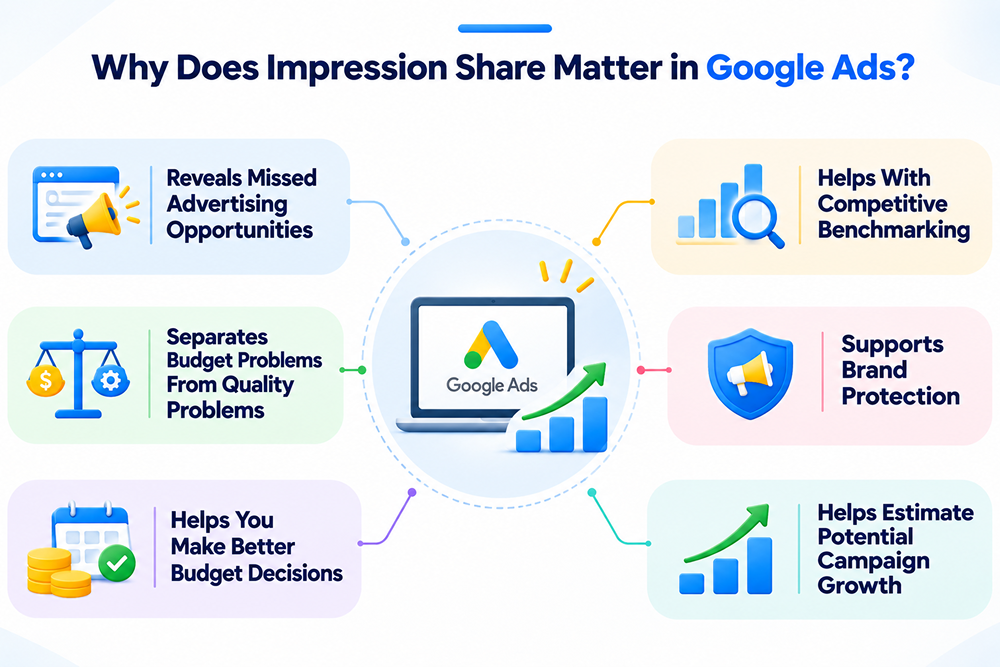
Impression Share cannot be considered just another reporting metric. It helps you understand whether your advertising budget and campaign setup are allowing you to capture available demand.
Here are some reasons why it matters:
1. It Reveals Missed Advertising Opportunities
A campaign can generate good results and still miss a significant number of eligible impressions. A low IS indicates that your ads aren’t capturing all the opportunities Google estimates were available to them. This gives you a reason to investigate whether competitors are gaining visibility in auctions you’re missing.
2. Separates Budget Problems From Quality Problems
One of the biggest advantages of IS is that it helps identify why your ads aren’t appearing. Search Lost IS (Budget) highlights budget-related limitations, while Search Lost IS (Rank) points towards Ad Rank issues.
This distinction matters because increasing your budget won’t necessarily solve a campaign that’s losing impressions because of poor Ad Rank.
3. Helps You Make Better Budget Decisions
Should you increase your advertising budget or keep spending at the current level? IS can help you answer the question.
If a profitable campaign has high Lost IS (Budget), increasing its budget could create opportunities for additional impressions, clicks, and conversions.
However, if the campaign isn’t giving you profits through conversions, capturing more impressions may only increase your costs.
Also Read: Most Common PPC Budget Mistakes
4. Helps With Competitive Benchmarking
IS becomes even more useful when combined with Auction Insights. While Impression Share shows how much of your eligible opportunity you’re capturing, Auction Insights provides information about other advertisers competing in the same auctions.
You can use both reports to understand changes in competitive visibility and identify campaigns where competitors may be gaining ground.
5. Supports Brand Protection
When someone searches for your business name, you generally want your official website and messaging to remain highly visible.
A high IS on branded campaigns can help you maintain that visibility, particularly when competitors are bidding on your brand-related keywords. This is especially relevant for businesses operating in competitive industries.
6. Helps Estimate Potential Campaign Growth
IS can help you find out whether there may be room to grow an existing campaign. For example, if a profitable campaign has 65% IS and significant Lost IS (Budget), you can investigate whether additional budget could capture more opportunities.
However, remember that more impressions don’t guarantee more conversions. Forecasting should also consider CPC, conversion rate, competition, and profitability.
How To Improve Impression Share in Google Ads?

Once you understand why your ad campaign is not getting impressions, you can take steps to improve its visibility.
The right approach depends on whether you’re losing impressions because of budget or Ad Rank.
1. If You’re Losing Impressions Due to Budget
If Search Lost IS (Budget) is high, your campaign may not have enough budget to participate in all the eligible auctions.
Try these approaches:
- Increase your daily budget: If a campaign consistently generates profitable conversions, consider increasing its budget gradually to capture more opportunities.
- Redistribute spending: Move budget away from underperforming campaigns and prioritize those generating better business results.
- Review ad scheduling: If certain hours or days generate better conversions, evaluate whether your budget allocation reflects those patterns.
- Use shared budgets carefully: Shared budgets can distribute spending across multiple campaigns. However, monitor individual campaign performance to ensure your priorities aren’t being ignored.
2. If You’re Losing Impressions Due to Rank
When Search Lost IS (Rank) is high, increasing your budget alone may not solve the problem. Your Ad Rank needs attention.
Here’s how you can improve it:
- Improve ad relevance: Write Google ad copy that closely matches the keywords and search intent you are targeting. Users should immediately understand how your offer addresses their needs.
- Enhance landing page experience: Make sure your PPC landing page is relevant, useful, easy to navigate, mobile-friendly, and consistent with your ad messaging.
- Review your bids: Increase your bids for high-intent keywords where additional visibility could generate profitable results.
- Use relevant ad assets: Add suitable sitelinks, callouts, structured snippets, and other available assets to make your ads more useful and informative.
- Remove irrelevant keywords: Review your search terms report and add negative keywords where appropriate. This helps reduce competition for irrelevant traffic and keeps your targeting focused.
It is important to remember that Ad Rank depends on more than your bid. Ad quality, auction competition, thresholds, search context, and the expected impact of ad assets also matter.
3. Consider Target Impression Share Bidding
If your main goal is visibility, Google’s Target Impression Share bidding strategy may be worth considering.
It automatically adjusts bids to help your ads appear at your selected placement:
- Anywhere on the search results page
- Among the top ads
- At the absolute top of the page
You can also set a target percentage and a maximum CPC bid limit.
However, use this strategy carefully. Google may increase bids to achieve your visibility target, potentially resulting in higher CPCs. It’s generally more suitable for campaigns where visibility is the priority, such as branded campaigns, rather than campaigns where profitability and conversion volume are the main objectives.
Should You Aim for 100% Impression Share?
Not necessarily.
A 100% IS sounds attractive because it means capturing every eligible impression. But achieving it isn’t always financially sensible.
As you compete for more impressions, you may need higher bids or a larger budget. This can increase your CPC and reduce your overall return on advertising spend (ROAS). Instead of chasing the highest possible percentage, focus on an Impression Share that supports your business goals.
Here’s a practical way to approach it:
- Brand campaigns: Aim for high IS, particularly for important brand-related searches where maintaining visibility is valuable.
- Non-branded campaigns: Prioritize profitable keywords and conversions. A lower IS can be perfectly acceptable if the campaign delivers strong returns.
- Competitor campaigns: Be selective. Competing for every impression on another brand’s keywords may become expensive without generating enough conversions. Know how to perform competitor analysis for paid ads.
There’s no universal IS percentage that works for every campaign. The better approach is to aim for optimal Impression Share, not the highest IS.
Frequently Asked Questions
1. What is a good Impression Share in Google Ads?
A good Impression Share depends on your campaign objectives, competition, and budget. The general rule is that brand campaigns should be visible, and non-brand campaigns should aim for profitable traffic, rather than achieving a certain percentage.
2. What is the difference between Impression Share and impressions?
Impressions are the count of how many times your ads were displayed. Impression Share is the percentage of the estimated impressions your ads earned. The first measures your visibility volume; the second measures your visibility opportunities.
3. Why is my Impression Share low?
Low Impression Share can be caused by a lack of budget, low Ad Rank, competitive keywords, or narrow targeting. Check Search Lost IS (Budget) and Search Lost IS (Rank) to identify the main reason.
4. Is a higher Impression Share always better?
No, higher IS can improve visibility, but it may also increase advertising costs. If additional impressions don’t generate valuable clicks or conversions, increasing Impression Share may not improve campaign profitability.
5. How can I increase Impression Share without raising my budget?
Optimize your budget for high-intent keywords, pause low-performing campaigns, eliminate irrelevant search terms, enhance ad relevance, and target specific locations and audiences that convert. Better budget allocation can help capture more valuable impressions.
The Final Words
Impression Share (IS) helps you understand something that clicks and conversions alone cannot: how much of your available ad opportunity you’re actually capturing. But knowing your IS percentage is only the first step. You also need to understand why you’re missing impressions, whether it’s due to budget limitations or poor Ad Rank, and what actions make financial sense.
Start by checking your Search Impression Share and Lost IS metrics. Identify the campaigns with the greatest potential, improve their visibility, and monitor how those changes affect conversions and costs.
Remember, successful Google Ads management isn’t about showing your ads everywhere; it’s about showing them to the right people at the right time without wasting your ad budget.
If you need help identifying missed opportunities in your campaigns, get a free Google Ads account audit or consultation with AdWords PPC Expert.