For running Google Ads campaigns, it is important to choose the right keywords to reach your target audience. Besides this, you also need to understand what your target audience is searching for.
Keywords and search terms are different terms. Google Ads keywords are the words or phrases advertisers add to their campaigns to target relevant searches, while search terms are the actual queries people enter into Google that may trigger their ads.
These terms are closely related, as they help to identify valuable traffic, reduce irrelevant clicks, and improve campaign performance.
Continue reading this blog for a deeper understanding of how Google matches keywords to search terms and how to analyze search-term reports.
Key Takeaways
- Search terms are the words or phrases searched by users.
- Google ad keywords are the words targeted by the advertizers.
- Search term reports help to identify real words or phrases searched by users.
- Reviewing conversion value, CPC, and return on ad spend helps identify valuable search terms.
- Adding irrelevant queries as negative keywords helps reduce unwanted ad exposure and improve budget efficiency.
- Google evaluates search intent, keyword match types, and other aspects to determine which ads can enter an auction.
What are keywords in Google Ads and how does Google Match Keywords to Search Terms?
Google Ads keywords are words or phrases advertisers add to Search campaigns to help determine which relevant Google searches may trigger their ads.
Here, I have explained how these words or phrases are targeted with a helpful example.
You run a digital marketing agency in the USA. The goal is to attract businesses looking for Google Ads services.
Now, after keyword analysis, you may target keywords like :
Google ads agency
Ads services
Google ads agency in USA
Google ads services for small firms
If Google finds a query like “best Google ads agency in USA for small business”, it may be possible that Google shows your ad to users because your targeted keywords and the user’s search intent are closely related.
Here, Google ads agency, Ads services, Google ads agency in USA, and Google ads services for small firms are keywords.
But have you ever thought about how Google matches keywords to search terms?
Here, I have explained it with the help of simple steps.
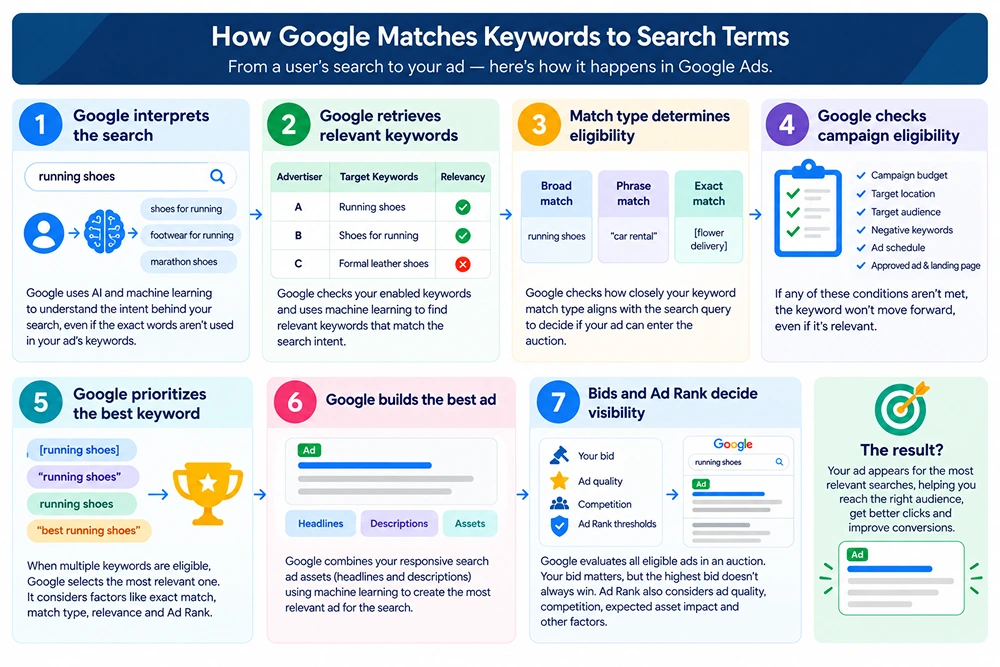
Step 1: Google interprets the search
The keyword matching process starts with users’ queries. After typing a query, Google processes users’ queries using advanced AI and machine learning models like RankBrain, BERT, and MUM, which are specifically designed to understand the true intent behind the user’s search.
For example, if you simply search for “running shoes”, Google may understand related concepts such as “shoes for running,” “footwear for running,” or “marathon shoes.”
It simply means your ad does not need to contain the same words as the user’s queries.
Step 2: Google Retrieves Relevant Keywords
After understanding search intent, Google finds relevant keywords that could potentially match it. It considers the advertiser’s enabled keywords and uses machine learning and natural-language understanding to assess relevance.
For example, a user searches for “best running shoes for beginners”; now, there are an infinite number of similar businesses competing for the closely related keyword.
Advertiser |
Target Keywords |
Relevancy |
|---|---|---|
| A | Running Shoes | Yes |
| B | Shoes for running | Yes |
| C | Formal leather shoes | No |
Google may retrieve keywords A and B as they are closely related to the user’s query.
At this stage, Google has not yet decided which ad will show. It simply identifies keyword candidates from accounts that may be relevant to the search.
Step 3: Match Type Determines Eligibility
After identifying relevant keywords, Google evaluates keyword match type to check how closely a user’s search queries align with an advertiser’s target keyword and, therefore, its ad to become eligible to enter the ad auction.
For this, Google Ads uses mainly three keyword match types: broad match, phrase match, and exact match.
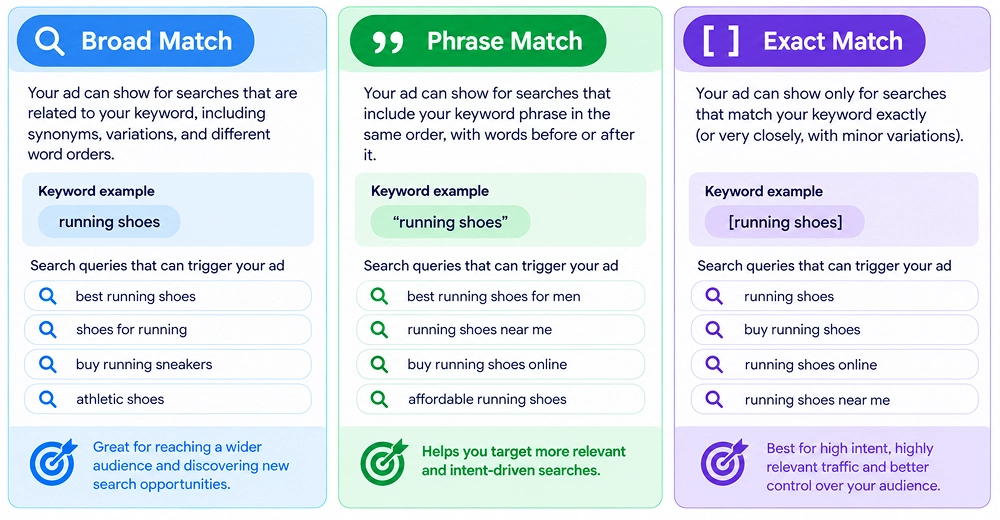
Broad Match
This is a default keyword match type that allows your ads to appear on Google search results even when a user’s query does not contain words related to your target keyword.
For example, if your targeted keyword for an ad is ” running shoes, ”
As we know, users search for a particular query in many different ways
For this keyword, users may search like “best shoes for jogging”, “marathon footwear”, “running sneakers for beginners,” or “comfortable shoes for running”
You don’t need to add these particular search terms to your keywords. Your ad may be eligible for searches, as it only needs to be relevant to the user’s intent.
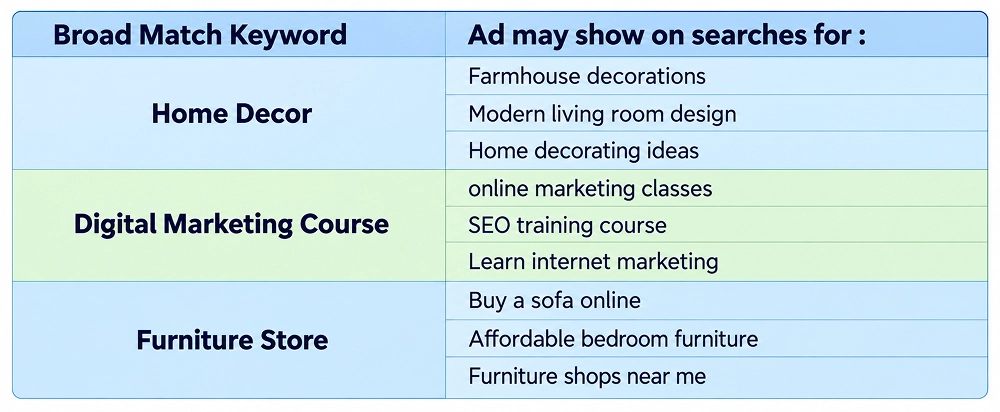
More examples:
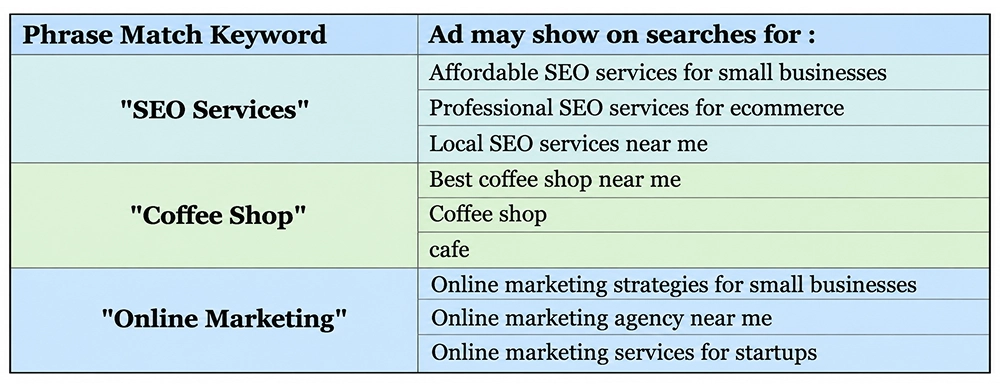
Phrase Match
Phrase match allows ads to appear for searches that include the meaning of your targeted keyword. These keywords are written inside quotation marks.
As we know, users never search for exact keywords you targeted; they may contain additional words, and Google considers variations that preserve the keyword’s meaning.
For example, you target the keyword for an ad: “car rental“. Your ad may be eligible to appear for searches such as “cheap car rental near me”, “car rental at the airport”.
However, a search such as “car repair near me” would not normally match because repairing a car has a different intent from the targeted keyword.
More examples :
Exact match
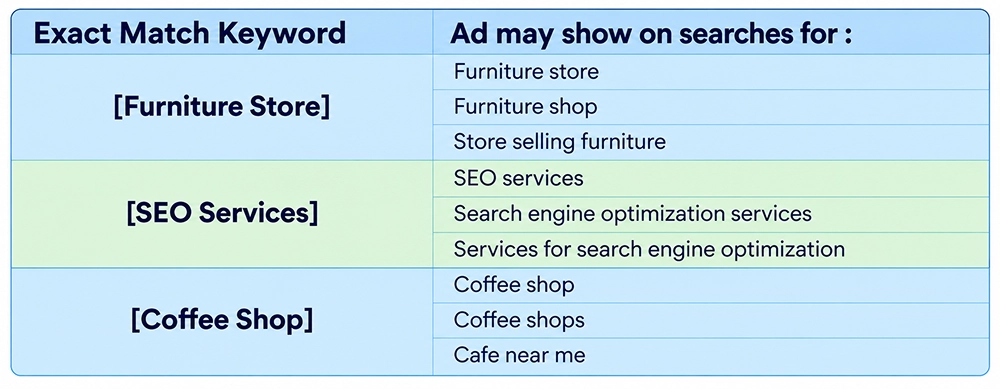
Exact match allows your ad to appear when a user’s search has the same meaning or intent as your keyword, including certain close variants. These keywords are written by placing them inside square brackets.
For example, suppose you run an online flower delivery business and want to reach people looking to send flowers. You target the keyword [flower delivery].
Your ad may be eligible to appear for searches such as flower delivery, flowers delivered, deliver flowers.
More Examples :
Step 4: Google Checks Campaign Eligibility
Google checks more than just keyword match type before an ad can appear.
Google checks factors such as:
- Campaign budget
- Target location
- Target audience
- Negative keywords
- Ad schedule
- Whether the ad group has an approved creative and landing page
If any of these conditions block the ad, the keyword will not move forward, even if it is relevant to the search.
Step 5: Google Prioritizes the Best Keyword
If your account contains more than one keyword that is eligible for a similar user search query, then Google does not automatically send every keyword into the auction.
For example, you target keywords like [running shoes], “running shoes”, running shoes, or “best running shoes”.
And a user searches for the best running shoes for beginners.
All of your target keywords may be eligible, but Google must choose one keyword so that only one ad from the same domain competes in the auction.
And for this, Google prioritizes and identifies keywords through a strict 4-step hierarchy based on exactness, keyword match type, relevance, and Ad Rank.
This step is important because it determines which ad, landing page, and bidding strategy will represent the advertiser in that particular auction.
Step 6: Google Builds the Best Ad
After Google selects the most appropriate keyword, it determines which version of the ad should represent that keyword in the auction.
This is done through responsive search ads (RSAs), which use machine learning to automatically mix and match multiple assets such as headlines and descriptions that you provide.
Google then mixes and matches these components into customized ad variations to match a user’s specific search query.
Step 7: Bids and Ad Rank: Decide Visibility
After completing all major steps, Google evaluates competing ads through the ad auction. Your bid is important, but it is not important that the highest bidder wins the top position.
For this, Google uses Ad Rank; it basically decides whether an ad is eligible to appear and where to show on the search engine results page (SERP).
Ad Rank considers several factors :
1. Your Bid
2. Ad quality
3. Competition
4. Ad Rank Thresholds
For example, you are searching for “best running shoes for beginners,” and two advertisers have relevant keywords and eligible ads, but their bids and ad quality differ.
Factors |
Advertizer A |
Advertizer B |
|---|---|---|
| Target Keyword | Running shoes | Running shoes |
| Bid | $3.00 | $2.00 |
| Ad quality | More relevant ad and landing page | Less relevant ad and landing page |
Advertiser A may achieve a higher ad position even though both advertisers target the same keyword. However, the highest bid does not automatically win the top position. Google also considers other factors, such as Ad Rank thresholds, competition, and the expected impact of ad assets.
What is a search term, and how to Use Search Terms to Optimize Your Google Ads Campaigns?
Search terms are words, phrases, or questions that users type into search engines (Google, Bing, Yahoo).
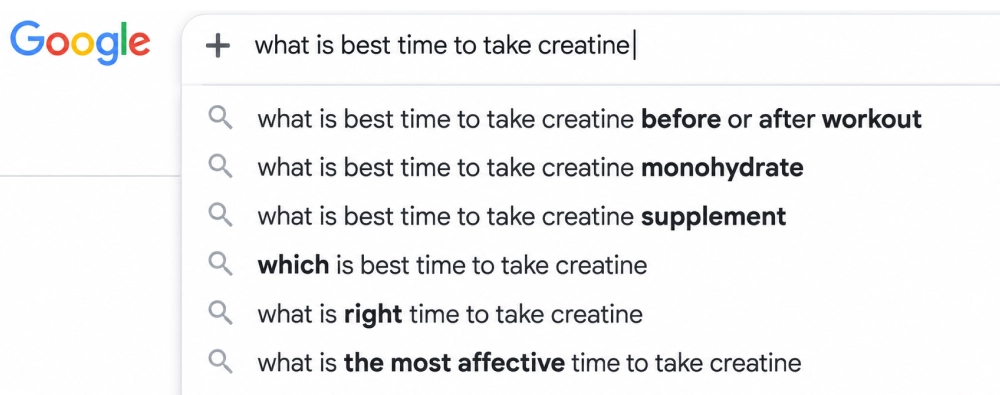
These search terms are mainly categorised under informational, commercial, navigational, transactional, and conversational queries.
Search term |
Search Type |
|---|---|
| How to fix Google Ads limited by budget? | Informational |
| Best laptops 2026 | Commercial |
| Amazon Prime Video | Navigational |
| Buy red roses online | Transactional |
| What's the best Italian restaurant near me that has outdoor seating? | Conversational |
Why is the search term important?
It discloses the difference between what you intended to target for your ad and what users actually search for.
For example, if you target a broad-match keyword, sports shoes, the best possibilities are “best sports shoes for running” or “sports shoes for beginners”; for these keywords, your ad may appear in search results.
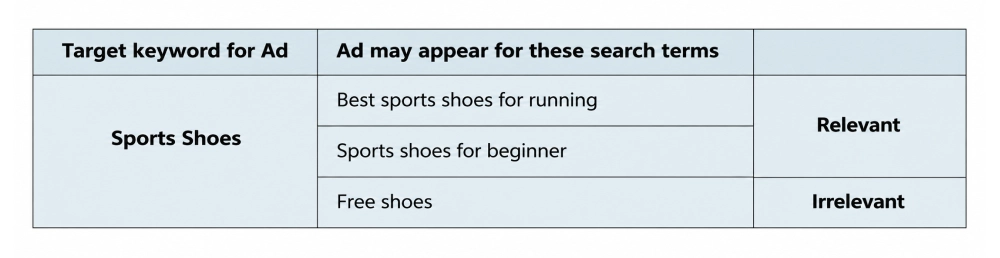
Without proper analysis of search terms, you will never find which queries are generating conversions.
After knowing what the search terms are, you must know how you can use search terms to optimize your Google Ads campaigns in real time.
For this, here are some simple steps you need to follow :
1. Review the search term reports regularly
A search term report is a performance tool that shows real words or phrases typed by users on Google that triggered your ads to appear.
To view the search term report, in your Google Ads account > go to the campaign > Search terms in Insights and reports.
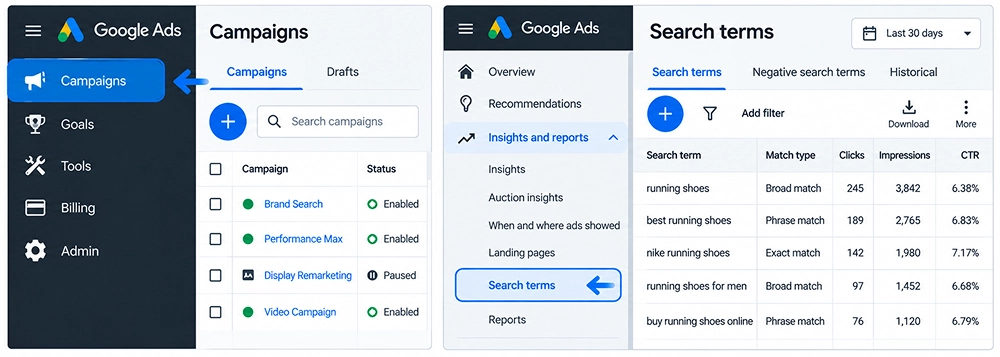
In the search term report, you find queries typed by users that have triggered clicks and impressions.
2. Identifying high-performing search terms
Start identifying search terms with strong conversion performance, which include :
- High conversion rate
- Low cost per conversion
- High conversion value
- Strong return on ad spend
Google recommends prioritizing terms that are already receiving traffic.
3. Add irrelevant terms as negative keywords.
There are many keywords that do not produce any monetary results; they just consume budget and do not convert. Add those terms as negative keywords.
For example,
For “running shoes”, negative terms may include: Free, Try, DIY, Jobs
Adding free as a negative keyword tells Google not to show my ad whenever someone searches for words or phrases including the word free.
4. Choose an accurate negative match type
For this, match the level of restriction you want to block irrelevant traffic.
Keyword |
How it works |
Format |
When to use |
Example |
|---|---|---|---|---|
| Negative broad match | Your ads will never show if the search queries contain all of the words in your negative keyword, in any order. | No brackets or quotes (e.g., Green boots) | Consider when specific words are not relevant to your business. | Free, jobs, DIY |
| Negative Phrase Match | Your ads will never show if the search query contains the exact word sequence, in that exact order, even if there are additional words before or after the phrase. | Enclosed in quotation marks (e.g., "running shoes") | Use this when a specific multi-word phrase is irrelevant in that specific sequence. |
Red running shoes (extra word: red) Running shoes for men (extra word: men) |
| Negative Exact Match | Your ads will never show if the search contains the exact keyword terms, in the same order, without extra words. | Enclosed in square brackets (e.g., [blue handbag]) | Use this when you want maximum control to block a single, specific query. | Blue handbag |
5. Apply negatives at the correct level.
To filter out irrelevant traffic, negative keywords are generally applied at 3 levels, explained below :
1. Account level :
This generally includes those terms which are never relevant to your campaign across your entire business.
For example: free, login, spam
2. Campaign level :
In this, we mainly focus on those terms that are irrelevant to a specific product or region but may be suitable for any other campaign.
For example, if you run two separate campaigns for “white sports shoes” and “Blue Shoes,” you may add “white” as a negative keyword to the blue shoes campaign.
3. Ad Group level :
When multiple ad groups within the same campaign compete against each other for similar queries.
For example, if you have separate ad groups for “Running Shoes” and “Hiking Shoes,” add “hiking” as a negative keyword to the Running Shoes ad group.
6. Improve ad-group structure
It focuses on organizing keywords and ads around single-intent themes, so your messaging matches what users are searching for.
Difference Between Search Terms And Google Ads Keywords
After discussing in depth what search terms and Google Ads keywords are, here is a quick difference between both terms.
Key points |
Search Terms |
Keywords |
|---|---|---|
| Meaning | Search terms are the words or phrases typed by users for a specific search | Keywords are words or phrases advertisers add to Google Ads to target relevant searches |
| Main purpose | It specifies which searches actually triggered your ads | It tells Google which searches you want to target |
| Match types | These are real queries searched by users | It includes broad, phrase, and exact match types |
| Where to see | Visible in the Keywords section | Visible in the Search terms report |
| Use | Optimization, negatives, new keyword discovery, and intent analysis | Campaign structure, targeting, bidding, and ad-group organization |
| Example | “best running shoes for beginners,” “running shoes under 5000” | running shoes, "running shoes", [running shoes] |
Common Keyword and Search-Term Mistakes to Avoid
Understanding keywords and search terms is essential for running effective Google Ads campaigns. Here are common mistakes to avoid :
Keyword mistakes to avoid |
Search term mistakes to avoid |
|---|---|
| Focusing only on search volume without understanding what and why users are searching leads to poor engagement and low conversions. | Focusing only on targeting keywords without understanding whether the user wants to buy something or find a specific website leads to poor engagement and low conversions. |
| Forcing exact-match keywords unnaturally into your text hurts readability and triggers search engine penalties. | Focusing mainly on the same phrase repeatedly makes content unreadable and can trigger search engine penalties. |
| Adding too many similar keywords without organizing them into relevant ad groups can make campaign management and ad optimization difficult. | Ignoring the Search terms report can cause you to miss irrelevant queries that waste your advertising budget. |
| Assuming exact match keywords will trigger ads only when users type the same words can lead to incorrect targeting expectations. | Adding every search term as a new keyword without checking its relevance, conversions, or business value can create unnecessary account complexity. |
Frequently Asked Questions
1. How do I stop ads from showing for irrelevant search terms?
You can prevent ads from showing for irrelevant searches by reviewing your Search terms report and adding unsuitable queries as negative keywords.
2. What is AI Max for Search campaigns?
AI Max is an AI-powered feature in Google Ads that is specifically designed for advertisers to expand their reach beyond traditional keyword targeting.
3. Do keywords still matter in AI search?
Yes, keywords play an important role in Google Ads because they help advertisers communicate their targeting preferences and connect ads with relevant search intent.
4. How AI Is Changing Google Ads Keyword Targeting?
With the advancement of AI, targeting keywords become more intent -focused. Google systems not only consider words or quires searched by users but also focus on understanding the reason behind each search and context. This can expand reach beyond the original keyword, making search term monitoring, conversion tracking, and negative keyword management increasingly important.
5. Where can I find search terms in Google Ads?
You can find search terms by opening your Google Ads account, navigating to Campaigns, and selecting Search terms under the Insights and reports section. The exact navigation may vary depending on your account interface.
Conclusion
To properly create and manage Google Ads, it’s important to know the difference between keywords and search terms. Keywords help advertisers communicate which searches they want to target, whereas search terms disclose which actual search phrases can activate ads.
By understanding search terms, one can find important traffic sources and new keyword opportunities and eliminate irrelevant searches.
With the advancement of AI, keyword matching is becoming more focused on search intent and meaning rather than identical wording alone.
A successful Google Ads optimization not only focuses on keyword targeting, but it also involves regularly reviewing search terms, understanding customer intent, evaluating conversions, and making informed targeting decisions.
By combining relevant keywords with ongoing search-term analysis, businesses can improve campaign efficiency and focus their advertising budget on more valuable opportunities.