
Key Takeaways
- Google Ads assets add useful information such as links, phone numbers, prices, images, and business details to your ads.
- Assets can make ads more useful and visible, which can help increase clicks and conversions.
- Google Ads supports manual and automated assets. Manual assets are created by advertisers, while Google can create some assets using available business and website information.
- Google decides which assets to show for each search based on factors such as the query, ad context, Ad Rank, and expected performance.
Want to find ways to improve your ads and get better performance? If so, this blog has something useful for you, whether you’re trying to improve results for your clients or your own business.
In WordStream’s 2026 benchmark study of more than 13,000 U.S.-based campaigns, the average Google Ads CTR was 6.64%, while the average conversion rate was 8.18%.
Stats are heartbreaking as Google Ads is an expensive marketing. Google Ads extension extracts each dollar that you spend.
What many advertisers used to call ad extensions is now officially called assets in Google Ads. They are an important part of your campaign because they give potential customers more information and more ways to interact with your ad.
Using the right assets can help you make your ads more useful, improve visibility, and give people more reasons to click.
And there’s a reason to pay attention to them. Google recommends using at least four different asset types in Search campaigns, while its own guidance says that multiple asset types can improve ad performance.
In this blog, we’ve researched and reviewed different Google Ads assets in detail. So instead of going through countless resources, you’ll know which assets you can use, where they fit, and how they can support your campaigns.
Let’s get started.
Table of Contents
- Why Google Ads Assets Matter
- How Google Decides Which Assets to Show
- Google Ads extension or Assets: What to use and when
- Common Mistakes to Avoid
- Final Says!
Why Google Ads Assets Matter
Google Ads assets provide more relevant information on the search results page. This can make your ads more useful and prominent, which may help increase clicks and conversions.
There are two main ways assets can be added: automated and manual. With automated assets, Google can use information from sources such as your website, Google Business Profile, or other data to create relevant assets. With manual assets, you provide the information and set them up yourself.
Google considers the expected impact of your assets along with your bid, ad quality, landing-page quality, Ad Rank thresholds, auction competition, and search context when deciding whether and where your ad can show.
And adding assets itself doesn’t cost anything. You’re charged as usual when someone clicks your ad or certain assets, while seller-rating clicks are an exception.
How Google Decides Which Assets to Show
- Google selects assets dynamically for each search query and ad auction.
- An approved asset may not always appear.
- Google may skip an asset if it is not expected to improve the ad’s performance.
- Ad Rank also matters — a low Ad Rank can prevent eligible assets from showing.
Manual vs. automated assets:
- Manual assets: You create and control the message, such as sitelinks, callouts, and promotions.
- Automated assets: Google generates or selects assets using information from your website and other available signals.
- Review automated assets regularly: They can become outdated or show messaging that no longer matches your offer, landing page, or brand.
- Key point: Adding more assets does not mean Google will show all of them. It chooses the combination most likely to help the ad in each auction.
Google Ads extension or Assets: What to use and when
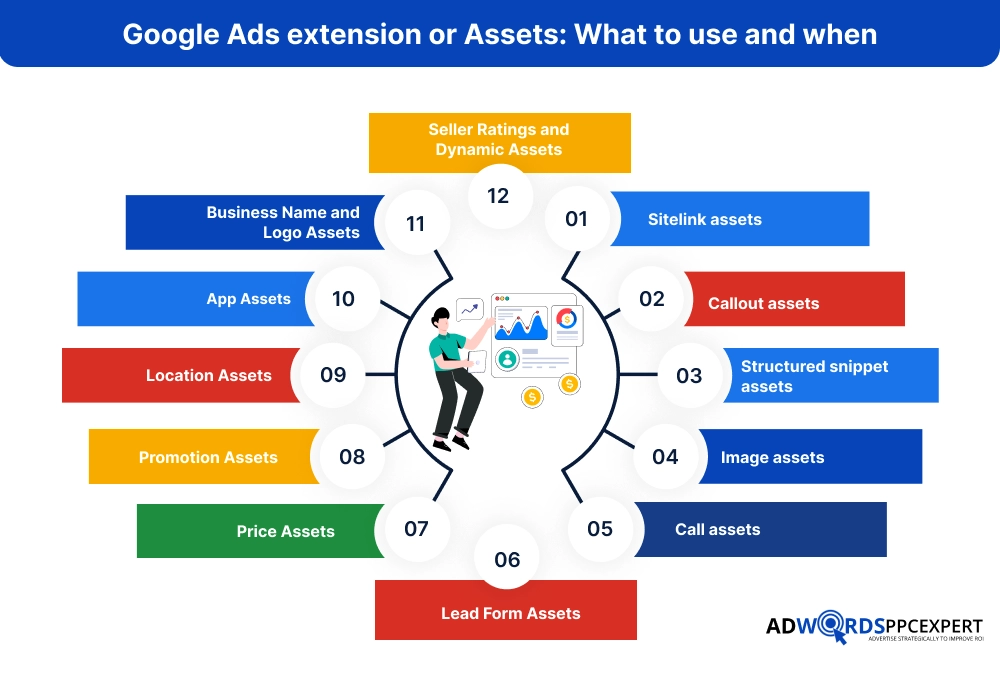
1. Sitelink assets:
Sitelink assets give your Search ad additional paths to different pages on your website. Instead of sending everyone to the same page, you can let users choose the page that best matches their buying intent.
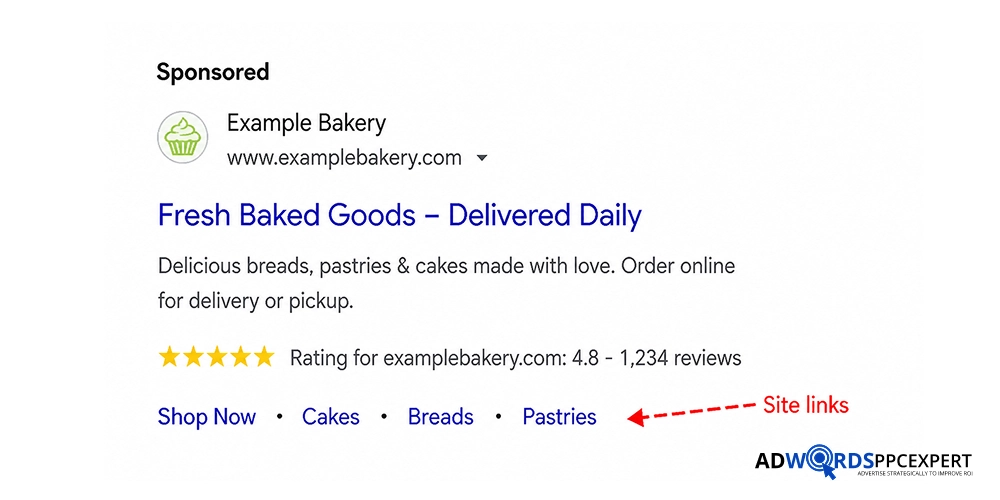
For example, an SEO agency advertising its services could show:
SEO Services | SEO Pricing | Case Studies | Book a Consultation
Someone comparing agencies may click Case Studies, while a user ready to enquire can go straight to Book a Consultation.
Best pages to use:
- Service or product pages
- Pricing pages
- Product categories
- Case studies and reviews
- Demo, booking, or contact pages
- Location pages
- Relevant offers
Best practices:
- Give each sitelink a clear, different purpose.
- Use specific text such as “SEO Pricing” rather than “Learn More.”
- Make sure the destination page matches the sitelink.
- Prioritize pages that help users evaluate, compare, or take action.
- Add several relevant sitelinks so Google has more options to show.
- Check which sitelinks generate clicks and conversions, then improve weaker ones.
One important point: Sitelinks are not guaranteed to appear every time. Google decides which eligible assets to show based on factors such as the search, ad context, available space, and expected performance.
The goal isn’t to add more links just to make the ad larger. Use sitelinks to answer the next question a potential customer is likely to have—“How much does it cost?” “What services do you offer?” “Can I see your results?” or “How do I get started?”
2. Callout assets:
Callouts give you a little more room to tell searchers why your offer is worth considering. They appear as short, non-clickable phrases alongside your ad, so there’s no page to send the user to.
For example, a cleaning company might highlight:
24/7 Support · Free Estimates · Eco-Friendly Products · Flexible Contracts
These details may not deserve a headline, but they can still influence the decision to click.
The trick is to use callouts for real advantages, not to repeat what the ad already says. If your headline says “24/7 Emergency Plumbing,” adding “24/7 Service” as a callout wastes the space. Something like “Upfront Pricing” or “Licensed Plumbers” gives the searcher new information.
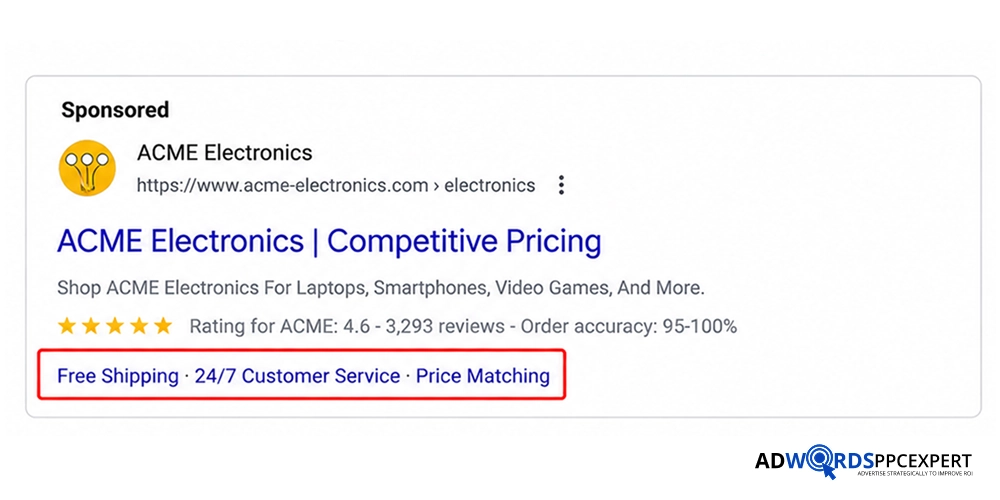
Good callouts usually answer questions like:
Is there free delivery or an estimate?
Can I get help outside normal hours?
Is there a contract?
Are returns easy?
Is the service available the same day?
What makes this business easier or safer to choose?
Keep them short, specific, and believable. Avoid filling them with generic claims such as “Best Service” or “Top Quality.” A phrase like “No Long-Term Contract” tells the customer something concrete; “Exceptional Service” doesn’t.
You can add multiple callouts to a campaign or account, giving Google different options to use depending on the search and available ad space. Not every callout will appear every time, so your core offer should still be clear in the main ad copy.
3. Structured snippet assets
Structured snippets help searchers see what you actually offer before they click. They appear with a predefined header, followed by a list of relevant items.
They work best when your business has several services, products, brands, or categories that people may want to compare quickly.
Choose the header that accurately describes your list and keep the values specific. Don’t use them to make promotional claims such as “Best Services” or “Lowest Prices”; structured snippets are meant to describe your offering, not sell it.
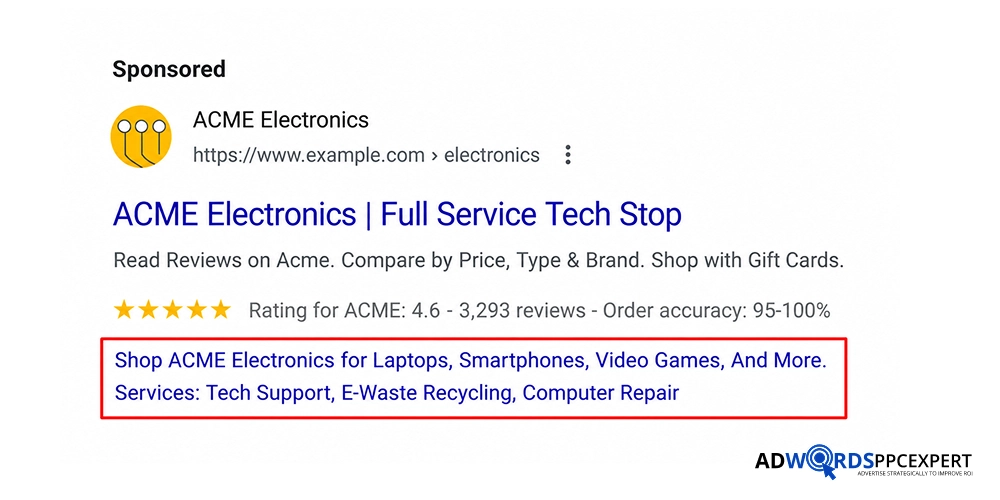
Best practice: Keep the information accurate, relevant to the ad, and easy to scan. Use multiple relevant values where appropriate, but don’t add unrelated services just to make the asset look fuller. Also remember that Google decides when eligible structured snippets appear, so they won’t necessarily show with every impression.
4. Image assets
Image assets add relevant visuals to your Search ads, helping people understand the product, service, property, or business before they click. They are particularly useful when an image can communicate something that ad text cannot—for example, a completed construction project or a product being sold.
Use multiple relevant images, rather than relying on one. For Search campaigns, Google recommends providing both square (1:1) and landscape (1.91:1) images so it has suitable options for different placements.
Choose clear, high-quality images that directly relate to the ad and landing page. Avoid generic visuals, heavy text overlays, or images that don’t represent the actual offer.
Best practice: Give Google a small but varied set of useful images—different products, projects, angles, or situations. Remember that Google decides when an image asset appears, so adding an image doesn’t guarantee it will show with every ad.
5. Call assets:
Call assets add a phone number or call option to your Search ad, making it easier for people to contact your business without first visiting your website.
They are most useful when a phone call is a valuable part of the sales process, such as for law firms, home services, clinics, real estate, and other businesses that qualify or close leads by phone.
The important part is call conversion tracking. Don’t count every call as a lead – track which calls came from your ads and, where possible, measure meaningful calls based on factors such as call duration.
This helps you see whether the asset is generating genuine enquiries rather than just increasing phone activity.
For businesses that depend heavily on phone leads, make sure the number reaches someone who can actually answer during the hours your ads are running. A call asset is only useful if the person on the other end can turn that call into a real opportunity.
6. Lead Form Assets
Lead form assets let people submit their details directly from the ad, without having to visit your website first. This removes a step from the journey and can work well for businesses where the main goal is generating enquiries, quote requests, or consultation leads.
The advantage is lower friction, but that can also bring less-qualified enquiries. A short form may generate more submissions, while adding useful qualifying questions can help filter out people who aren’t a good fit. Don’t judge the asset only by cost per lead; compare the number of leads that actually become qualified opportunities or customers.
Use lead forms when convenience matters and the offer is clear enough for someone to enquire directly from the ad. If your service requires customers to read detailed information before contacting you, sending them to a dedicated landing page may produce better-qualified leads.
7. Price Assets
Price assets show products or services and their prices directly with your Search ad, giving potential customers an idea of cost before they click. This is particularly useful when you have clear pricing, starting prices, packages, or standardized services.
The biggest benefit is pre-qualification. Showing that a service starts at $1,500 can discourage clicks from people expecting a $200 service, while making the ad more relevant to buyers who are comfortable with that price range.
Keep the displayed price accurate and consistent with the actual offer. If the price only applies under specific conditions, make that clear on the landing page rather than using a misleadingly low figure simply to attract clicks.
8. Promotion Assets
Promotion assets make a limited-time offer visible alongside your Search ad without forcing you to rewrite the main ad every time a sale or discount changes. You can use them for offers such as 20% off, $100 off, seasonal sales, or special customer discounts.
They are most useful when the promotion has a clear deadline or condition that can create urgency. Keep the offer accurate and make sure the landing page reflects the same deal. There’s little value in promoting an expired discount or an offer that users can’t easily claim.
Best practice: Use promotion assets for genuine, time-sensitive offers rather than permanent selling points. A promotion can attract attention, while your main ad continues to communicate the core product or service.
9. Location Assets
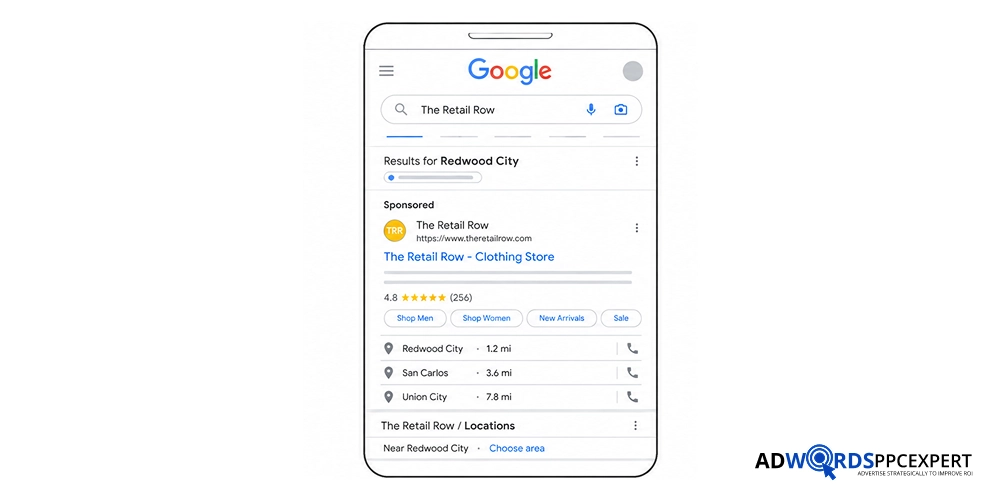
Location assets help people who are looking for a nearby business find and contact you. Depending on the situation, they can show details such as your business location and help users get directions, visit the location, or contact the business.
For eligible advertisers, location assets can be linked to a Google Business Profile, allowing Google Ads to use information from your business locations. This is particularly useful for restaurants, clinics, retail stores, offices, gyms, and other businesses where visiting a physical location matters.
The important part is keeping your Business Profile information accurate—especially your address, phone number, and opening hours. If the information is outdated, the asset can send customers to the wrong place or create unnecessary friction.
Best practice: Use location assets when physical visits or local enquiries are important. They are less useful for a business that operates entirely online and has no customer-facing location.
10. App Assets
App assets give people a direct way to download or open your mobile app from a Search ad. They make sense when the app is an important part of how customers use your business, such as for shopping, ordering, bookings, banking, or subscriptions.
Use them when app installs or app usage is an actual campaign goal. If your app is only a secondary option and most customers complete the purchase on your website, there’s usually little reason to prioritize this asset.
11. Business Name and Logo Assets
Business name and logo assets show your business identity alongside eligible Search ads, making it easier for people to recognize who is behind the advertisement. This is particularly useful for branded searches or when several businesses are competing for attention on the same results page.
These assets are subject to Google’s eligibility and verification requirements, so they may not be available to every advertiser immediately. Make sure the business name and logo accurately represent the advertiser rather than treating them as another promotional element.
12. Seller Ratings and Dynamic Assets
Some assets don’t need to be manually created in the same way as sitelinks or callouts. Seller ratings and certain dynamic assets can appear automatically when Google determines that the advertiser meets the relevant eligibility requirements and the asset is useful for a particular search.
Seller ratings can show a business’s star rating and review information, giving potential customers an extra trust signal before they click. Dynamic assets, such as automatically created sitelinks or callouts, can give users additional relevant information based on your ads, website, and other signals.
You can’t simply force these assets to appear on every impression. Eligibility, available data, search context, and Google’s serving systems determine when they can show. That’s why it’s still worth creating your important assets manually rather than relying entirely on Google’s automatic options.
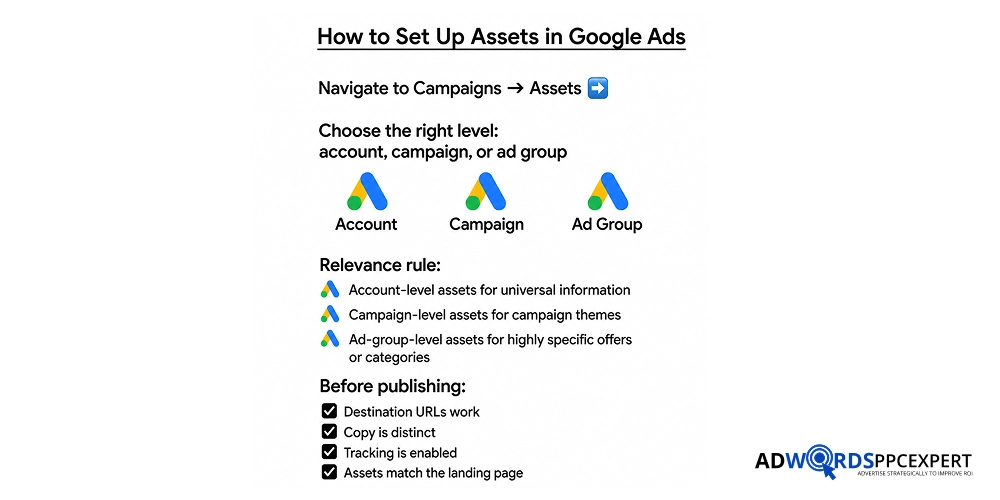
Common Mistakes to Avoid
- Calling every asset an “extension” without noting the platform’s updated terminology.
- Adding generic account-level sitelinks to unrelated campaigns.
- Repeating the same text in headlines, callouts, and sitelinks.
- Linking sitelinks to the same landing page as the main ad.
- Showing call assets outside staffed business hours.
- Using price assets without clear pricing on the destination page.
- Assuming an asset is broken simply because it does not show every time.
Final Says!
Google Ads extensions should do more than make your ads look bigger. Each asset should give high-intent searchers another useful way to take action, whether that means calling your business, checking prices, viewing a service page, finding a local store, or claiming an offer.
The best-performing asset strategy is not about adding every option blindly. It is about matching each asset to the searcher’s intent, the campaign’s goal, and the landing page experience. Relevant sitelinks, clear callouts, accurate pricing, and properly tracked call or lead assets can help turn more ad interactions into measurable business opportunities.

Ami Singh is a highly skilled AdWords PPC Specialist, known for creating profitable Google Ads strategies that elevate brands. With deep expertise in Google Search, Display, Shopping, YouTube Ads, and advanced bidding techniques, Ami consistently converts data into performance-driven results.
With a sharp analytical mind and a strong understanding of online consumer behavior, Ami designs campaigns that maximize ROI, boost quality scores, and reduce acquisition costs. His approach blends technical expertise with strategic thinking—making him a go-to expert for businesses aiming to dominate Google Ads.
Ami doesn’t just adapt to the fast-changing PPC industry, but he also stays ahead of the curve by testing new features, adopting automation smartly, and refining what works. Clients trust him for his transparency, insights, and ability to scale campaigns sustainably.
Looking to take your Google AdWords performance to the next level? Connect with Ami Singh at Adwordsppcexpert and discover how he can help you get the maximum growth through powerful PPC strategies.