
Key Takeaways
- AI is changing PPC, making tasks like keyword research, ad copy creation, and data analysis easier.
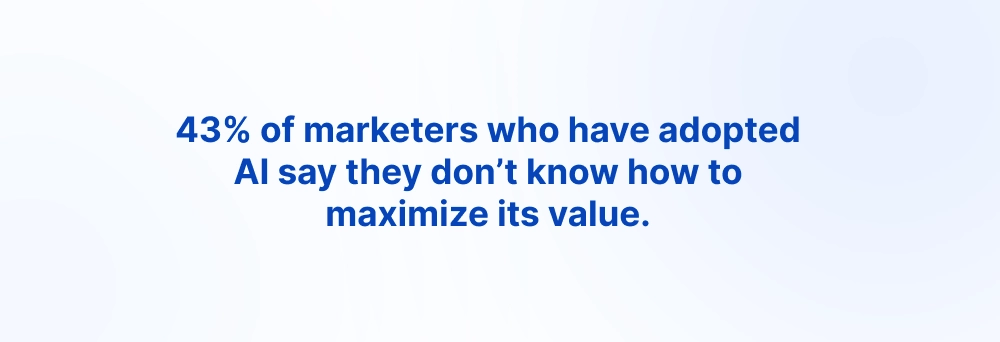
- Simply using AI isn’t enough to gain a competitive edge. Knowing how to use it effectively matters.
- Effective prompts are essential for getting useful, actionable PPC insights from AI.
- Generic prompts produce generic results, such as basic keyword lists without strategic insights.
- A keyword list alone isn’t enough to identify high-converting searches or wasted ad spend.
- Better prompts provide context and direction, helping AI analyze keywords based on intent, conversion potential, and business goals.
- AI should support PPC expertise, not replace it.
Old methods are colliding with new technology, and this is one major reason PPC competition is getting fiercer.
In the past, PPC was tricky to manage. But AI is making many tasks easier. With access to AI, almost anyone can research keywords, create ad copy, analyse data, and generate campaign ideas with little technical knowledge.
According to HubSpot’s State of Marketing Report, 61% of marketers believe that AI is causing the biggest marketing disruption in 20 years, while 80% use AI specifically for content creation and 75% use it for media production
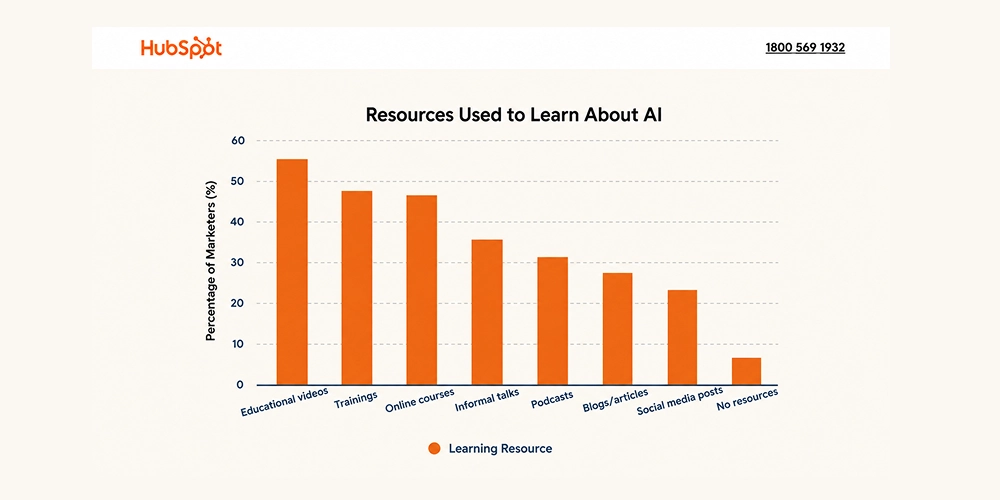
Presently, simply using AI is not enough to stand out from the competition. Instead, knowing how to use it effectively is a plus point.
And this is where prompts act like an expert.
How you command artificial intelligence can be a game-changer.
If you are a PPC expert, a new business owner, or a small business owner looking to strengthen your campaigns with AI, you have landed in the right place. This guide brings together battle tested, workflow integrated prompt templates that you can adapt to different stages of your PPC campaigns.
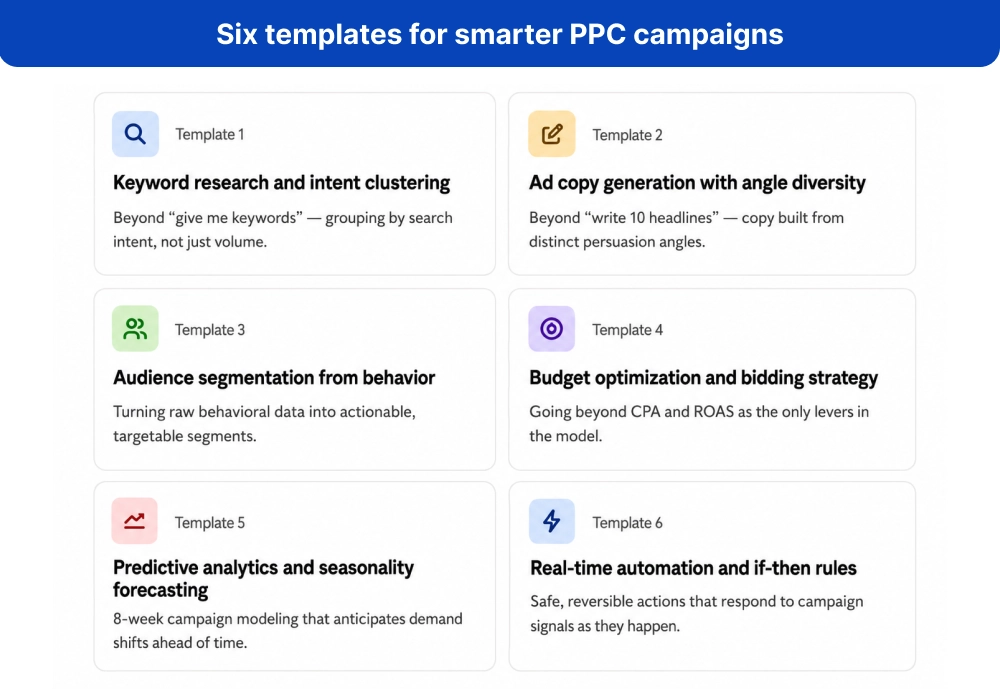
We will cover six core prompt templates, moving from basic tasks to more advanced workflows, along with a practical implementation plan. We will also consider the PPC landscape, including Performance Max, AI Overviews, automation, and changing privacy signals.
The idea is not to let AI run your PPC campaigns. It is to make your own PPC expertise faster, sharper, and more effective.
What Makes a PPC Prompt Template Actually Work? The 2026 Framework
A good PPC prompt is not simply a question you give to ChatGPT and hope for a useful answer.
Think of it more like a brief you would give to a PPC specialist. You explain what needs to be done, provide the information they need, set a few boundaries, and tell them what the final work should look like.
That is what makes a prompt reusable.
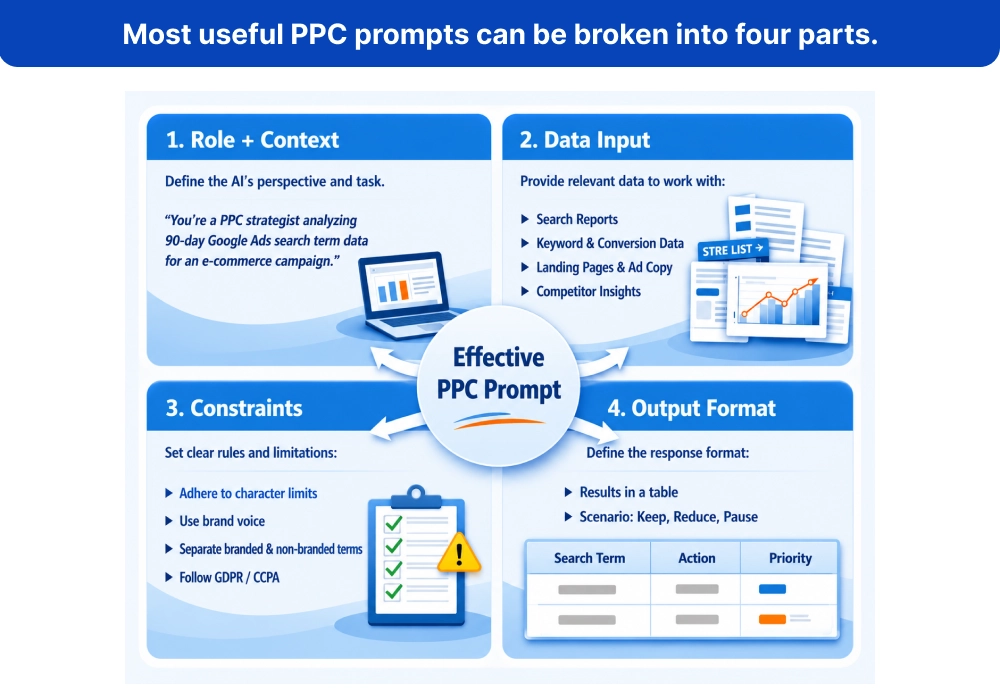
A PPC prompt template is a repeatable set of instructions that combines your role, campaign context, data, rules, and expected output. Instead of starting from scratch every time, you can reuse the same structure and change the campaign-specific details.
The 4 parts of a PPC prompt that matter
Most useful PPC prompts can be broken into four parts.
Reason why most PPC prompts fall short
Generally, when someone is given instructions for the AI tool, a lot of PPC prompt examples stop at:
“Write 10 Google Ads headlines for a dentist.”
Vague and general instruction. Here, the problem isn’t that the prompt is short. The problem is that it leaves too much unsaid.
- Which dentist?
- What service?
- Who is the customer?
- What makes the practice different?
- What's on the landing page?
- What claims are allowed?
- What tone should the ads use?
Without that information, AI has to guess.
And when it guesses, you often get the same safe, generic ad copy you’ve seen hundreds of times.
A stronger prompt gives AI the situation, the evidence, the rules, and the job to do. That’s the difference between asking AI to make something and giving it enough information to make a PPC decision.
Try These Ready-to-Use Prompt Templates
Template 1: Keyword Research and Intent Clustering Beyond “Give Me Keywords”
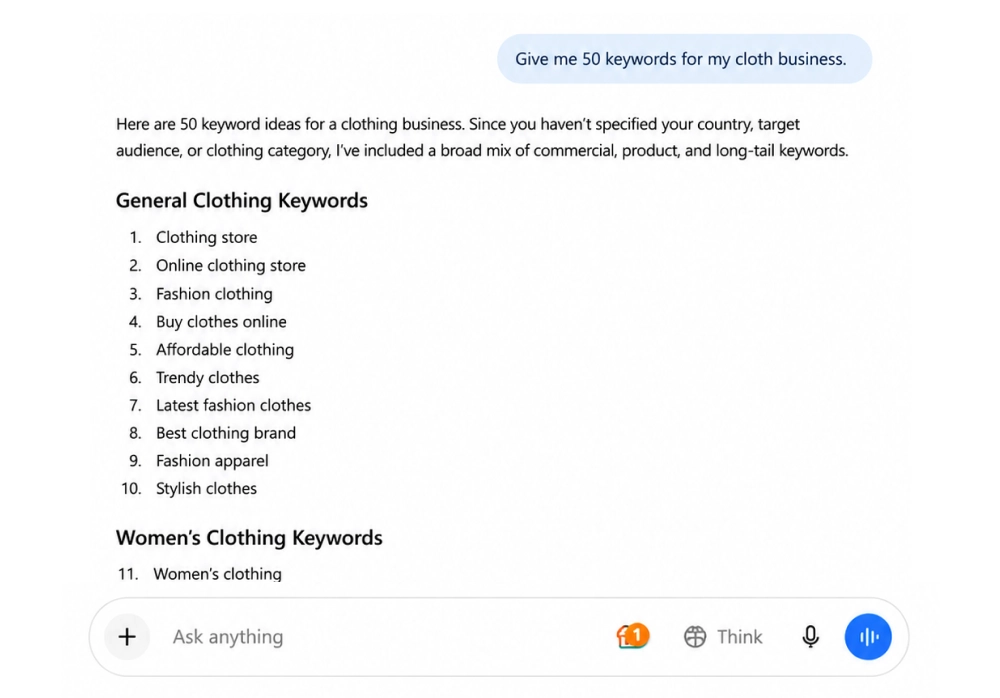
If you are a new marketer or unsure how to write effective PPC prompts, you may start your keyword research with a simple request like this:
“Give me 50 keywords for my clothing business.”
This sounds like you.
The problem is that a list of keywords doesn’t tell you which searches are likely to bring in customers and which ones could waste your budget.
For PPC, the real value comes from understanding the intent behind the search.
For example, someone searching “what is PPC advertising” has a very different intention from someone searching “PPC agency near me.” Putting both keywords into the same ad group and showing them the same ad rarely makes sense.
This template helps you go beyond keyword generation by organizing search terms based on intent and identifying irrelevant searches before they consume more budget.
What you need to provide
Give the prompt:
- A 90-day search term report
- Your product or service categories
- Your winning or converting queries
Prompt for clothing business
Give me 50 high-value keywords for my clothing business based on my 90-day search term report. My products include men’s shirts, T-shirts, graphic T-shirts, jeans, and baggy jeans. Prioritize search queries that have already generated conversions or shown strong performance. Also include relevant high-commercial-intent keywords with strong potential to generate sales. Categorize the keywords by product type and include key performance insights from the report where available.
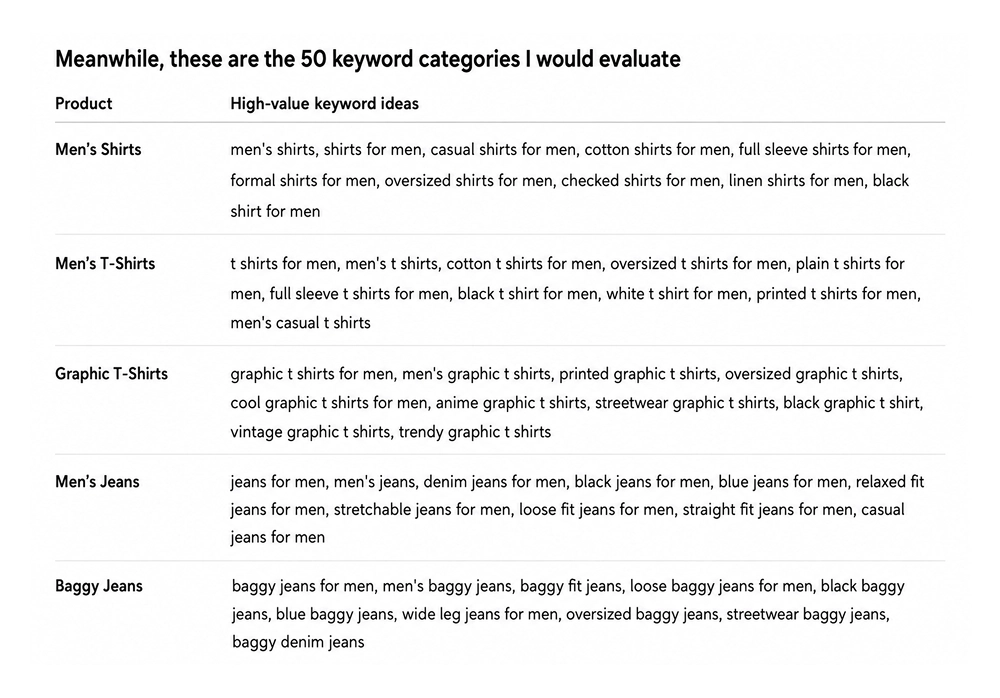
Generally, when you write the prompt, keep this point in mind.
- Cluster keywords into informational, commercial, and transactional intent
- Identify near-duplicate keywords that do not need separate targeting
- Find 25 high-intent keyword opportunities
- Suggest 20 negative keywords
- Explain the recommended match type for each important keyword
What the output should look like
Ask for a table containing:
Ad Group Theme |
Keywords |
Search Intent |
Recommended Match Type |
Landing Page Fit |
|---|---|---|---|---|
| PPC Management Services | PPC management agency | Transactional | Phrase/Exact | PPC service page |
| PPC Agency Pricing | PPC agency pricing | Commercial | Phrase | Pricing page |
This makes the output easier to review and move into your actual campaign structure.
Template 2: Ad Copy Generation With Angle Diversity Beyond “Write 10 Headlines”
A prompt like “Write 10 Google Ads headlines for my dental clinic” sounds useful, but it leaves out the information that actually shapes good ad copy.
You may end up with headlines like:
- Best Dentist Near You
- Trusted Dental Clinic
- Quality Dental Care
- Expert Dentists
They are usable, but they don’t test different customer motivations. Someone with severe tooth pain may want a same-day appointment, while someone considering cosmetic treatment may care more about experience, results, or financing.
That’s where a better prompt helps.
A better prompt to use
I’m running Google Ads for a dental clinic that offers same-day emergency appointments. Based on the landing page copy, customer reviews, key USPs, and competitor ads I provide, create 8 different ad angles rather than repeating the same message in different words. Consider angles such as urgency, convenience, trust, social proof, value, risk reduction, problem-solution, and local PPC relevance. For each angle, write relevant RSA headlines and descriptions that stay true to the information provided. Also suggest which funnel stage the angle fits best: TOFU, MOFU, or BOFU. Include 2 short, mobile-friendly variations. Where relevant, suggest opportunities to test Dynamic Keyword Insertion, but only when the inserted keyword would read naturally and remain relevant. Return everything in a table with the angle, headline, description, DKI suggestion, and funnel stage.
The important difference is that the prompt doesn’t just ask AI to write ads. It tells it what information to use, what variety you expect, what rules to follow, and how you want the results organized.
Ad Angle |
RSA Headlines |
Descriptions |
DKI Suggestion |
Funnel Stage |
|---|---|---|---|---|
| Urgency | Same-Day Emergency Dentist: Need a Dentist Today? Get Emergency Dental Care | Dental pain can't always wait. Check availability for a same-day emergency appointment. | Test: {Keyword:Emergency Dentist} if the keyword reads naturally in the headline. | BOFU |
| Convenience | Same-Day Dental Appointments: Dental Care When You Need It. Book a Same-Day Visit | Get the dental care you need without waiting days for an appointment. | {Keyword:Same Day Dentist} — test only if search terms closely match the service. | BOFU |
| Trust | A Dentist You Can Trust. Compassionate Dental Care. Experienced Dental Team | Use verified trust signals from the clinic's reviews, credentials, or landing page. | Usually not needed | MOFU |
| Social Proof | Patients Recommend Our Care. See What Patients Say. Trusted by Local Patients | Turn genuine review themes into ad copy without exaggerating or altering the review. | Usually not needed | MOFU |
| Value | Quality Dental Care. Affordable Dental Options. Get Dental Care Today | Highlight only pricing, insurance, payment, or value claims confirmed by the provided material. | Test only where natural | MOFU |
| Risk Reduction | Don't Ignore Dental Pain. Get Your Tooth Checked. Help for Dental Emergencies | Address the concern behind delaying care without making unsupported medical claims. | Usually not needed | BOFU |
| Problem → Solution | Tooth Pain? We Can Help. Need Emergency Dental Care? Dental Help When You Need It | Experiencing sudden dental pain? Find out whether a same-day appointment is available. | {Keyword:Emergency Dentist} where relevant | BOFU |
| Local Relevance | Emergency Dentist Near You. Local Same-Day Dental Care. Your Local Emergency Dentist | Make the ad locally relevant using the actual service area and location information provided. | {Keyword:Emergency Dentist} if natural | BOFU |
Template 3: Audience Segmentation from behavioral data
Knowing that a customer is 25–43 tells very little about them. No doubt, it’s an important factor. But the real hit is when you understand their behaviour.
For example, two individuals having the same age and location, but the first customer visits your pricing page three times before converting, and on the other hand, the other reads several product guides and leaves without buying. They shouldn’t necessarily receive the same message.
A better prompt to use
I’m sharing anonymized conversion data, including pages visited, time on site, device, key actions, and high-LTV search queries. Group users into 4–6 behavior-based segments. For each segment, identify their likely need, objection, and buying trigger, then suggest suitable Google Ads audience targeting and messaging. Also recommend bid adjustments, creative ideas, and negative audiences to reduce wasted spend. Include custom intent signals for Performance Max where relevant. Keep the recommendations practical and base them only on the data provided.
What this gives you
Instead of broad groups like “men aged 25–34,” you might uncover segments such as:
Price-focused visitors → compare pricing before converting
High-intent visitors → visit product and checkout pages
Research-heavy visitors → consume several informational pages first
Mobile converters → browse and convert mainly on mobile
This makes audience targeting more useful because you’re building segments around what people actually do, not just who they are.
Segment |
Need |
Objection |
Buying Trigger |
Google Ads Targeting |
Messaging Angle |
Bid Adjustment |
PMax Custom Intent Signals |
|---|---|---|---|---|---|---|---|
| 1. High-Intent Evaluators | Need a SaaS solution now and are comparing providers | Price, features, implementation | Pricing/demo page visits + repeated visits | In-market SaaS, competitor/custom segments, high-intent keywords | Compare features, ROI & book a demo | +25% | “SaaS demo,” “best [software] for business,” competitor terms, pricing searches |
| 2. Problem-Aware Researchers | Looking to solve a specific business problem | Unsure which solution fits | Product guides + use-case pages + high engagement | Problem-based keywords, custom intent audiences | Show how the product solves their specific problem | +10% | “how to automate [problem],” “[problem] software,” “[problem] solution” |
| 3. Product-Engaged Users | Already interested and exploring functionality | Need proof before committing | Feature/pricing page visits + product interactions | Remarketing, customer-match lists, engaged audiences | See the product in action | +20% | Product features, integrations, demo-related searches |
| 4. High-LTV Decision Makers | Need a reliable solution with strong business ROI | Risk, cost, switching difficulty | Multiple sessions + high-value conversion behavior | High-value customer lists, custom intent, competitor audiences | Reduce risk and prove long-term ROI | +30% | “[competitor] alternative,” enterprise SaaS, ROI-focused searches |
| 5. Low-Intent Visitors | General research or early-stage exploration | Not ready to buy | Short sessions + informational pages + no key actions | Broad relevant audiences with lower bids | Educate first, sell later | -20% | Informational/problem-awareness searches |
Template 4: Budget Optimization & Bidding Strategy Beyond CPA and ROAS
If you’re getting a good CPA from your campaigns but generating few or no qualified leads, something is wrong.
A low CPA doesn’t always mean your campaign is performing well. You could still be wasting budget on low-quality conversions. To maximize revenue, don’t base budget decisions only on Google Ads data. Also consider conversion rate, lead quality, sales rate, and actual revenue generated.
A better prompt to use
I’m sharing campaign budgets, CPA/ROAS targets, location, device, and hourly performance, lead quality scores, and call outcomes. Create 3 budget reallocation scenarios to increase valuable conversions while staying within my targets. For each scenario, show where to increase or reduce budget, the expected CPA/ROAS impact, trade-offs, and risks. Also consider customer LTV and cohort performance so the strategy doesn’t focus only on short-term CPA. Present the recommendations in a simple table with clear guardrails.
What this gives you
Instead of simply saying “increase budget on the campaign with the lowest CPA,” the analysis could show:
Scenario |
Budget Action |
Why |
|---|---|---|
| Conservative | Shift 10% to high-quality campaigns | Lower risk |
| Balanced | Shift 20% based on CPA + lead quality | Better growth potential |
| Aggressive | Shift 30% toward high-LTV cohorts | Higher upside, higher risk |
Template 5: Predictive Analytics & Seasonality Forecasting 8-Week Campaign Modeling
What if you could spot a PPC problem before it showed up in your monthly report?
That’s where forecasting becomes useful. Instead of looking only at what happened, you can use historical campaign data to see what may be coming next.
Take an online fashion store preparing for its festive season. Its 18-month data may show that clicks and conversions usually increase during certain weeks, while CPC also rises as competitors become more aggressive. That pattern can help the team plan its budget before costs start climbing.
Try this prompt
I’m sharing 18 months of PPC data covering impressions, clicks, conversions, spend, promotions, and competitor search impression share. Forecast the next 8 weeks and highlight any patterns that could affect CPA or conversion volume. Show the likely impact of seasonality and identify early warning signs, such as rising CPC or falling CVR. For each major scenario, tell me what action to take and when. Also account for possible changes from AI Overviews and privacy-related signal loss. Keep the recommendations practical and show the forecast and scenarios in a simple table.
What you should get back
The useful part isn’t just the forecast. It should connect a change in the data to a decision.
Scenario |
What to Watch |
Suggested Response |
|---|---|---|
| CPC Rises 12% | Costs increasing faster than conversions | Review bids and budget allocation |
| CVR Falls 5% | Traffic is becoming less efficient | Check search intent and landing-page performance |
| Seasonal Demand Rises | More conversion opportunity | Increase budget within CPA limits |
This turns forecasting from a chart you look at once into a plan for what to watch, when to react, and how much risk to take.
Template 6: Real-Time Automation & If-Then Rules With Safe, Reversible Actions
Automation can save time, but letting a system make large PPC changes without limits can create problems just as quickly.
The safer approach is to define exactly when an action should happen, how much the account can change, and when a human should review it.
For example, instead of telling AI to “optimize bids automatically,” give it clear thresholds and limits.
A better prompt to use
I’m sharing near-real-time PPC data including CPC, CVR, CPA, impression share, and click share, along with my target CPA, acceptable thresholds, and monitoring windows. Create prioritized if-then rules for bid, budget, and asset changes. For each rule, specify the trigger, action, maximum adjustment, reason, and when human approval is required. Keep all changes small and reversible. Also show which rules could be implemented through Google Ads Rules, Scripts, or Performance Max automation.
Trigger |
Action |
Limit |
|---|---|---|
| CPA is 20% above target for 3 hours | Reduce bids | Max 15% |
| CVR drops sharply for 3 hours | Flag campaign for review | No automatic budget change |
| CPA is consistently below target | Consider increasing budget | Max 10% |
The important part is the guardrail. A rule should not simply say “if performance drops, reduce the budget.” It should define how much, for how long, and whether someone needs to approve the change.
Bonus: 10 Quick-Win Prompts for Immediate PPC Gains (2026 Tested)
- Review these 5 competitor ads [paste]. Find 3 messaging gaps and suggest a stronger angle for each.
- Analyze this 90-day search term report [paste]. Find 15 irrelevant or costly searches and suggest the right negative match type for each.
- Rewrite these Google Ads headlines and descriptions [paste] so the main benefit is clear within the first few words on mobile.
- Review this landing page [paste]. Suggest 3 CTA variations: one focused on urgency, one on reducing friction, and one on value.
- Group these keywords [paste] into cold, warm, and high-intent searches. Suggest which group should get higher bid priority.
- Analyze this campaign data [paste]. Find the biggest sources of wasted spend and rank them by potential impact.
- Review these converting search terms [paste]. Find similar high-intent searches that could be tested as new keywords.
- Compare these ads [paste] using CTR and conversion rate. Identify weak areas and suggest new angles to test.
- Compare these keywords, ads, and landing page [paste]. Find any gaps between search intent, ad messaging, and landing page content.
- Review this campaign data [paste]. Suggest 3 low-risk budget shifts that could increase conversions without pushing CPA above the target.
Closing Thoughts!
AI prompts can make PPC work faster, but the quality of the output depends on the quality of your instructions and data. The right prompts can help you find better keywords, create stronger ads, understand audiences, manage budgets, forecast performance, and automate routine decisions. The goal isn’t to use AI for everything. It’s to use it where it can help you make better PPC decisions with less wasted time and spend.

Ami Singh is a highly skilled AdWords PPC Specialist, known for creating profitable Google Ads strategies that elevate brands. With deep expertise in Google Search, Display, Shopping, YouTube Ads, and advanced bidding techniques, Ami consistently converts data into performance-driven results.
With a sharp analytical mind and a strong understanding of online consumer behavior, Ami designs campaigns that maximize ROI, boost quality scores, and reduce acquisition costs. His approach blends technical expertise with strategic thinking—making him a go-to expert for businesses aiming to dominate Google Ads.
Ami doesn’t just adapt to the fast-changing PPC industry, but he also stays ahead of the curve by testing new features, adopting automation smartly, and refining what works. Clients trust him for his transparency, insights, and ability to scale campaigns sustainably.
Looking to take your Google AdWords performance to the next level? Connect with Ami Singh at Adwordsppcexpert and discover how he can help you get the maximum growth through powerful PPC strategies.