
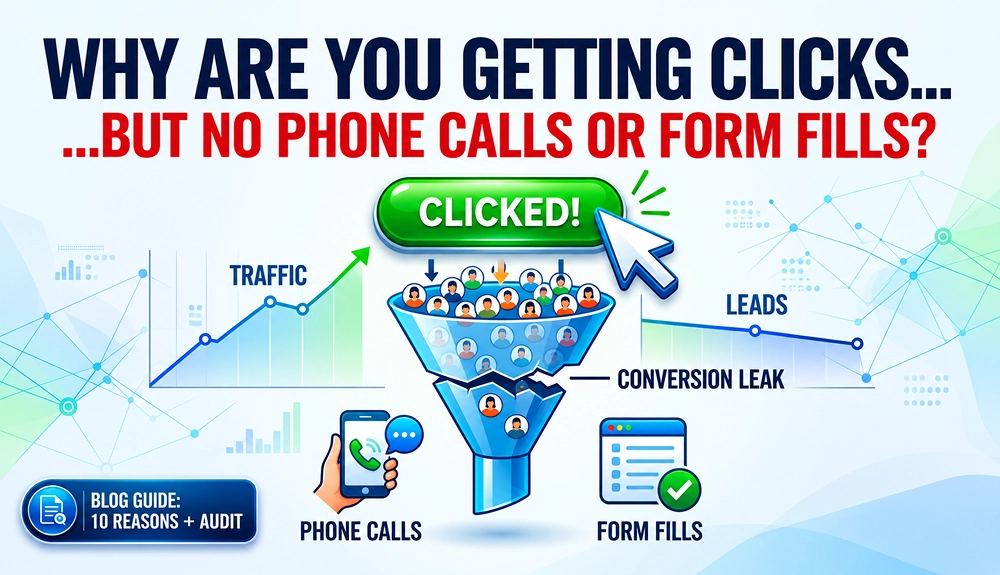
Quick Answer: You’re getting clicks but no leads because something in your conversion funnel is preventing visitors from taking action. Common causes include attracting the wrong audience, landing pages that don’t match search intent, weak trust signals, unclear calls-to-action, difficult forms, poor user experience, weak offers, stronger competitors, or inaccurate conversion tracking
Your ads are getting clicks. Your website is attracting visitors. Your analytics report looks healthy. Everything seems to be working on the surface. Yet the phone isn’t ringing, contact forms remain untouched, and new leads are hard to come by.
It is important to understand that traffic is not the same as leads. Clicks only indicate that someone visited your website. This doesn’t mean the visitor was ready to enquire or call. Getting traffic is only the first step. To generate leads, your website must give visitors a reason to trust you, engage with your content, and take action.
In this guide, you’ll discover the 10 most common reasons why websites get clicks but fail to generate phone calls and form submissions. You’ll also learn how to audit your site, identify the exact conversion leaks, and fix the issues that are quietly costing you leads every day.
10 Reasons You're Getting Clicks but No Leads
Getting clicks is only half the battle. Not every click represents a potential customer. The real challenge is turning those visitors into phone calls and form submissions. Clicks often stop converting for a handful of specific reasons. Below are the 10 most common issues to look for.
Before we dive into each specific reason, here’s a quick overview of what each one looks like in practice.
Problem |
Common Symptom |
What's Actually Happening |
|---|---|---|
| Wrong Audience | High bounce rate, low time on page | The people clicking your ads aren't actively looking for your services. |
| Landing Page Mismatch | Visitors leave quickly after arriving | Visitors don't find the information they expected after clicking. |
| Unclear Value Proposition | People don’t understand what you offer | Prospects don't see why they should choose your business. |
| Low Trust | Few reviews / no social proof | Reviews, testimonials, and proof points are missing or weak. |
| Weak or Hidden CTA | Phone number hard to find | Visitors don't know how to take the next step. |
| Form Friction | High form abandonment | Contact forms require too much effort to complete. |
| Poor User Experience | Slow speed or mobile issues | Speed, navigation, or mobile issues drive visitors away. |
| Weak Offer | No urgency or incentive | There's no urgency or compelling incentive. |
| Stronger Competitors | Losing to better-reviewed businesses | Another business appears more trustworthy or valuable. |
| Inaccurate Tracking | Leads not showing in reports | Calls and form fills may be happening without being recorded. |
1. You're Attracting the Wrong Traffic
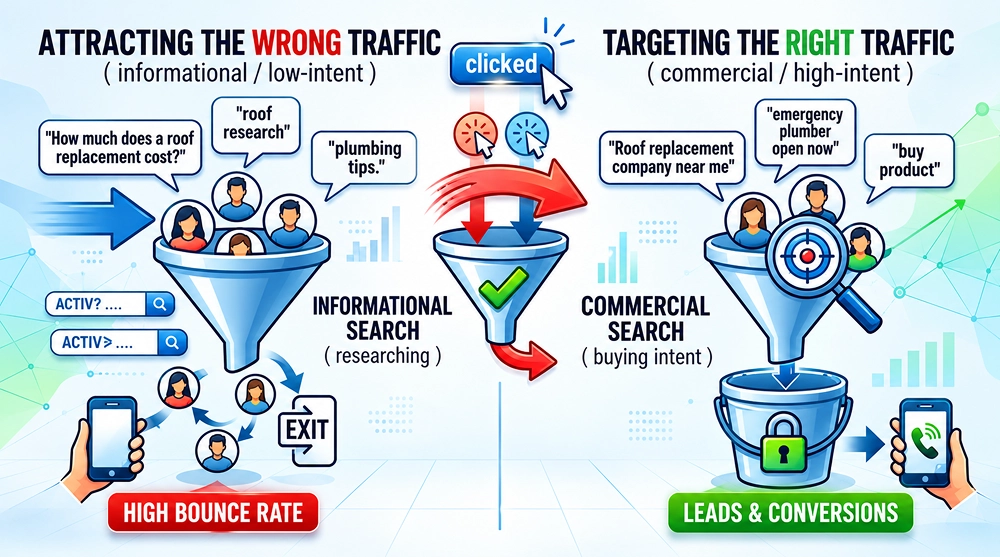
Your ads may be attracting people who are looking for information, researching options, or searching for something you don’t offer. These visitors are unlikely to become leads.
This usually happens because of:
- Broad or low-intent keywords
- Poor audience targeting in Google Ads
- Content that ranks for informational searches instead of commercial ones
For example: Take these two keywords:
- How much does a roof replacement cost: This visitor might still be exploring options and researching.
- Roof replacement company near me: This user has a much clearer commercial intent.
Hence, the right search terms, keyword targeting, locations, and negative keywords are essential for PPC campaign conversions. When the wrong people land on your page, you are most likely to experience high bounce rates and low time-on-page. The traffic looks good in your reports, but it was never likely to convert in the first place.
More traffic won’t generate more leads if you’re attracting people who aren’t looking for what you sell.
2. Your Landing Page Doesn't Match Search Intent
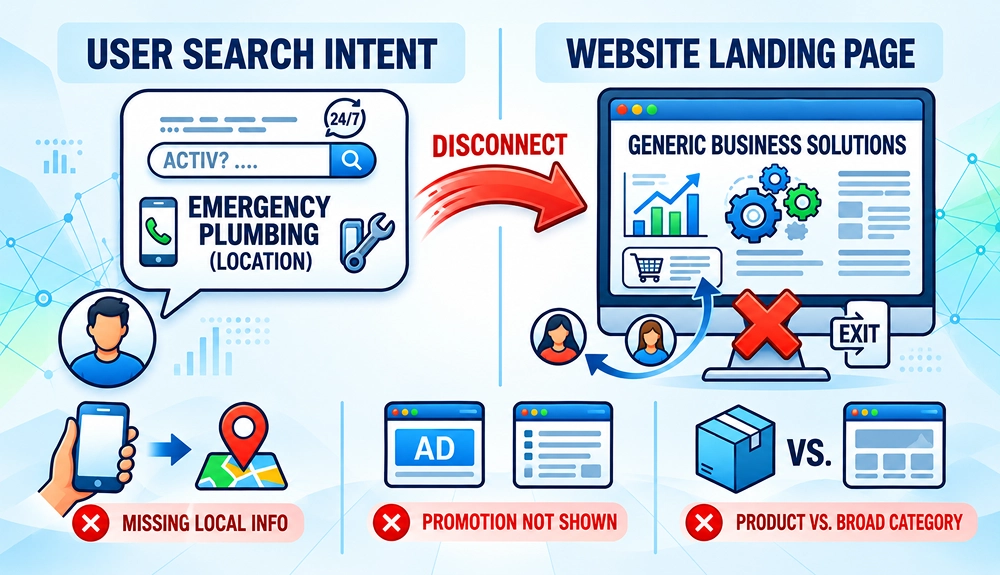
If there is a gap between what the visitors expected and what they actually find on your page, they are most likely to leave. A visitor should immediately recognise that your page offers the service, product, or solution they were looking for. If the ad promises one thing but the landing page presents something else, visitors may leave before contacting you.
For example: If someone clicks an ad promising “same-day emergency plumbing” and lands on a generic homepage that talks about “professional solutions,” they immediately feel disconnected. They are likely to feel misled and leave. Landing page optimization for PPC leads can help align your page content, offer, messaging, and conversion path with the intent behind your ads.
Common examples of landing page mismatch:
- A local ad sends users to a page with no location information.
- An ad promotes a discount that is not mentioned on the landing page.
- A product-specific ad sends visitors to a broad category page.
- A service ad focuses on features while the visitor is looking for pricing or availability.
How to Fix It:
- Match the page headline and content to the ad or target keyword.
- Make sure the main offer is clearly visible near the top.
- Keep service and location messaging consistent from the search result to the landing page.
- Use dedicated landing pages for high-intent campaigns when appropriate.
- Remove unrelated content and distractions that can pull visitors away from the conversion path.
- Answer the key questions visitors are likely to have based on their search.
The closer your landing page matches what visitors expected to find, the less likely they are to leave without taking action.
3. Your Value Proposition Isn't Clear
Visitors generally make decisions quickly. Within a few seconds of landing on your page, they need to understand three things:
- What you do
- Who you help
- Why they should choose you over anyone else
This is your value proposition. If your value proposition is vague, generic, or buried, visitors either keep scrolling or leave entirely. Generic information like “Quality service” or “professional solutions” doesn’t give anyone a compelling reason to pick up the phone. Businesses need a strong value proposition.
The table below shows some examples of how you can improve your value proposition with a strong message about why they should choose your business.
Weak message |
Stronger message |
|---|---|
| “Quality services for every need” | “Get a fixed-price boiler repair from a local engineer” |
| “We are industry leaders” | “Licensed electricians with same-day appointments” |
| “Customer-focused solutions” | “Receive a free property valuation within 24 hours” |
| “Affordable and reliable” | “Transparent quotes with no call-out fee” |
Visitors need to quickly understand what you offer, who it’s for, and why they should choose your business.
4. Visitors Don't Trust Your Business
Missing or weak trust signals are one of the biggest silent conversion killers. A visitor may need your service but still avoid contacting you if your website does not provide enough evidence that your business is legitimate, capable, and reliable. Without visible proof, most people often hesitate to get in touch.
Useful trust signals generally include:
Trust Element |
Why It Matters |
|---|---|
| Google Reviews | Builds credibility |
| Testimonials | Provides social proof |
| Case Studies | Demonstrates results |
| Certifications | Shows expertise |
| Awards | Enhances authority |
| Client Logos | Builds confidence |
When these elements are missing or hard to find, visitors often leave to check competitors, who may present stronger trust signals.
People are more likely to enquire when your website gives them enough proof that your business is credible and reliable.
5. Your Calls-to-Action Are Weak or Hard to Find
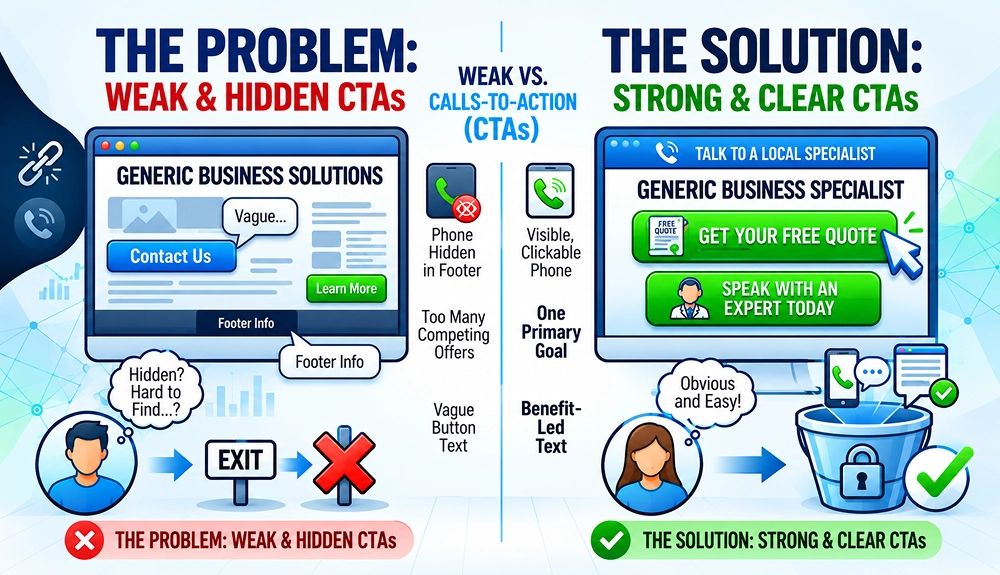
A visitor may be ready to take action, but if they can’t easily find a clear next step, the opportunity is lost.
Common problems include:
- Phone numbers hidden in the footer or contact page
- Vague button text like “Submit” or “Contact Us”
- Too many competing calls-to-action fighting for attention
The table below shows examples of strong and weak CTAs.
Weak CTA |
Stronger CTA |
|---|---|
| Contact Us | Get Your Free Quote |
| Submit | Request an Estimate |
| Learn More | Speak With an Expert Today |
| Get Started | Schedule Your Free Consultation |
| Call Now | Talk to a Local Specialist |
Ensure your primary CTA is impossible to miss, especially on mobile. Even interested visitors may leave if the next step isn’t obvious or easy to take.
6. Your Forms Create Too Much Friction
With every extra field you add to a form, the chance that someone might abandon it increases. Many businesses ask for far more information than they actually need at the first point of contact.
Your form should be focused on collecting the information that is genuinely required to begin the conversation. You may ask additional business details later when the project proceeds.
Below are some friction examples:
Form Element |
High-Friction Example |
Low-Friction Example |
|---|---|---|
| Number of Fields | 10-15 fields | 3-5 fields |
| Phone Number | Required | Optional |
| Project Details | Long essay box | Short description |
| Multi-Step Form | 4 steps | Single step |
| CAPTCHA | Complex verification | Simple verification |
How to improve form completion rates:
- Ask only essential questions.
- Use clear labels rather than relying on placeholder text.
- Keep the form easy to use on mobile.
- Make required fields obvious.
- Provide helpful error messages.
- Use a benefit-led button.
- Add a short privacy reassurance.
- Explain what happens after submission.
- Test the form on multiple devices and browsers.
If your sales team needs additional information, collect it during the follow-up conversation rather than adding unnecessary fields to the first form.
The goal of the first form should be simple: make it easy for the right person to start a conversation with you.
7. Your Website Provides a Poor User Experience
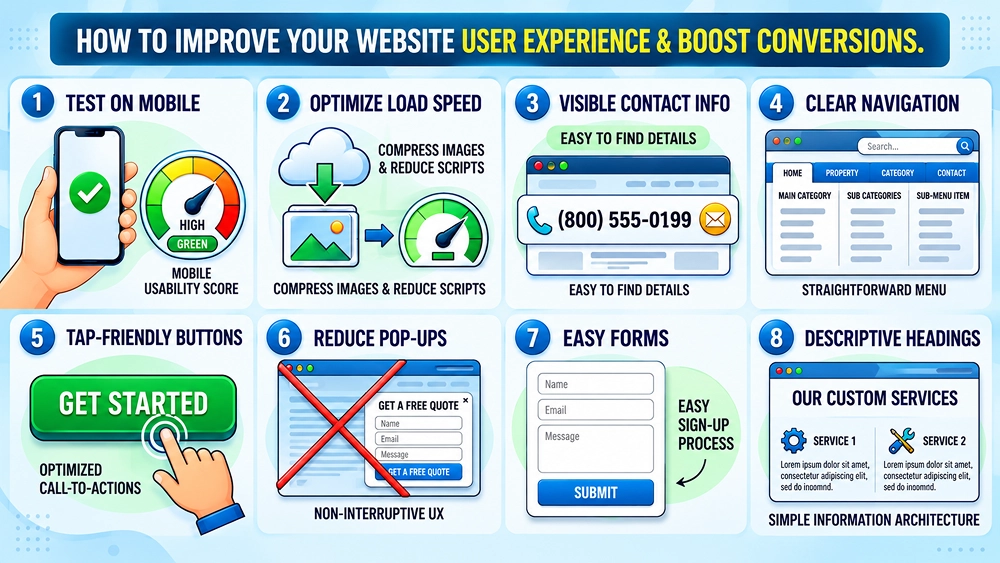
If your website is not providing a good user experience, a user with the right intent may also leave without converting. Speed, mobile usability, and clear navigation all play a major role in whether someone stays long enough to convert or leaves immediately.
Below are some common user experience problems and how they impact conversions:
Problem |
Impact on conversions |
|---|---|
| Slow load times | Visitors leave before the page becomes usable |
| Poor mobile design | Users struggle to read, scroll, or tap buttons |
| Confusing navigation | Visitors cannot find services or contact details |
| Intrusive pop-ups | Interrupt the user journey |
| Broken forms | Prevents inquiries from being submitted |
| Small or unclear buttons | Makes important actions difficult |
| Poor contrast | Makes text and CTAs harder to read |
| Missing contact information | Reduces confidence and increases effort |
How to improve the user experience:
- Test important pages on real mobile devices.
- Compress large images and remove unnecessary scripts.
- Keep the phone number visible.
- Make buttons large enough to tap comfortably.
- Reduce intrusive pop-ups.
- Use descriptive headings and clear sections.
- Keep forms and contact options easy to find.
- Check that all links, buttons, and confirmation pages work.
A slow or clunky website quietly kills conversions every day without most business owners realising it.
8. Your Offer Doesn't Create Urgency
Most visitors are generally busy and easily distracted. It is essential to provide them with a clear reason to act now. Otherwise, they may leave thinking they will visit again but never do.
Common gaps in offers include:
- No limited-time offer or incentive
- No clear next step explained
- No mention of response time or availability
You should include some sort of good urgency. These may cover:
- Limited appointment availability.
- Seasonal demand.
- A genuine booking deadline.
- Time-sensitive repairs.
- A scheduled price change.
- A limited consultation schedule.
For example: Request a Free Estimate. We’ll review your requirements and contact you within one business day.
The primary goal should be creating urgency without fake countdown timers or misleading scarcity. Visitors should get a clear reason to act and take the next step easily.
Adding a simple, low-risk reason to act such as a free quote, same-day response, or limited availability often improves conversion rates significantly.
9. Competitors Give Prospects a Better Alternative
Your website doesn’t exist in isolation. Users often compare several other alternatives before making a final decision. If a competitor appears more established, trustworthy, or responsive, they may win the lead.
Your website needs to have stronger reviews, clearer guarantees, better proof of results, or a more convincing offer to give visitors a reason to choose you over a competitor.
Below is a quick comparison that may help you identify gaps:
Factor |
Your Site |
Competitor Site |
|---|---|---|
| Reviews | 12 reviews | 150 reviews |
| Testimonials | Few | Several detailed testimonials |
| Service Guarantees | None | Satisfaction guarantee |
| Case Studies | None | Multiple examples |
| Response Time | Not mentioned | 24/7 availability |
In general, users don’t choose the first option they see. They may choose the one that feels safest and looks more professional. The goal should be to identify what information or reassurance visitors may be looking for and ensure your website communicates your own strengths clearly.
Visitors often compare multiple businesses, so a stronger combination of trust, value, service, or offer can influence whom they contact.
10. You're Not Tracking Conversions Correctly
Sometimes your website is generating calls or form submissions, but your analytics and advertising platforms are not recording them correctly. The conversion tracking setup is not working effectively.
Common tracking problems include:
- Google Analytics 4 not set up properly
- Phone calls not being tracked
- Forms submitting without triggering conversion events
- Offline conversions such as calls, emails, and WhatsApp messages never being recorded
Professional Google Ads management services include monitoring conversion data and using it to optimize campaigns based on actual lead and sales activity.
Without accurate tracking, it is difficult to know which pages, ads, or keywords are working and generating leads. You can’t improve what you can’t accurately measure.
Understanding the Difference Between Traffic and Conversions
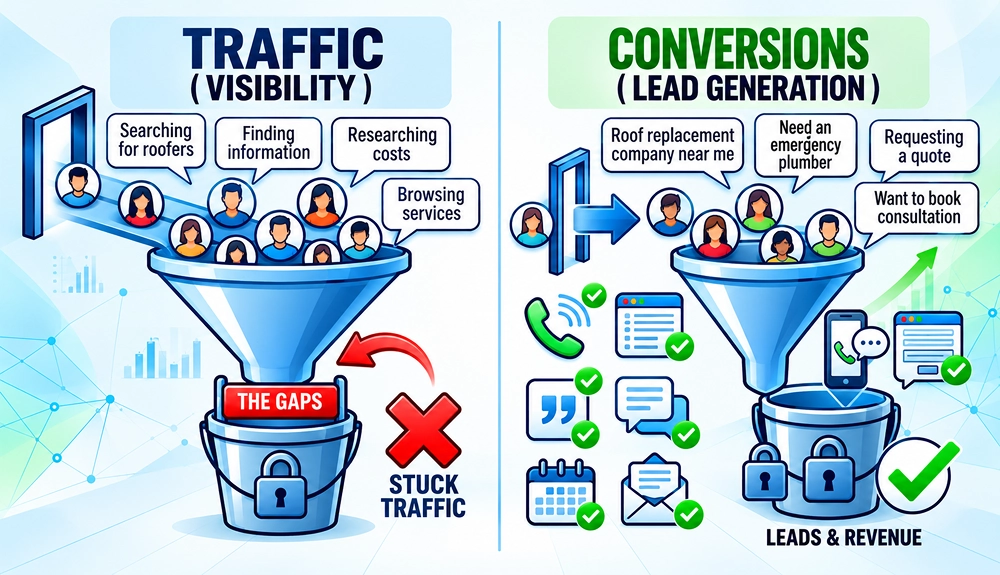
Getting website traffic is a positive sign, and it seems like progress. But traffic alone doesn’t guarantee revenue; it only tells you that people have arrived at your website. Visitors must take a valuable action, such as calling your business, completing a form, requesting a quote, or booking a consultation to be called a lead.
This is where many businesses get stuck. They focus heavily on generating more visitors while overlooking the gap between a click and an actual lead.
What Counts as a Conversion?
A conversion happens when a visitor takes a specific action that moves them closer to becoming a customer. For most service-based and local businesses, the most valuable conversions include:
- Phone calls: Calls from ads, calls from your website, or clicks on a mobile phone number.
- Contact form submissions: Completed forms requesting information, a callback, or assistance.
- Quote requests: Visitors asking for pricing, an estimate, or a proposal.
- Consultation bookings: Scheduled calls, meetings, inspections, or appointments.
- Live chat inquiries: Conversations that show genuine interest in your products or services.
- Appointment bookings: Completed bookings through an online scheduling system.
- Demo requests: Common for SaaS, technology, and professional service businesses.
- Newsletter sign-ups: Useful for businesses with a longer lead-nurturing process.
Traffic shows that people found you. Conversions show that they trusted you enough to take the next step.
How to Audit Your Website for Conversion Problems
Once you understand the common reasons why clicks don’t turn into leads, the next step is to systematically check your own website. A proper conversion audit lets you move beyond guesswork and identify exactly where potential leads are dropping off. It helps uncover the obstacles preventing people from taking action and highlights opportunities for improvement.
Start by reviewing these key areas:
Audit Area |
What to Check |
Where to Check |
|---|---|---|
| Traffic Quality | Keywords and search intent | Google Ads / Google Search Console |
| Landing Page | Search intent, messaging, offer, relevance | Manual page review |
| User Behaviour | Engagement, scroll depth, exit pages | GA4 / Microsoft Clarity / Hotjar |
| Mobile Experience | Speed, navigation, click-to-call, forms | PageSpeed Insights + real phone test |
| Forms | Fields, errors, usability | Manual test + form analytics |
| Conversion Tracking | Calls, forms, conversion events | GA4 + Google Ads + call tracking |
Step 1: Review Traffic Quality
Start by examining who is actually visiting your site and why. Not all traffic has the same potential to convert.
- Check keywords: Look at the search terms driving traffic through Google Ads and organic search. Check if they are commercial, showing buying intent, or mostly informational.
- Analyse search intent: Check whether the keywords match what your page offers. Someone searching “how to fix a leaking tap” has very different intent from someone searching “emergency plumber near me.”
- Review audience targeting: In your ad campaigns, check location, device, demographics, and audience settings. Broad targeting often brings higher traffic volume, but it can also result in low-quality clicks.
If most of your traffic comes from low-intent or poorly matched searches, conversion rates will stay low no matter how good the rest of your site is. Well-managed PPC services can help refine keyword targeting, search terms, audience settings, and negative keywords to reduce irrelevant clicks and improve lead quality.
Step 2: Examine User Behaviour
Once people land on your site, their behaviour reveals a lot about what’s working and what isn’t. Check for the steps taken by visitors once they arrive at your website.
- Bounce rate: A high bounce rate on key landing pages usually signals a mismatch between expectation and experience.
- Scroll depth: If most visitors never scroll past the first screen, your headline, offer, or layout may not be engaging enough.
- Session recordings: Watching real user sessions shows exactly where people get stuck, confused, or leave.
- Heatmaps: These highlight where visitors click, move the cursor, and ignore content. They often reveal that important CTAs or trust elements are being overlooked
You can use tools like Google Analytics 4, Microsoft Clarity, or Hotjar to make this data easy to access and interpret.
Step 3: Test Every Conversion Path
Don’t assume that your forms, phone numbers, live chat, or booking tools are working. Test each conversion path as a real visitor would use it, especially on mobile.
- Forms: Submit a test enquiry. Check for errors, unnecessary fields, slow loading, or poor mobile layout.
- Phone numbers: Make sure numbers are clearly visible and click-to-call enabled on mobile devices.
- Live chat: Confirm that chat widgets load properly and don’t interfere with the rest of the page.
- Mobile experience: Review the entire journey on a real smartphone. Many conversion problems only appear on smaller screens.
A broken form or phone link can turn otherwise qualified visitors into lost leads. It’s also worth checking that these actions are being recorded correctly in your analytics. You can learn more in our guide on PPC conversion tracking setup.
Step 4: Compare Traffic vs Leads
The final step is to compare where visitors arrive with where inquiries are generated. This helps you identify pages that attract attention but fail to create business opportunities.
Looking at the patterns below can quickly reveal where the biggest conversion leaks are happening:
If you see this pattern |
Possible explanation |
What to investigate |
|---|---|---|
| High impressions, few clicks | Weak ad or search-result messaging | Headlines, descriptions, keyword relevance |
| Many clicks, short visits | Poor traffic quality or page mismatch | Search terms, targeting, landing-page relevance |
| Good engagement, few form starts | Weak offer or hidden CTA | Value proposition, CTA placement, page structure |
| Many form starts, few completions | Form friction | Number of fields, errors, mobile experience |
| Many phone-number clicks, few calls | Tracking or technical issue | Click-to-call links, forwarding, call tracking |
| Leads recorded but few customers | Poor lead quality or follow-up | CRM data, response time, sales process |
| Strong desktop results, weak mobile results | Mobile usability problem | Page layout, speed, forms, buttons |
These patterns can turn raw data into clear priorities. Once you know which issue is most common on your site, you can focus your efforts where they will make the biggest difference.
What to Fix First
After completing the audit, prioritise issues in this order:
1. Repair broken forms, phone numbers, booking tools, and tracking.
2. Remove irrelevant traffic and refine audience targeting.
3. Match landing-page messaging with search intent and ad copy.
4. Make the value proposition and main CTA clearer.
5. Add trust signals close to the conversion point.
6. Simplify forms and improve mobile usability.
7. Improve page speed and remove disruptive elements.
8. Review the offer and explain the next step.
9. Improve lead notifications and response times.
10. Test one change at a time and compare the results.
A conversion audit isn’t about looking at one metric in isolation or simply trying to increase it. It is to identify where potential users are dropping out and focus on the fixes that will actually generate more inquiries.
Signs You Need a Website Conversion Audit
More traffic doesn’t always lead to more customers. Many business owners assume they need more traffic when leads start to slow down. However, the real issue is generally low conversion performance. If your website is attracting visitors but not generating leads, there may be some underlying conversion issue that is preventing visitors from becoming leads.
Take a look at the warning signs below. If any of these sound familiar, your website’s conversion path may need closer attention.
Warning Sign |
What It Could Mean |
|---|---|
| Traffic is growing but leads aren't | Conversion bottlenecks exist |
| Visitors leave without taking action | Poor user experience or weak CTA |
| Forms receive few submissions | Form friction |
| PPC clicks are increasing but ROI isn't | Landing page or offer issues |
| You can't identify why leads are dropping | Tracking or analytics issues |
More clicks won’t solve a conversion problem. Identifying and fixing the bottlenecks that prevent visitors from becoming leads is often the fastest path to generating more calls, inquiries, and customers from your existing traffic.
Conclusion
Getting clicks is only the first step. Real growth comes from conversion when you turn those visitors into phone calls, form submissions, and genuine inquiries.
If you are getting clicks but no conversions, there may be a problem in your conversion funnel. You may be attracting the wrong audience, sending visitors to pages that don’t match their intent, failing to build trust, creating friction in the conversion process, or missing opportunities to track valuable leads.
A simple website audit can help you identify issues, understand where visitors are dropping off, and determine what needs to be fixed. Once you identify the main bottleneck, you can focus on improving the part of the customer journey that is actually holding back your leads and strengthen your lead generation.
Frequently Asked Questions
1. Why am I getting website traffic but no leads?
Getting traffic but no leads usually indicates a conversion problem rather than a traffic problem. Traffic only means people visited your site. Leads come from conversions like phone calls and form submissions. Common reasons for this gap can be attracting the wrong audience, sending visitors to an irrelevant landing page, using weak calls-to-action, creating too much friction, lacking trust signals, or not tracking conversions correctly.
2. How long does it take to improve conversion rates?
Simple fixes to improve conversion rates, like clearer CTAs, shorter forms, or a better mobile experience, may show results within days or weeks. However, larger changes such as new landing pages, trust-building, or tracking setup may take 4 to 8 weeks to fully impact results.
3. Should I focus on getting more traffic or improving conversions first?
If you’re already getting consistent clicks but few inquiries, you can prioritise conversion rate optimisation. However, you should always focus on improving how well your existing traffic converts. This is usually a faster and more cost-effective strategy than simply buying more traffic.
4. How do I audit a website that gets traffic but no conversions?
You can start by reviewing traffic quality, landing-page relevance, user behaviour, mobile experience, forms, conversion paths, and tracking. Then, compare traffic with leads to identify where potential customers are dropping off.
5. What is a good conversion rate for a website?
There is no single conversion rate that works for every business. It depends on factors such as industry, traffic source, offer, audience, location, and the type of conversion being measured. It’s usually more useful to compare your current performance with your own historical data and qualified lead volume.
6. How can I improve my website conversion rate?
You can start by identifying where visitors are dropping off. Then improve the areas that may be causing friction, such as landing-page relevance, value proposition, CTAs, forms, mobile experience, trust signals, and page speed.
7. Why do people start my form but not submit it?
Check your form’s complexity. A complicated form with too many required fields, unclear messaging, weak offers, lack of trust, or poor mobile usability can discourage visitors from submitting a form. As a result, they leave without converting.
To fix this, test the form on different devices, simplify the questions, improve error messages, and use action-oriented button text such as “Request My Quote.”
8. Why are my Google Ads getting clicks but no phone calls?
Possible causes include low-intent keywords, incorrect location targeting, a hidden or non-clickable phone number, weak landing-page messaging, poor call handling, or missing call tracking. Check your search terms, phone links, business hours, forwarding setup, and call conversion settings.
9. How do I know if I'm attracting the wrong traffic?
If you’re getting many clicks but little relevant engagement or few qualified leads, your traffic may not be well targeted, and you are likely to attract the wrong traffic. Review your keywords, search terms, audience targeting, locations, and the actions visitors take after arriving.
10. What’s the difference between clicks and conversions?
A click means someone visited your page. A conversion, on the other hand, means they have shown interest in your offered products or services and taken a valuable action such as calling, submitting a form, requesting a quote, or booking a consultation.