
Key Takeaways
- ROI starts with the right numbers. If you leave out agency fees, software, landing pages, or other acquisition costs, the final ROI will never reflect your actual return.
- The formula is simple. The inputs are what matter. Calculate ROI using (Profit − Campaign Cost) ÷ Campaign Cost × 100, and always use profit, not revenue.
- Clicks, conversions, ROAS, and CPA each tell part of the story. Only ROI answers the question every business cares about: Did this campaign actually make money?
- Before increasing your budget, make sure your current campaigns are making every dollar count.
You run Google Ads campaigns and successfully generated 500 leads last month. Doesn’t that sound like a big win? But when it comes to calculating your profit margin, you realize those leads barely generated any revenue.
This happens to many businesses. They celebrate their success using the wrong calculator. But when they compare the actual revenue earned from their Google Ads campaigns with what they spent, the numbers tell a very different story.
Why do so many marketers face this problem? Let’s find out.
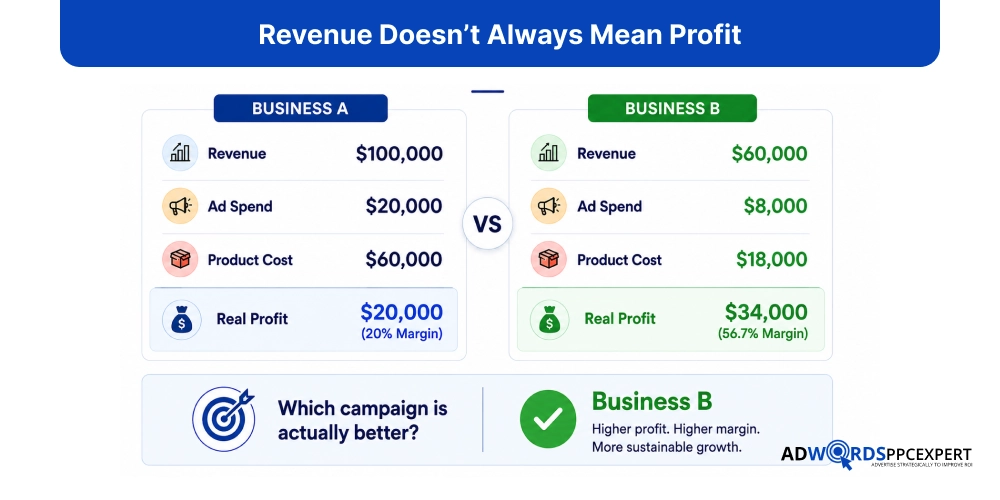
Most marketers judge performance using metrics like clicks, conversions, or even ROAS. These metrics are important, but they don’t tell you how much money your campaigns are actually making.
Calculating the real ROI means looking beyond your ad spend. You need to account for product costs, operating expenses, sales quality, customer lifetime value, and every other factor that affects profitability.
Once you do, you’ll know which campaigns deserve more budget and which ones are only creating the illusion of success.
In this guide, you’ll learn how to calculate the real ROI of your Google Ads campaigns, avoid common mistakes, and measure performance in a way that reflects your actual business growth.
Why Most Google Ads ROI Calculations Are Wrong
The biggest advantage of PPC is the ability to deliver fast, measurable results. But it doesn’t come by coincidence; PPC campaigns are built for speed at every layer with a strategic approach. Following are the five strategic pillars that ensure the fastest results by PPC services:
- Google Ads only shows part of the story. It reports what happened inside the platform, not whether your business actually made a profit.
- A conversion doesn't always mean a customer. Someone can submit a form or call your business and never make a purchase. Google Ads still counts it as a successful conversion.
- ROAS leaves out most of your costs. It compares revenue with ad spend but ignores expenses like product costs, fulfillment, sales, software, and campaign management. That's why a campaign with a high ROAS can still have a low profit margin.
- ROI is often measured too early. If your sales cycle takes weeks or months, checking results after a few days won't show the campaign's true value.
- The biggest mistake is focusing on marketing metrics instead of business metrics. Clicks, conversions, and ROAS are useful, but they don't answer the question that matters most: Did this campaign make the business more profitable?
How to Calculate Your Actual Google Ads ROI
For accurate results, it’s essential that your inputs are accurate. Why am I saying this? Because most marketers who want to calculate their Google Ads ROI start with the formula. And that’s okay because that’s exactly how ROI is calculated. So, the problem isn’t the formula.
The real issue is the numbers that go into it.
If you miss even one important value, the final result won’t reflect your actual ROI, no matter how accurate the formula is. That’s why, if you want to calculate the real ROI of your Google Ads campaigns, don’t overlook the values mentioned below.
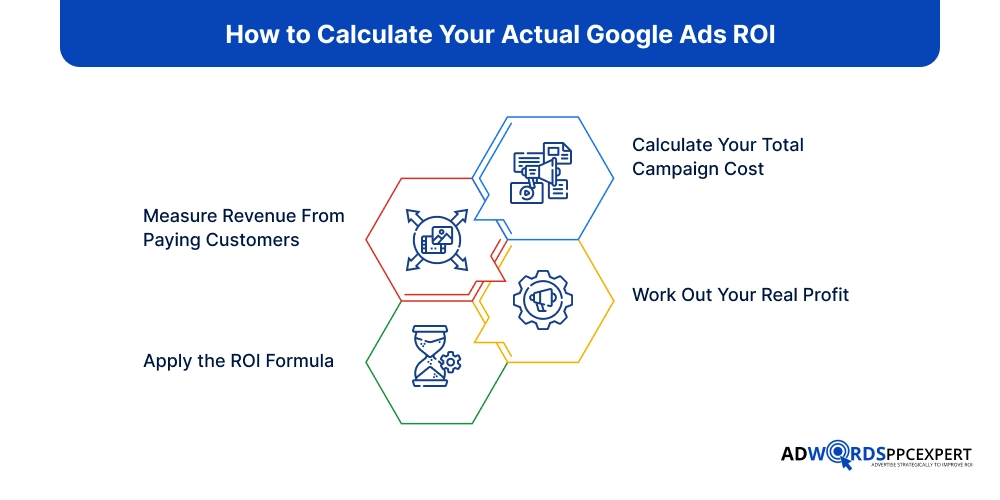
Step 1: Calculate Your Total Campaign Cost
The first step is simple, but it’s also where many ROI calculations go wrong. In many cases, marketers get inaccurate results because they use their Google Ads spend as the total investment. In reality, that’s only one part of the equation.
To calculate ROI accurately, include every cost that was required to acquire a customer through your campaign. A campaign that spends $5,000 on ads may actually cost much more once you factor in the tools, people, and resources behind it.
Your total campaign cost may include:
- Google Ads spend
- Agency or PPC management fees
- Landing page design and development
- Call tracking or CRM software
- Creative assets
- Sales costs directly related to closing those leads
Step 2: Measure Revenue From Paying Customers
Now look at the money your campaign actually generated.
This is where many businesses overestimate ROI. They count every lead as future revenue even though some leads never buy. Others assign an estimated value to each conversion without checking what customers actually spent.
Instead, work backwards from completed sales.
Suppose your campaign generated 80 leads. That sounds encouraging. But after speaking with those prospects, only 18 became customers. Those 18 customers spent a total of $36,000.
For ROI purposes, $36,000 is the number that matters, not the 80 leads.
Step 3: Work Out Your Real Profit
Before you think about ROI, answer one question: How much profit did this campaign actually generate?
Many businesses use revenue for this calculation because it’s the easiest number to find. The problem is that revenue doesn’t account for what it cost to deliver the sale.
Suppose your campaign generated $40,000 in sales. If manufacturing, shipping, and fulfillment cost $25,000, your ROI shouldn’t be based on $40,000. It should be based on the $15,000 your business actually earned.
That’s why it’s important to remove every direct cost before moving to the ROI formula. The closer your profit figure is to reality, the more reliable your ROI calculation will be.
Step 4: Apply the ROI Formula
Once you know your actual profit and your total campaign investment, the calculation becomes simple.
ROI = (Profit − Campaign Cost) ÷ Campaign Cost × 100
Notice the word profit. Many people use revenue instead, which inflates the final result.
Let’s understand this with a real example so you can see how the calculation works and learn how to measure the actual ROI from your Google Ads campaigns.
For example, let’s say a law firm runs Google Ads for one month. Here’s their campaign investment:
Google Ads spend: $4,000
Agency management: $800
Call tracking software: $200
Total campaign cost = $5,000
The one thing is note here, it’s not the final campaign cost. With the ads campaign law firm gernate 35 enquiries.
Out of those, 10 people become clients, where they bring in $45,000 in revenue. The legal work costs the firm $20,000 to deliver.
That leaves $25,000 in profit.
Now calculate ROI:
ROI = ($25,000 − $5,000) ÷ $5,000 × 100 = 400%
At first glance, someone might have calculated ROI using the full $45,000 in revenue and claimed an 800% return. It sounds impressive, but it isn’t accurate because half of that revenue was spent delivering the service.
That’s why ROI isn’t just a formula. It’s a way of thinking about your campaigns. Instead of asking, “How much did we sell?” ask, “After everything it took to win those customers, how much did we actually make?”
That single shift changes how you judge every Google Ads campaign. It also leads to better decisions about where to invest your budget next.
ROI, ROAS, CPA, CAC, and LTV: What Each Metric Actually Tells You
No single metric can tell you whether your Google Ads campaigns are successful. Each one answers a different question. The mistake is relying on one number while ignoring the rest.
For example, a campaign may have an excellent ROAS but still lose money because customer acquisition costs are too high. Another campaign might have a high CPA, yet be worth scaling because those customers stay with your business for years.
Here’s a quick comparison.
Metric | What It Measures | Best Used For | Limitation |
|---|---|---|---|
| ROI | Overall profit compared to total investment | Measuring true business profitability | Requires complete cost and revenue data |
| ROAS | Revenue generated for every dollar spent on ads | Evaluating advertising efficiency | Doesn't account for business expenses or profit |
| CPA | Average cost to generate one conversion | Comparing campaign or keyword performance | Doesn't show lead quality or revenue |
| CAC | Total cost to acquire a paying customer | Understanding customer acquisition costs | Includes more than just advertising expenses |
| LTV | Total revenue or profit a customer generates over time | Measuring long-term customer value | Takes time to calculate accurately |
What Counts as Google Ads Cost?
When people calculate Google Ads ROI, they usually subtract only the ad spend. It seems logical because that’s the number shown in the Google Ads dashboard. The problem is that ad spend is only one part of what it costs to acquire a customer.
Think about everything that happens before someone becomes a paying customer. Someone creates the ads. A landing page is built. Leads are tracked. The sales team follows up. Every step has a cost. If you leave those expenses out, your ROI won’t reflect reality.
Direct Costs | Hidden Costs |
|---|---|
| Ad spend – The amount you pay Google for clicks | Sales team time – Following up with leads, preparing quotes, and closing deals |
| Agency or freelancer fees – What you pay someone to manage and optimize your campaigns | CRM and software – The tools you use to manage and nurture leads |
| Landing page costs – Design, development, hosting, or testing | Call center expenses – If your business relies on phone enquiries |
| Creative production – Copywriting, graphics, videos, or display banners | Discounts and promotional offers – Heavy discounts can reduce overall profitability |
| Tracking tools – Call tracking software, analytics platforms, and conversion tracking tools | Returns or refunds – Revenue returned to customers should not be counted as profit |
Here’s a simple example. You spend $2,000 on Google Ads and generate $8,000 in sales. At first glance the campaign looks like a clear success. Then you add a $600 agency fee, $400 for a landing page, and $500 in sales costs. Suddenly, your investment is $3,500, not $2,000. The campaign may still be profitable, but the return is very different.
The more accurately you calculate your costs, the more reliable your ROI becomes. That’s the number you should use when deciding whether to scale a campaign or rethink your strategy.
How Different Business Models Measure Google Ads ROI
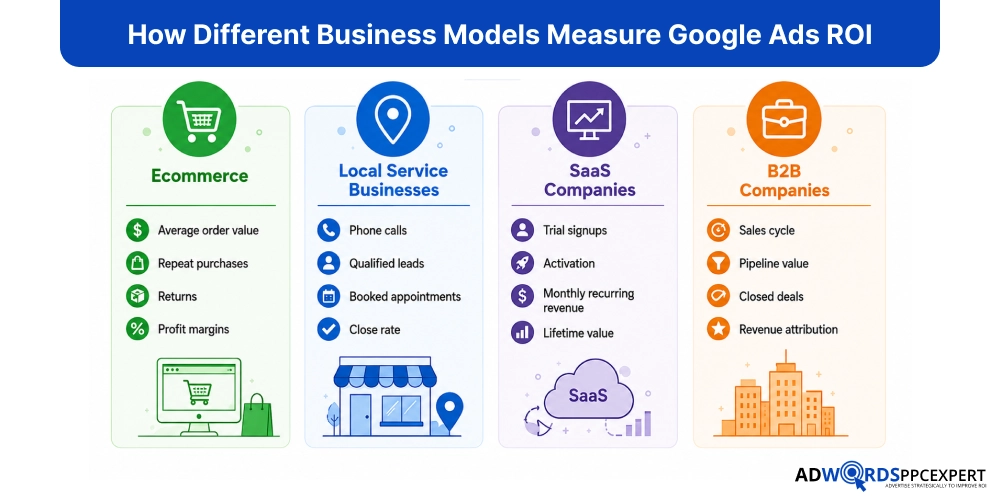
Not every business measures Google Ads ROI the same way. The metric that matters depends on how your business generates revenue, how long the sales cycle is, and what defines a successful customer. Here’s a quick overview of how ROI is typically measured across different business models.
Common Google Ads ROI Calculation Mistakes
- Don't measure ROI after just a few days or a week. Give your campaign enough time to generate actual sales.
- Include phone orders, in-store purchases, or sales closed by your team if they came from Google Ads.
- Connect your CRM with Google Ads so you can track which leads turned into paying customers.
- Always calculate ROI using actual revenue, not projected sales.
- A form submission isn't the same as a paying customer. Focus on conversions that generate revenue.
- ROAS measures revenue from ads, while ROI measures profit after all business costs.
- If customers buy from you again, include their lifetime value instead of counting only the first purchase.
A Simple Google Ads ROI Calculator (Manual Method)
You don’t need a complex calculator to work out your Google Ads ROI. Just gather the numbers below and fill in the worksheet. In a few minutes, you’ll know whether your campaign generated a real return or simply looked successful.
Example ROI Worksheet
Metric | Example Value |
|---|---|
| Google Ads Spend | $3,000 |
| PPC Management Fee | $500 |
| Landing Page Cost | $700 |
| Total Campaign Cost | $4,200 |
| Revenue Generated | $15,000 |
| Cost of Goods Sold (COGS) | $6,000 |
| Gross Profit | $9,000 |
| ROI | 114.3% |
How the ROI Was Calculated
Total Campaign Cost
$3,000 + $500 + $700 = $4,200
Gross Profit
$15,000 − $6,000 = $9,000
ROI Formula
ROI = (Gross Profit − Total Campaign Cost) ÷ Total Campaign Cost × 100
ROI = ($9,000 − $4,200) ÷ $4,200 × 100 = 114.3%
This means that after recovering every dollar invested in the campaign, the business earned an additional 114.3% return on its marketing investment.
This example is intentionally simple, so you can replace each value with your own numbers and calculate your Google Ads ROI manual.
Ways to Increase Google Ads ROI Without Increasing Your Budget
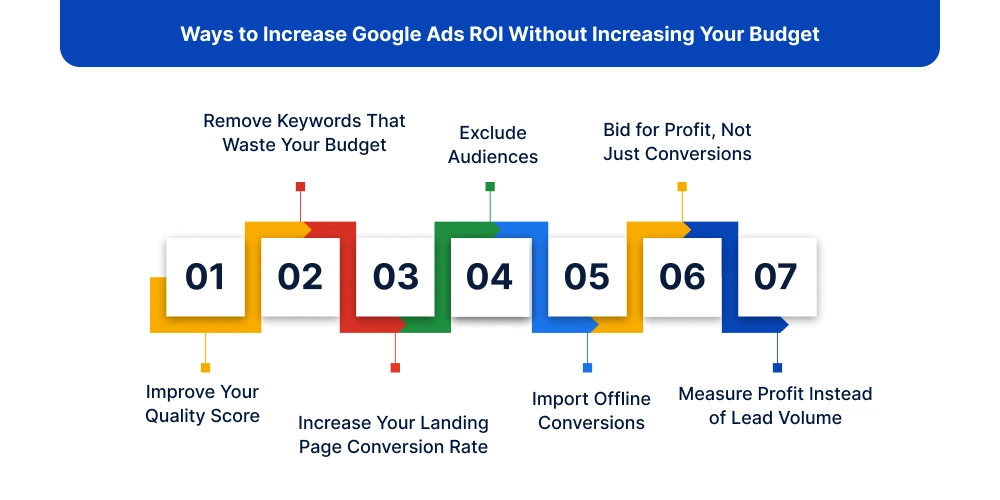
A larger budget doesn’t automatically produce a better return. In many cases, the fastest way to improve ROI is to make better use of the budget you already have.
Instead of asking, “How can I spend more?” ask, “How can I make every dollar work harder?” Small improvements across your campaigns can increase profitability without increasing your advertising costs.
Improve Your Quality Score
A higher Quality Score often leads to lower cost-per-click and better ad positions. Focus on writing relevant ad copy, choosing keywords that match user intent, and sending visitors to landing pages that deliver what your ads promise. Even a small improvement can reduce acquisition costs over time.
Remove Keywords That Waste Your Budget
Not every click is worth paying for. Review your Search Terms Report regularly and pause keywords that generate clicks but rarely convert. At the same time, add negative keywords to prevent your ads from appearing in irrelevant searches. Less wasted spend means more budget for searches that actually convert.
Increase Your Landing Page Conversion Rate
Buying more traffic isn’t always the answer. Sometimes the biggest opportunity is converting more of the visitors you already have.
Review your landing page with a critical eye. Is the message consistent with the ad? Is the call-to-action clear? Are there unnecessary distractions slowing visitors down? Even a small increase in conversion rate can improve ROI without spending another dollar on ads.
Exclude Audiences
Every business has audiences that click but rarely buy. They may be outside your service area, existing customers, job seekers, or users with little purchase intent.
Using audience exclusions helps prevent your budget from being spent on traffic that’s unlikely to generate revenue.
Import Offline Conversions
Many businesses only track what happens online. The real sale, however, often happens offline through phone calls, meetings, or your sales team.
By importing offline conversions into Google Ads, you can see which keywords and campaigns produce paying customers—not just leads. This gives Google’s bidding system better data and helps it find more profitable opportunities.
Bid for Profit, Not Just Conversions
Not every customer has the same value. Some generate larger orders, buy repeatedly, or require less effort to close.
Instead of optimizing bids around the number of leads, focus on the customers who create the most profit. A campaign generating fewer but higher-value customers will almost always outperform one that simply delivers more leads.
Measure Profit Instead of Lead Volume
More leads don’t always mean better results. If half of those leads never become customers, they’re adding workload rather than revenue.
The campaigns that deserve more budget are the ones that consistently generate profitable customers. When profit becomes your primary metric, your optimization decisions become much clearer, and your ROI improves naturally.
People Often Ask About Google Ads ROI
1. What's the difference between ROI and ROAS?
ROAS measures how much revenue you earn for every dollar spent on ads and tells you if your ads generated sales. Whereas, ROI measures how much profit remains after accounting for all campaign and business costs. It tells you if those sales were actually profitable.
2. Can a campaign have positive ROAS but negative ROI?
Yes. A campaign may generate more revenue than it spends on ads, but once you include product costs, agency fees, fulfillment, and other expenses, it can still lose money.
3. Should agency fees be included?
Absolutely. If agency fees contributed to acquiring customers through Google Ads, they are part of your marketing investment and should be included in your ROI calculation.
4. Can Google Ads ROI be negative even with lots of conversions?
Yes. High conversion numbers don’t guarantee profitability. If the leads are low quality, your margins are too small, or acquisition costs are too high, your ROI can still be negative.
5. Is ROI more important than CPA?
For long-term growth, yes. A low CPA is valuable, but it doesn’t tell you whether those customers are profitable. ROI looks at the complete financial outcome, making it the better metric for measuring business performance.
Final Says!
Google Ads ROI isn’t determined by how many clicks, leads, or conversions your campaigns generate. It’s determined by how much profit they create for your business.
That means looking beyond the numbers inside your Google Ads account. Include every meaningful cost, measure actual profit instead of revenue, and avoid the common mistakes that distort your results. A campaign with fewer conversions can outperform one with hundreds of leads if it generates more profit.
The businesses that consistently grow with Google Ads don’t just optimize for lower CPCs or higher ROAS. They optimize for profitability. Once you start measuring ROI the same way, your budget decisions become clearer, your campaigns become more efficient, and every marketing dollar works harder.

Ami Singh is a highly skilled AdWords PPC Specialist, known for creating profitable Google Ads strategies that elevate brands. With deep expertise in Google Search, Display, Shopping, YouTube Ads, and advanced bidding techniques, Ami consistently converts data into performance-driven results.
With a sharp analytical mind and a strong understanding of online consumer behavior, Ami designs campaigns that maximize ROI, boost quality scores, and reduce acquisition costs. His approach blends technical expertise with strategic thinking—making him a go-to expert for businesses aiming to dominate Google Ads.
Ami doesn’t just adapt to the fast-changing PPC industry, but he also stays ahead of the curve by testing new features, adopting automation smartly, and refining what works. Clients trust him for his transparency, insights, and ability to scale campaigns sustainably.
Looking to take your Google AdWords performance to the next level? Connect with Ami Singh at Softtrix and discover how he can help you get the maximum growth through powerful PPC strategies.